SaaS Security Questionnaire: A Vendor Guide to Respond Accurately

Every conversation you have with a potential B2B client today circles back to one question: “Can we trust you with our data?”
As a vendor, you’ve likely felt the pressure. Buyers are now more cautious. Their procurement and security teams don’t just ask about features of your product but also want proof that your systems, processes, and teams are airtight. This is where a security questionnaire becomes a non-negotiable step in closing deals.
A security questionnaire is more than a routine document. It’s a detailed, structured way for prospective clients to assess the risks of working with you. Whether you’re pitching to a Fortune 500 or a fast-growing startup, you’ll face these questionnaires early and often.
In this blog, you’ll get a clear understanding of what a security questionnaire is, why it matters for your business, and how to handle it efficiently without draining your team’s time. Keep reading!
What is a Security Questionnaire?
A security questionnaire is a structured set of questions that helps companies assess your organization’s security practices, protocols, and compliance posture.
It serves one clear purpose: to evaluate how you protect sensitive data before they trust you as a vendor. These questionnaires are a standard part of most procurement and sales processes today.
You’ll typically find them in a few formats. Many arrive as Excel spreadsheets with hundreds of questions. Others show up in vendor management portals or as recognized templates like the Consensus Assessments Initiative Questionnaire (CAIQ), Standardized Information Gathering (SIG) questionnaire, or Vendor Security Alliance (VSA) questionnaire. Each one asks detailed, often repetitive, questions about your security controls.
Procurement teams, compliance officers, and risk management teams are the ones who send these to you. They want proof that your security program aligns with their risk tolerance and regulatory obligations. On your side, your security team, legal, sales, or even engineering might collaborate to respond.
The questions typically cover four critical areas:
- Data protection: How you handle encryption, backup, and secure data storage
- Network security: Your safeguards for preventing unauthorized access or cyberattacks
- Access controls: Who has access to sensitive systems and how you manage permissions
- Compliance standards: Whether you meet frameworks like SOC 2, ISO 27001, HIPAA, or others relevant to your industry
For example, a prospect in healthcare might ask for HIPAA-specific security practices, while a fintech buyer may prioritize SOC 2 and encryption standards. These questionnaires can stretch to hundreds of rows and demand evidence-backed answers.
They aren’t optional anymore. As a vendor, you’ll be handling a security questionnaire sooner or later. And how well you respond often determines how fast the deal progresses.
Next, let’s look at why security questionnaires matter so much for a vendor like you.
Why Security Questionnaires Matter for You

A security questionnaire is more than just paperwork. It shapes how prospects evaluate your business and influences how quickly you close deals. If you ignore it or deliver weak responses, you risk losing opportunities. Here’s why it carries so much weight for B2B vendors across industries.
Builds Trust with Potential Clients
Your clients don’t just want a reliable product or service; they want to know you’ll protect their sensitive data and business operations. A thorough, well-answered security questionnaire shows you take those responsibilities seriously.
For example, when you provide clear answers about how you secure client information, manage operational risks, and respond to incidents, you demonstrate that you understand their concerns. This builds trust early, whether you’re handling personal data, financial records, operational systems, or intellectual property.
In today’s market, where third-party breaches are common, your security questionnaire responses act as proof that your processes and controls meet client expectations.
Accelerates Sales Cycles with Risk Assurances
Procurement, legal, and compliance teams prioritize risk reduction before approving new vendors. A complete, accurate security questionnaire speeds up their evaluation.
When you respond quickly and clearly, you move faster through vendor assessments, helping deals advance without unnecessary delays. Slow or incomplete answers can stall deals, and prospects won’t wait if another vendor submits a better, faster response.
Using Inventive AI’s AI-powered response automation, you can reduce security questionnaire completion time by up to 60%. This helps you stay ahead of slower vendors. See how it works>>
Verifies Your Compliance and Security Maturity
Buyers often need proof that you follow industry standards and risk management best practices. A well-completed security questionnaire gives them confidence that your business operates responsibly and can handle sensitive data or critical services without exposing them to unnecessary risk.
For instance, if you hold certifications like SOC 2, ISO 27001, HIPAA, or industry-specific credentials, listing those clearly in your responses shows clients that independent auditors have validated your processes. Even without formal certifications, detailing your internal controls, incident response plans, and risk mitigation strategies helps demonstrate operational maturity.
Without this transparency, prospects may either delay their decision or reject your bid altogether. Vague or outdated answers won’t satisfy procurement teams when compliance obligations and business continuity are on the line.
Gives You a Competitive Advantage
Speed, accuracy, and confidence in responding to security questionnaires set you apart from competitors. Vendors who submit clean, comprehensive answers early in the procurement process often have a better shot at winning contracts.
For example, completing a 200-question security questionnaire in two days instead of two weeks signals to prospects that your organization is prepared, organized, and takes risk management seriously. It also shows you understand the importance of protecting their operations, not just your own.
Inventive AI’s platform helps here by pulling pre-approved answers from a centralized knowledge base. That means fewer errors and quicker submissions.
Clients notice when a vendor looks prepared and confident. This directly impacts their buying decision.
Helps You Avoid Delays and Missed Revenue
Incomplete, outdated, or slow security questionnaire responses can stall deals — and in some cases, lead to lost revenue. Clients may hesitate or choose a competitor if you fail to provide clear, timely risk assurances.
Imagine losing a high-value contract because your team spent too long chasing down documentation or confirming policies. It happens often when vendors lack an organized process for handling these requests.
By maintaining up-to-date answers and using tools that streamline the questionnaire process, you protect both your deal velocity and your pipeline.
Now that you know why security questionnaires matter, let’s talk about the common challenges you face when responding to them.
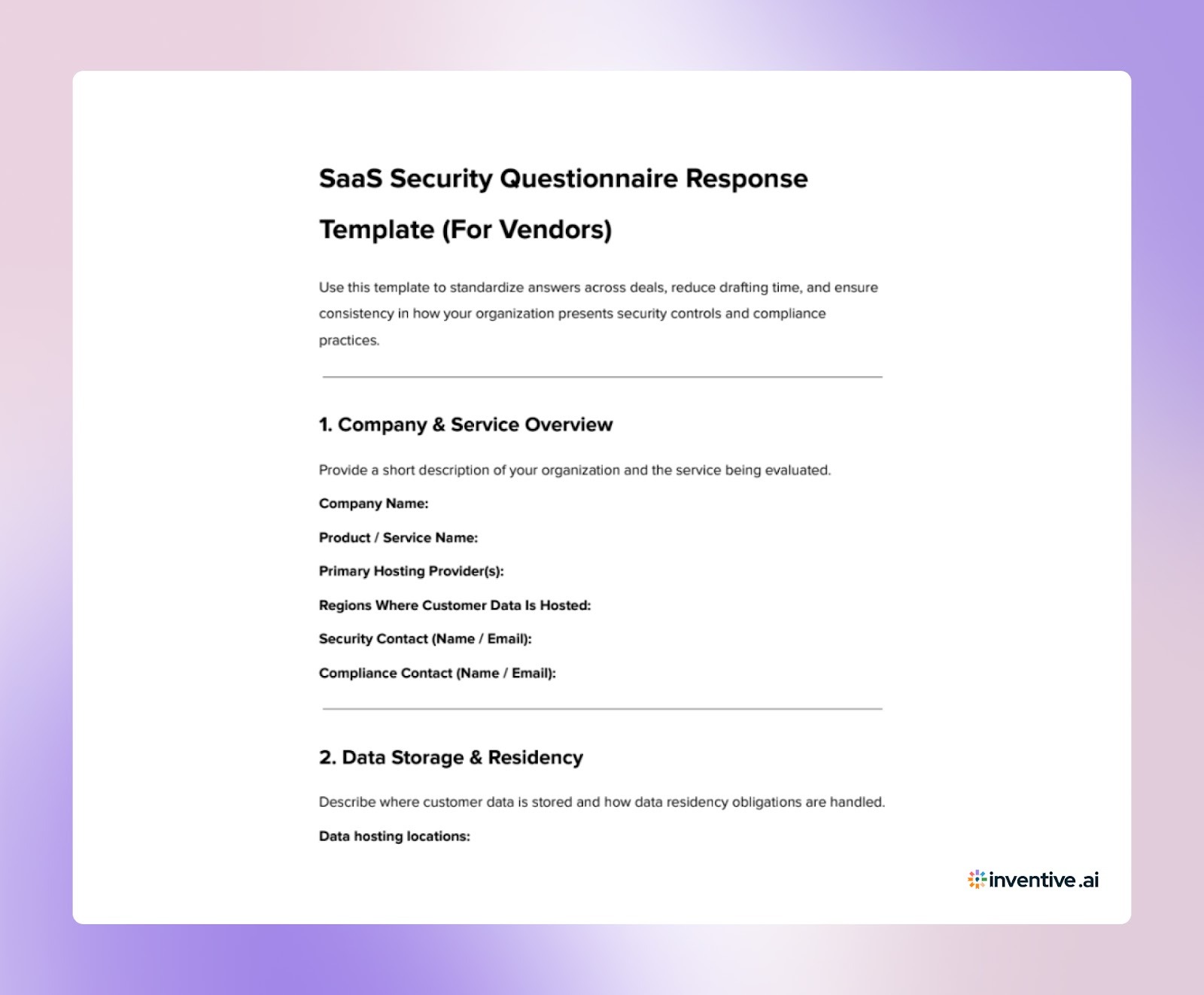
SaaS Security Questionnaire Response Template 2026
Before a questionnaire lands in your inbox, you should already have a structured template that is documentation-ready. Here's the template you can use to respond:
SaaS Security Questionnaire Checklist 2026
Here’s a practical checklist of areas buyers typically evaluate and what you must be prepared to address:
1. Data Storage & Residency
You should clearly document where customer data is hosted, how data locations are determined, and how regional regulations are handled. Buyers use this to assess legal exposure and jurisdictional risks.
2. Encryption Practices
Be ready to explain encryption standards for data at rest and in transit, including how encryption keys are managed. This reassures buyers that sensitive information remains protected during storage and transfer.
3. Access Control Mechanisms
Maintain documentation on multi-factor authentication, role-based access control, privileged account oversight, and internal access approval workflows. Buyers want evidence that only authorized personnel can access systems.
4. Incident Response & Breach Handling
Keep formal procedures describing how incidents are detected, contained, investigated, and communicated. Include escalation processes and notification timelines.
5. Compliance & Certifications
Store proof of compliance, such as SOC 2 or ISO 27001 reports, in an easily accessible location. Buyers use these to validate that security controls are independently reviewed.
6. Disaster Recovery & Business Continuity
Prepare Recovery Time Objectives (RTO), Recovery Point Objectives (RPO), infrastructure redundancy details, and how frequently recovery processes are tested. Buyers assess your service reliability during disruptions.
7. Secure Software Development Practices
Document how security is built into your development lifecycle. This includes code reviews, dependency checks, secure coding standards, and vulnerability scanning. Buyers want assurance that security is embedded in the product, not added later.
8. Security Monitoring & Logging
Be ready to describe how systems are monitored for suspicious activity, how alerts are handled, and how investigations are conducted. Buyers assess your ability to detect threats quickly.
9. Vulnerability & Patch Management
Maintain records of penetration testing, vulnerability assessments, remediation timelines, and patch deployment practices. Buyers evaluate how proactively you address weaknesses.
10. Vendor & Third-Party Risk Management
Have documented policies explaining how subcontractors and external service providers are assessed and monitored for security compliance.
11. Data Lifecycle Management
Prepare documentation on data retention policies, deletion processes, backup security, and end-of-contract data handling. Buyers assess how data is managed beyond active use.
12. Employee Security & Governance
Maintain policies covering background checks (where applicable), security awareness training, and employee offboarding procedures to reduce insider risk.
Pro Tip: Keep version history for all security documents. Buyers often compare answers across renewals to detect inconsistencies.
When these areas are structured in advance, answering a SaaS security questionnaire becomes a retrieval task rather than a cross-team scramble. That preparation alone can shorten response cycles and improve answer consistency across deals.
How to Answer SaaS Security Questionnaire in an RFP?
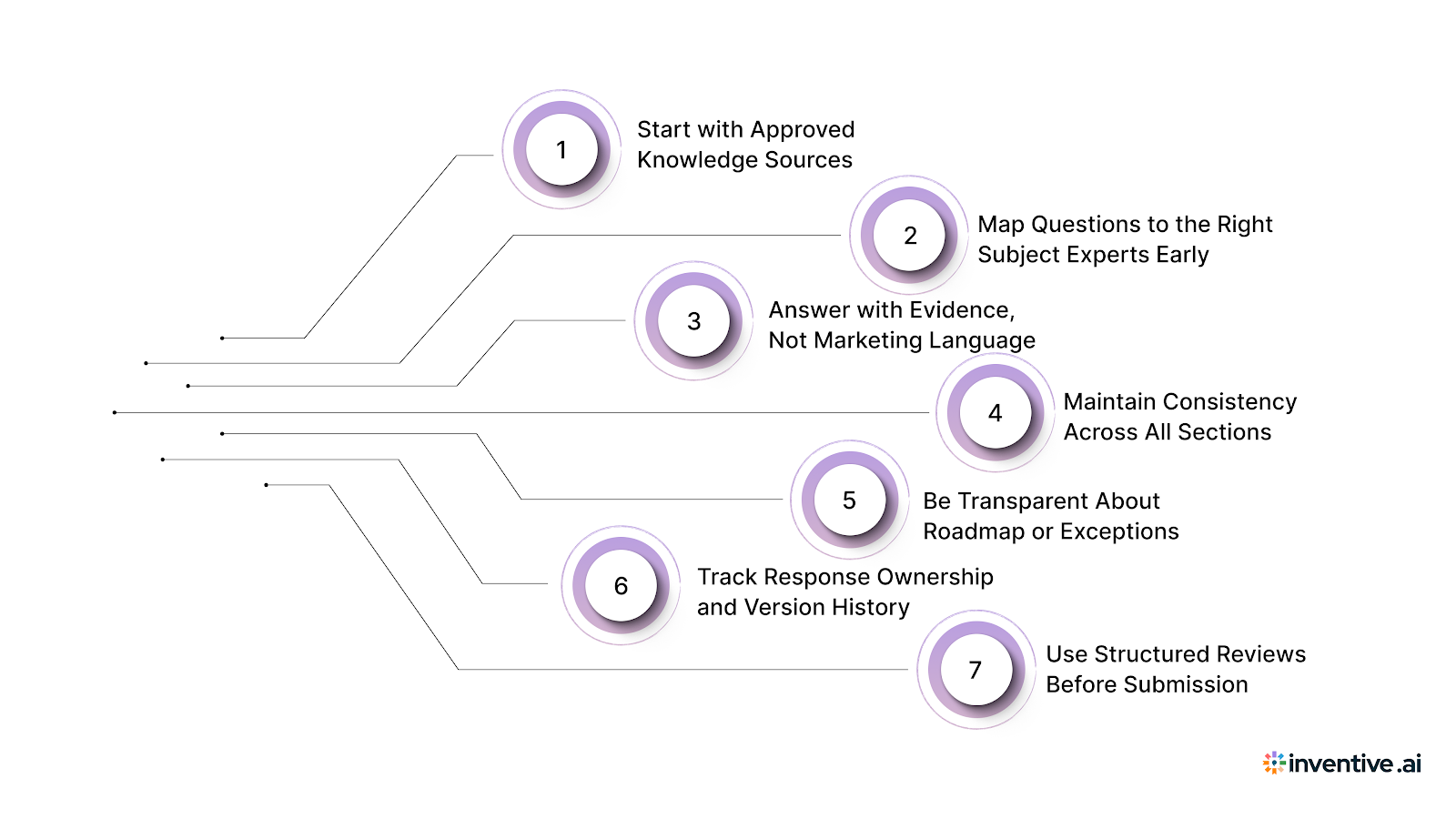
Answering a SaaS security questionnaire is not just about filling fields. It is a structured exercise in risk communication. Buyers are trying to determine whether working with you introduces security exposure. That means every answer must be consistent, evidence-backed, and aligned across teams.
Here’s a practical process that helps you respond with accuracy while keeping timelines under control.
1. Start with Approved Knowledge Sources
Do not begin from a blank page. Your organization already has validated material such as past questionnaire responses, policy documents, compliance reports, and security architecture summaries.
Using approved sources helps you:
- Reduce drafting time
- Avoid contradictory answers
- Ensure alignment with official policies
When teams draft from memory, wording drifts, and inconsistencies appear. Buyers often compare responses across sections and even across different deals.
2. Map Questions to the Right Subject Experts Early
Security questionnaires cover legal, infrastructure, development, and operations topics. If routing happens late, deadlines get tight.
A better approach is to:
- Categorize questions by domain
- Assign SMEs immediately
- Set internal review checkpoints
Security teams validate controls. DevOps confirms infrastructure practices. Legal reviews compliance language. Proposal teams coordinate the final narrative.
This prevents back-and-forth cycles close to submission.
3. Answer with Evidence, Not Marketing Language
Security reviewers look for proof, not positioning. Overly promotional language creates skepticism.
Strong answers include:
- Specific controls are in place
- Documented procedures
- Audit references
- Test frequencies
For example, saying “we follow strong security practices” is weak. Stating “all privileged access requires MFA and is logged” is clear and verifiable.
4. Maintain Consistency Across All Sections
Inconsistencies are one of the biggest reasons buyers request clarifications. A mismatch between your access control answer and your incident response answer can signal risk.
To avoid this:
- Use standardized terminology
- Reuse approved wording
- Cross-check answers before submission
Consistency builds trust because it shows maturity in your internal processes.
5. Be Transparent About Roadmap or Exceptions
Not every control may be implemented today. That is normal. What matters is clarity.
If something is planned:
- State current status
- Mention the roadmap timeline
- Describe interim risk mitigation
Buyers prefer transparent answers over vague claims.
6. Track Response Ownership and Version History
As multiple teams contribute, answers evolve. Without tracking, older language may resurface.
Maintain:
- Version control
- Change logs
- Final approval checkpoints
This prevents outdated responses from entering future questionnaires.
7. Use Structured Reviews Before Submission
Before sending responses, conduct a final pass to:
- Check completeness
- Verify SME approvals
- Confirm compliance references
- Ensure formatting consistency
This reduces follow-up questions from buyers and shortens review cycles.
This structured approach reduces rework and strengthens buyer confidence. However, coordinating content, SMEs, and reviews manually takes time. As questionnaire volume grows, that is where automation plays a critical role in keeping response quality high while speeding up the process.
Also Read: Guide to Writing Government Contract Proposals with AI
Role of Automation in Answering SaaS Security Questionnaire
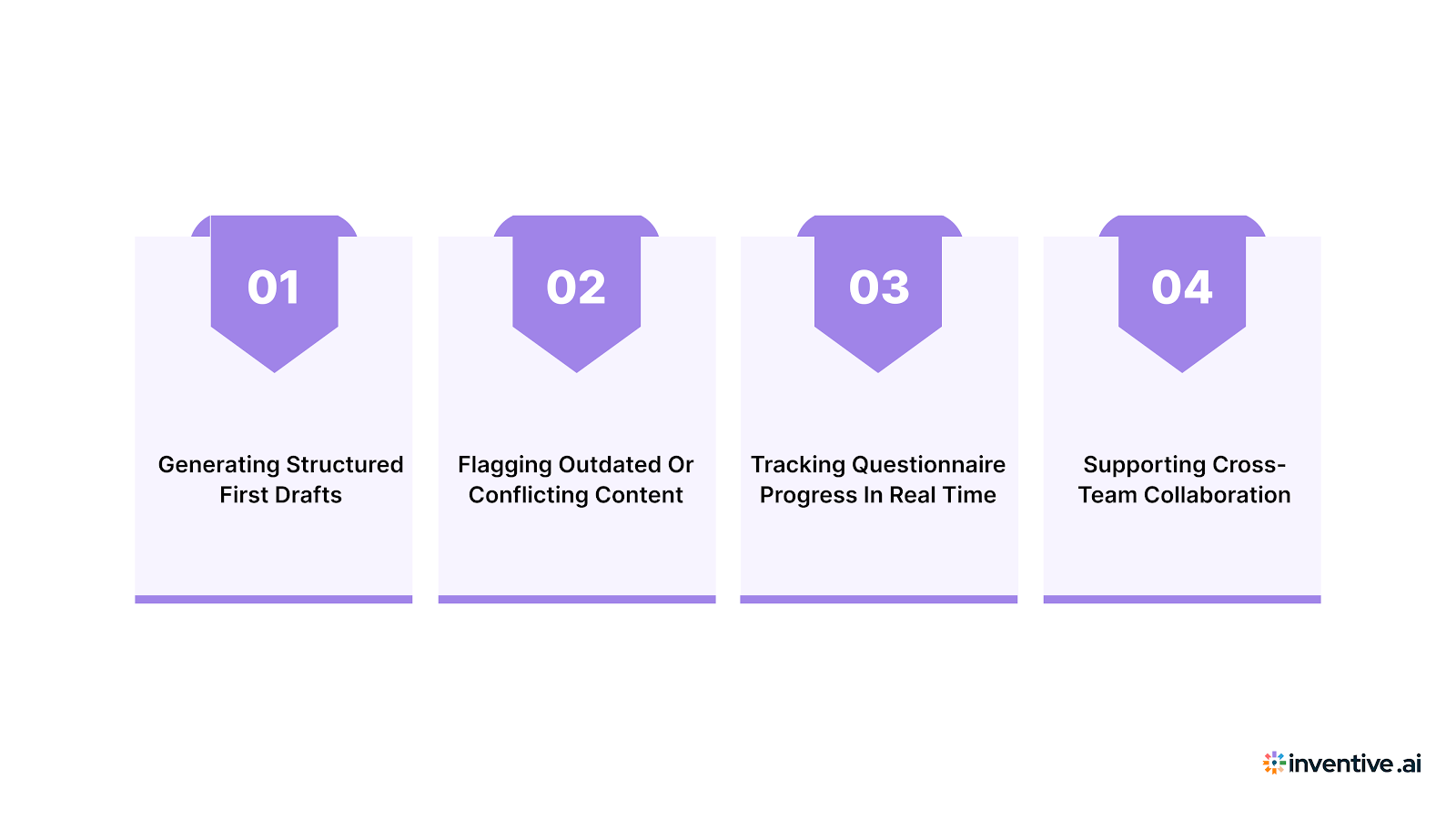
As questionnaire volume increases, manual coordination becomes the bottleneck. Sales cycles move fast, but security responses often rely on document searches, SME availability, and repeated formatting work. Automation helps you remove that operational drag.
AI-powered systems support your team by:
1. Generating Structured First Drafts
Instead of assembling responses from scratch, automation tools generate initial drafts using your approved policies, previous answers, and knowledge sources. This cuts down hours of repetitive writing and gives SMEs something concrete to validate rather than edit from zero.
2. Flagging Outdated or Conflicting Content
Security answers evolve as policies, infrastructure, or certifications change. Automation helps identify when a response conflicts with another section or uses older language that no longer reflects current controls. This reduces the risk of inconsistencies that raise buyer concerns.
3. Tracking Questionnaire Progress in Real Time
Security questionnaires often involve multiple contributors. Automation platforms show which sections are complete, pending review, or awaiting SME input. This visibility prevents last-minute bottlenecks and helps proposal managers stay on schedule.
4. Supporting Cross-Team Collaboration in One Environment
Instead of sending files over email or managing versions, automation tools bring security, legal, DevOps, and proposal teams into a shared workspace. Comments, approvals, and edits stay centralized, reducing confusion and version mismatches.
Automation does not replace expert judgment. It removes repetitive assembly work so that specialists can focus on validating controls, refining language, and ensuring accuracy.
Common Challenges Vendors Face When Responding to SaaS Security RFPs
Even experienced teams struggle with security questionnaires because the issue is not knowledge; it’s coordination and workflow structure.
Vendors frequently encounter:
1. Scattered Documentation Across Systems
Security policies, compliance reports, and past answers often exist in different drives, tools, or email threads. Time is lost searching instead of responding.
2. Inconsistent Answers Between Teams
Security, DevOps, and legal teams may describe the same control differently. These variations create contradictions that buyers flag during review.
3. Tight Deadlines During Active Sales Cycles
Questionnaires usually arrive mid-deal, when sales teams are already managing demos, negotiations, and follow-ups. Security reviews become a parallel workload that competes for SME time.
4. Frequent Updates Due to Regulatory and Policy Changes
Privacy laws, certifications, and internal security policies evolve over time. Without a structured update process, older answers resurface and create compliance risks.
5. Time Spent Formatting Instead of Validating
Proposal and revenue teams often spend hours copying, reformatting, and structuring responses instead of focusing on technical accuracy.
These issues do not stem from a lack of expertise. They result from fragmented workflows that make a complex process harder than it needs to be.
Also Read: Understanding RFI and RFP in Healthcare Procurement
How Inventive AI Improves SaaS Security Questionnaire Responses?
Security questionnaires show up in nearly every enterprise deal — SIG, CAIQ, VSAQ, and custom vendor-risk forms. The work isn't writing answers; it's finding the current, approved language for controls like encryption, access, and data residency, and making sure no two responses contradict each other. Inventive AI helps turn that into a repeatable workflow.
Using AI-powered RFP response software, it reads each questionnaire, drafts answers from your approved security knowledge, and routes the gaps to the right reviewer.
Where it helps:
- 2× more accurate responses — Answers stay grounded in your policies, certifications, and past questionnaires, with a citation on each. That tends to cut buyer follow-ups.
- Context Engine — Reads the intent behind each control question and pulls the matching evidence, so the team isn't searching across SOC 2 reports and prior SIGs by hand.
- Conflict detection — Flags contradictions across sections or past answers before submission — say, two different responses on data retention.
- Outdated content detection — Flags language tied to an expired SOC 2 period or a retired control, so answers don't ship stale.
- One workspace — Security, legal, and proposal teams assign, review, and approve in one place with role-based access.
- Narrative and Q&A output — Drafts the supporting documents buyers ask for, like a security overview, from the same approved sources.
Frequently Asked Questions (FAQs)
1. How long does it typically take to complete a SaaS security questionnaire?
Without a structured answer library, responses can take days or even weeks because multiple teams must contribute. With organized documentation and automation, turnaround time drops significantly since most answers are reused and validated instead of being drafted from scratch.
2. Who should lead the response process inside a SaaS organization?
Proposal or revenue operations teams usually coordinate the process because they manage timelines and submissions. Security teams validate controls, DevOps confirms infrastructure practices, and legal reviews compliance-related statements.
3. What makes buyers reject or question security questionnaire responses?
The most common triggers are inconsistent answers, vague wording, missing evidence, and outdated information. Buyers often escalate reviews when responses do not align with certifications or previously shared documentation.
4. Can vendors reuse answers from previous questionnaires?
Yes, but only if those answers are reviewed for accuracy and updated to reflect current policies, certifications, and infrastructure. Reuse saves time, but unchecked reuse can introduce compliance risks.
5. How do security questionnaires impact sales cycles?
Delays in responding can extend deal timelines because buyers cannot move forward without completing risk assessments. Faster, well-organized responses help keep procurement and legal stages on schedule.

.avif)