Free RFP Tracking Template for Growing US Teams

How many RFP deadlines have slipped through the cracks because your tracking sheet wasn’t up to date? When multiple bids are live and stakeholders are juggling inputs, even one missed update can cost revenue. A reliable RFP tracking template can mean the difference between control and chaos.
If you’re a CRO, VP of Sales, or proposal manager, you’ve likely dealt with version confusion, unclear ownership, and last-minute scrambles before submission. Spreadsheets get messy fast, and visibility into deal value or win probability becomes blurry. The pressure to hit targets only makes it harder.
In this blog, we’ll explore what an RFP tracking template should include, share a practical Excel-based structure you can use, and explain how to use it to track deadlines, revenue, and accountability across your team.
Advanced RFP Tracking Template for Sales Teams
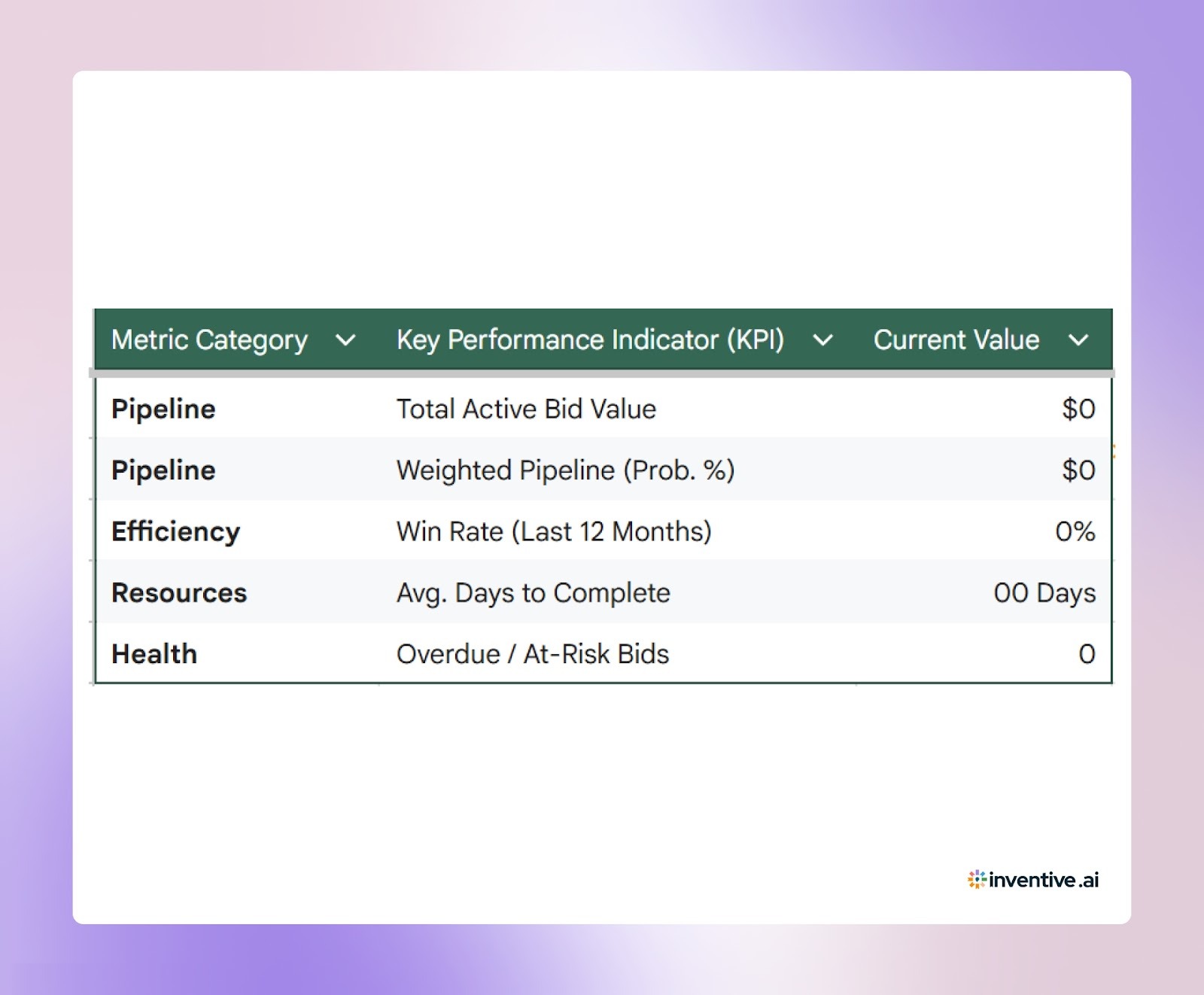

If you’re managing multiple bids at once, you need more than a basic spreadsheet. This Excel-based RFP tracking template is designed for vendors who want visibility into deadlines, ownership, deal value, and win probability, all in one place. It works for proposal managers running day-to-day execution and for sales leaders reviewing pipeline impact.
Below is the structure of the template, organized into four tabs.
Tab 1: Executive Dashboard (Leadership View)
This tab gives CROs and sales leaders a quick summary of pipeline health. All metrics pull automatically from the Master Tracker.
Key KPIs to include:
- Total Active Bid Value
=SUMIF(StageRange,"Drafting",ValueRange) - Weighted Pipeline (Probability Adjusted)
=SUMPRODUCT(ValueRange,ProbabilityRange) - Win Rate (Last 12 Months)
=Wins / (Wins + Losses) - Average Days to Complete
=AVERAGE(SubmissionDateRange-IssueDateRange) - Overdue / At-Risk Bids
=COUNTIFS(DaysRemainingRange,"<0",StageRange,"<>Submitted")
This gives the leadership team instant clarity on revenue exposure and bid health.
Tab 2: Master RFP Tracker (Primary Data Entry Sheet)
This is where your team logs and updates every active opportunity. Freeze the first few columns and the top row for easy scrolling.
Apply conditional formatting:
- Red if Days Remaining < 3 and not Submitted
- Green if Status = Won
- Strikethrough if Status = Lost or No-Go
This sheet becomes your single source of truth during active bids.
Tab 3: Go/No-Go Scoring Matrix
Before committing resources, evaluate whether the opportunity is worth pursuing.
Set a threshold (for example, 3.0). Anything below that requires leadership review before moving forward.
Tab 4: Win/Loss & Intelligence Log
After submission, track outcomes and capture lessons.
Use this tab to identify:
- Pricing trends
- Common loss reasons
- Strengths that drive wins
- Patterns by industry or deal size
Over time, this data improves qualification decisions and forecasting accuracy.
How to Use This RFP Tracking Template the Right Way?
An RFP tracker only works if your team treats it as the single source of truth. If updates happen in Slack, email, or side documents, the sheet quickly loses accuracy. Consistency and ownership matter more than complexity.
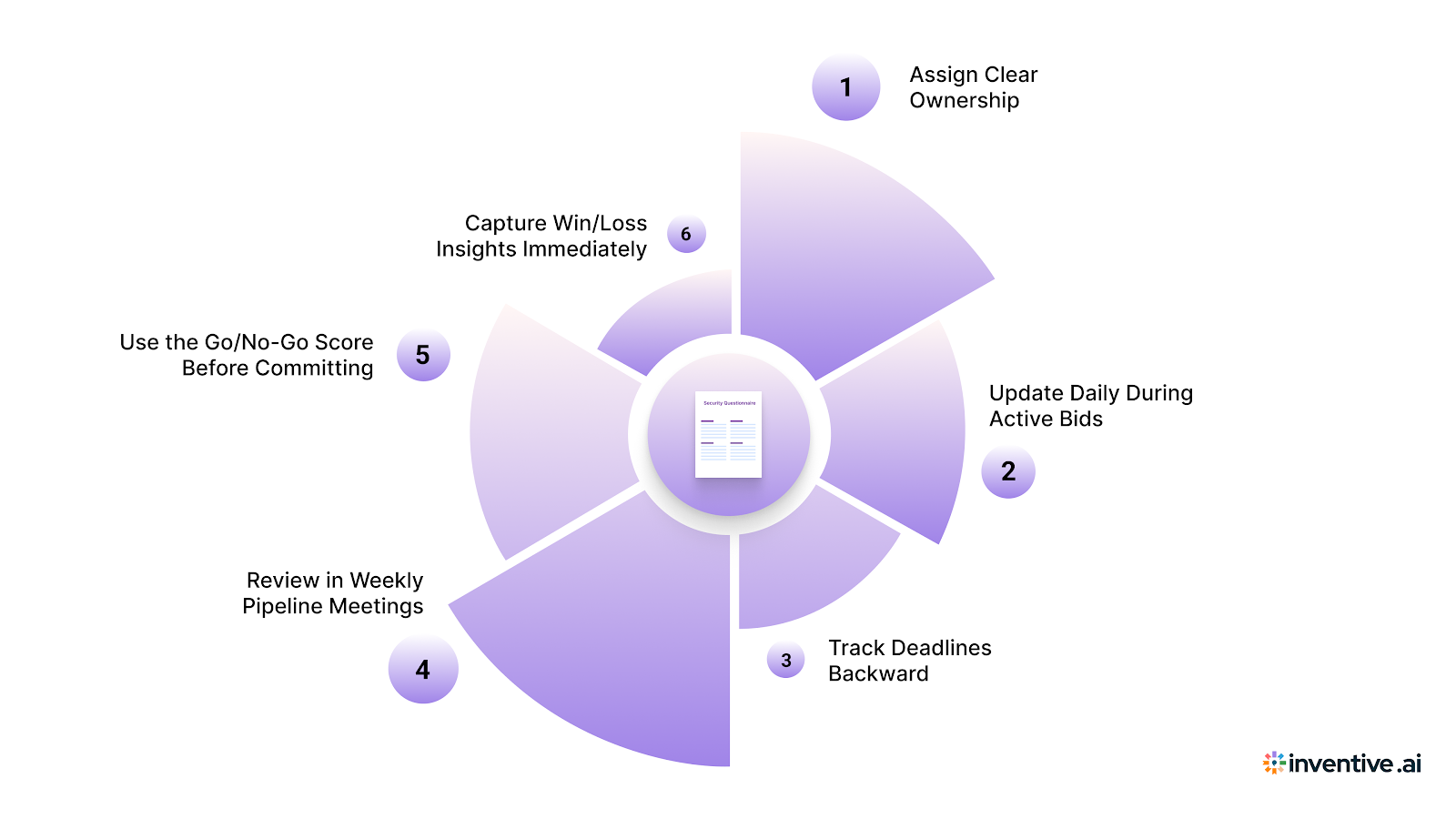
Here’s how to make the template work for your team:
- Assign Clear Ownership: Every RFP must have a named Account Executive and Proposal Manager. Avoid shared responsibility; one person owns revenue, one owns submission.
- Update Daily During Active Bids: When an RFP is in Drafting or Review, update status, deadlines, and notes every day. This prevents last-minute surprises before submission.
- Track Deadlines Backward: Don’t focus only on the final submission date. Add internal draft deadlines and review checkpoints to protect buffer time.
- Review in Weekly Pipeline Meetings: Include active RFPs in revenue calls. Discuss deal value, win probability, and risk status alongside other pipeline opportunities.
- Use the Go/No-Go Score Before Committing: Enter new opportunities into the scoring matrix before adding them to the Master Tracker. This prevents wasted effort on low-fit bids.
- Capture Win/Loss Insights Immediately: Once an outcome is known, log the reason and competitor details. Fresh data improves future qualification decisions.
When used consistently, the template becomes more than a tracking sheet — it becomes a control system for your bid pipeline.
Automate RFP Tracking with Inventive AI
Spreadsheets work when you’re managing a handful of bids. Once volume increases, collaboration spreads across tools, and content lives in multiple places, manual tracking starts breaking down. Version confusion, stale answers, and compliance risks begin to affect deal outcomes.
Here’s how Inventive AI changes RFP tracking and response management:
2X Quality Responses

With its multi-agent AI system, Inventive AI delivers responses that reflect the true intent behind each question. Answers are clearer, more complete, and more aligned with evaluation criteria. This leads to consistently stronger submissions across opportunities.
Context Engine for Tailored Responses
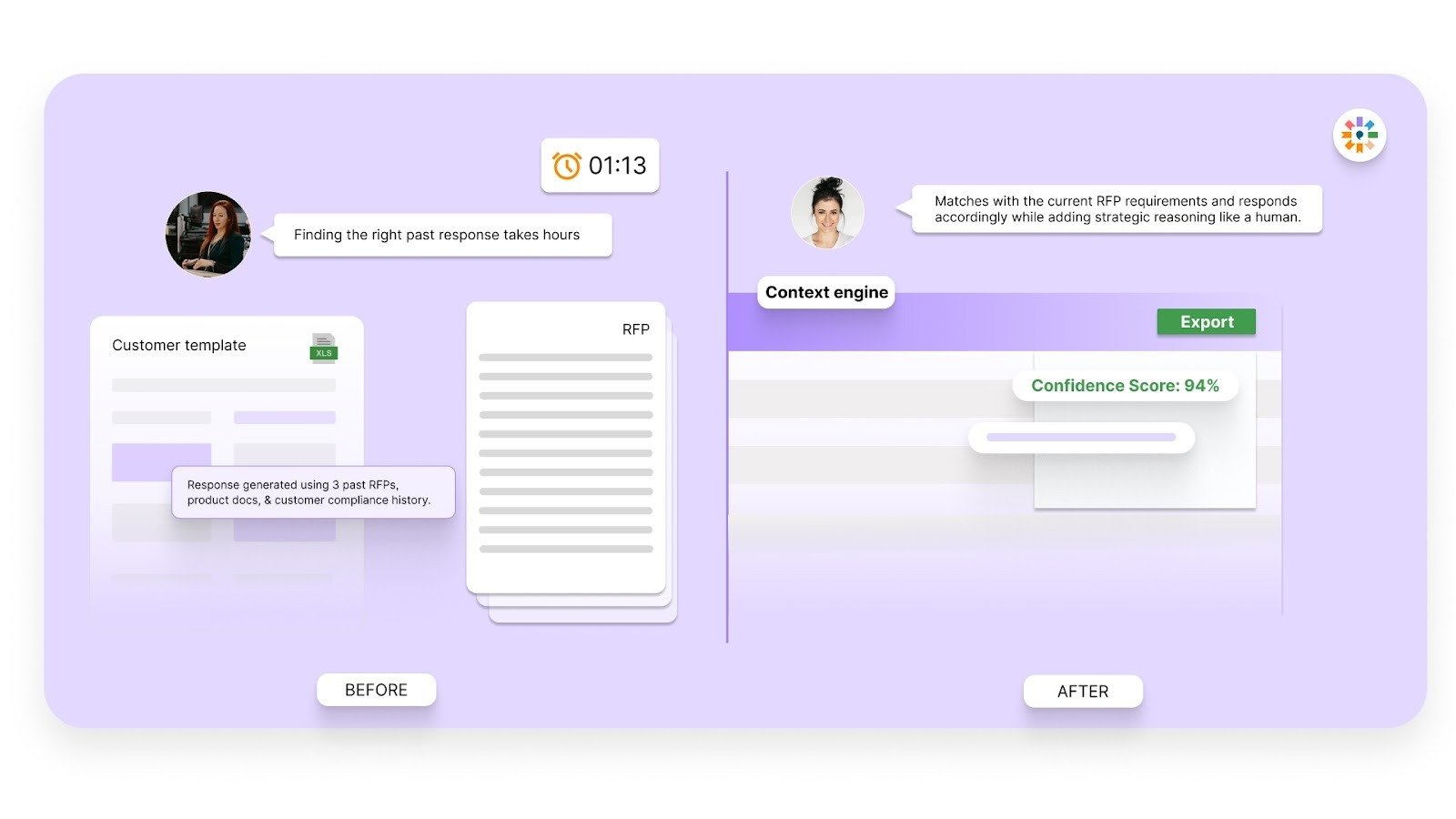
Many tools rely on shallow ChatGPT-style lookups that generate generic answers. Inventive AI uses multi-layer reasoning that understands the full context of the RFP, including requirements, evaluation criteria, and deal specifics. The result is tailored responses that read like they were written by a subject matter expert.
Conflict Detection to Prevent Risk
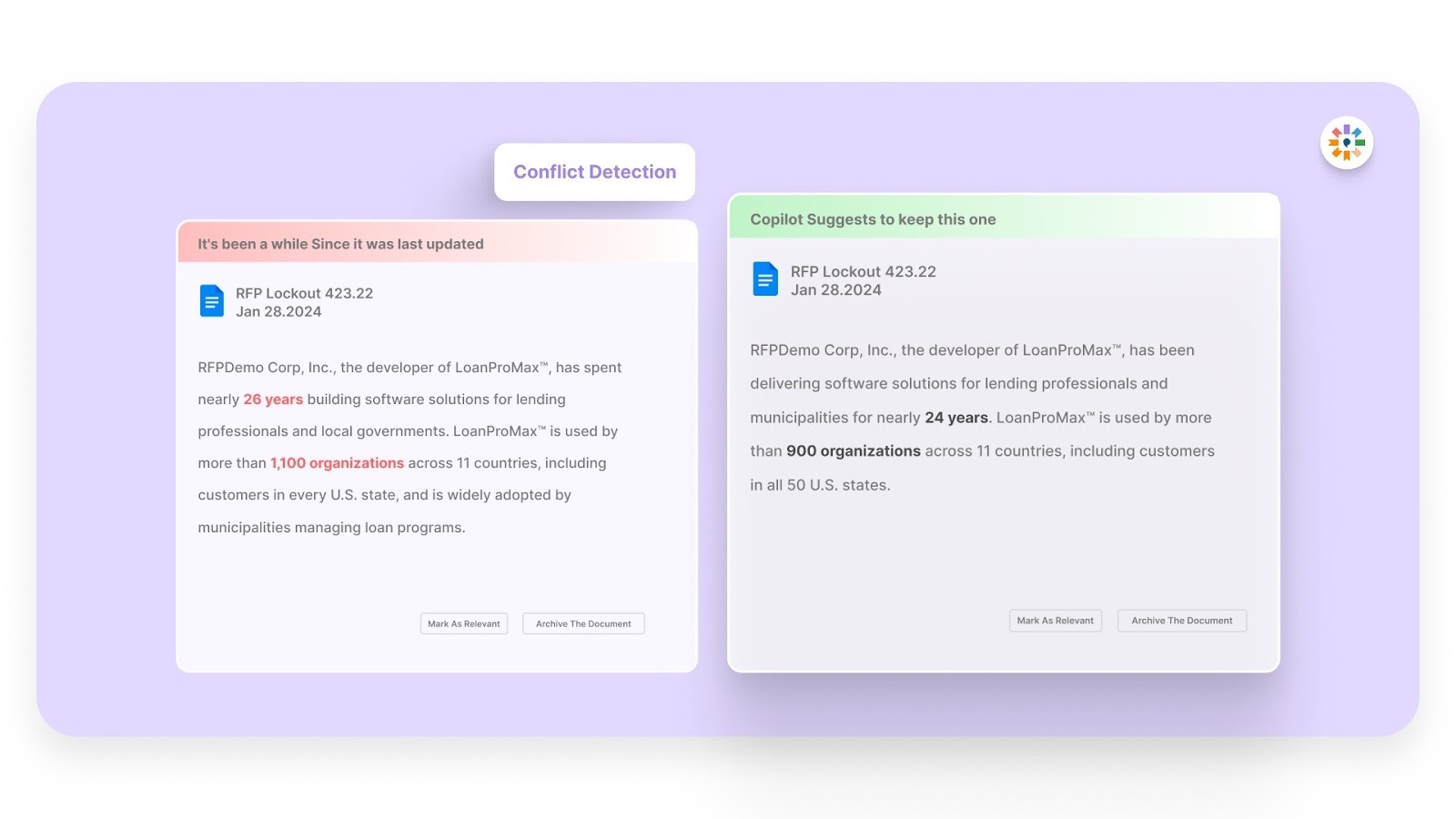
Large RFPs often involve multiple contributors, which increases the chance of contradictory statements. Inventive AI automatically flags internal conflicts across responses before submission. This helps teams avoid sending inconsistent answers that could raise red flags during evaluation.
Outdated Content Detection
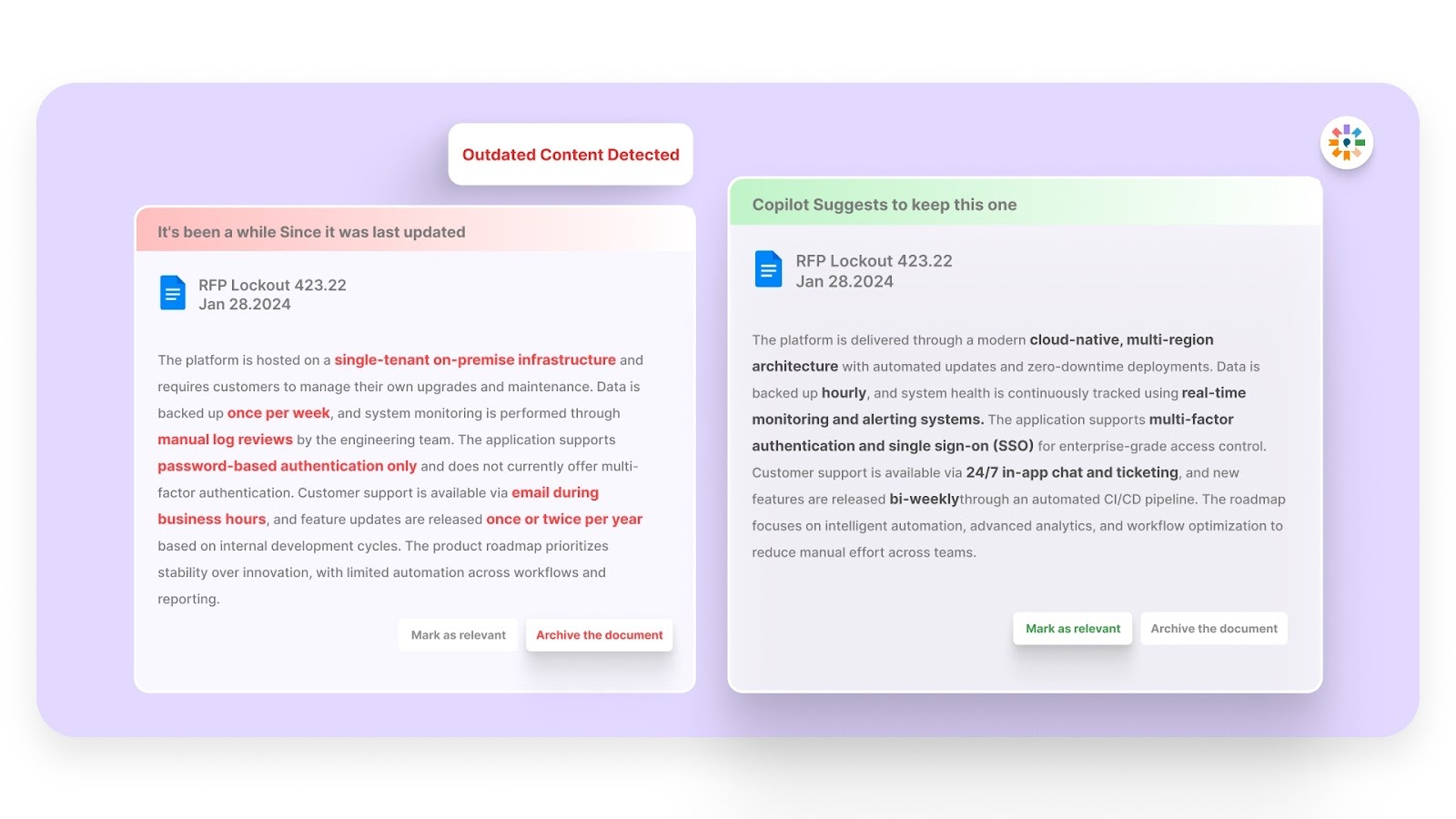
Most vendors maintain large libraries of legacy answers, many of which are no longer accurate or compliant. Inventive AI identifies outdated or conflicting content inside your knowledge sources. This reduces manual review time and limits last-minute rewrites.
Simple, Easy-to-Use UI
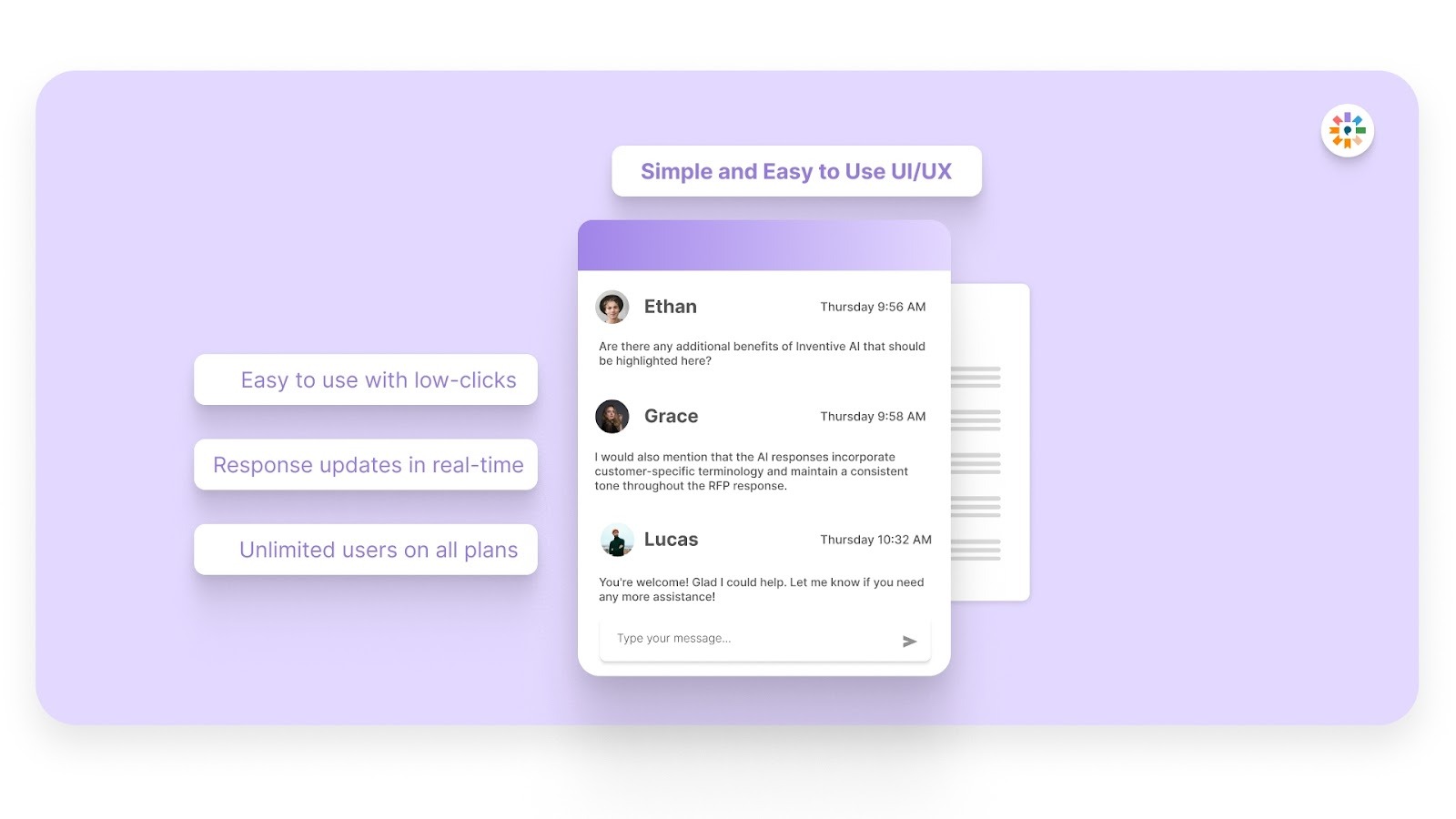
Adoption matters. Inventive AI is rated as the easiest-to-use RFP software on G2 and has achieved full adoption across its current customer base. Even teams new to AI-based RFP tools can get started quickly without a steep learning curve.
If your team is managing a growing number of bids and your spreadsheet is starting to show cracks, it may be time to see what AI-supported RFP management looks like in practice.
FAQs
1. How many RFPs can a team realistically manage without automation?
Most teams begin to struggle once they handle more than 5–7 active bids at the same time. Manual updates, scattered documents, and repetitive drafting slow everything down. Automation reduces administrative workload and keeps tracking, content, and deadlines synchronized across opportunities.
2. Who should own RFP tracking in an AI-supported workflow?
Even with automation, ownership still matters. Proposal managers typically oversee tracking and response progress, while account executives remain accountable for deal outcomes. AI supports coordination and accuracy, but clear human accountability keeps momentum and decision-making on track.
3. How does AI improve visibility into RFP pipeline health?
AI systems can automatically update statuses, flag at-risk deadlines, and connect response progress to revenue metrics. Instead of manually reviewing rows in a spreadsheet, leadership gets structured insights into pipeline value, probability, and submission readiness in one place.
4. Can AI help reduce errors in RFP responses?
Yes. AI pulls responses from approved knowledge sources and flags conflicting or outdated content before submission. This reduces inconsistencies that often occur when teams copy answers from past proposals or maintain multiple versions across different tools.
5. What signs indicate it’s time to automate your RFP process?
If your team spends more time searching for past answers than refining messaging, struggles with version confusion, or misses internal review deadlines, those are strong indicators. Automation centralizes knowledge, accelerates draft creation, and provides structured oversight as bid volume grows.
.avif)



%20That%20Gets%20Shortlisted.png)