Claude for RFPs: How to Respond to RFPs with Claude Skills | Downloadable Skills + Detailed Guide Included
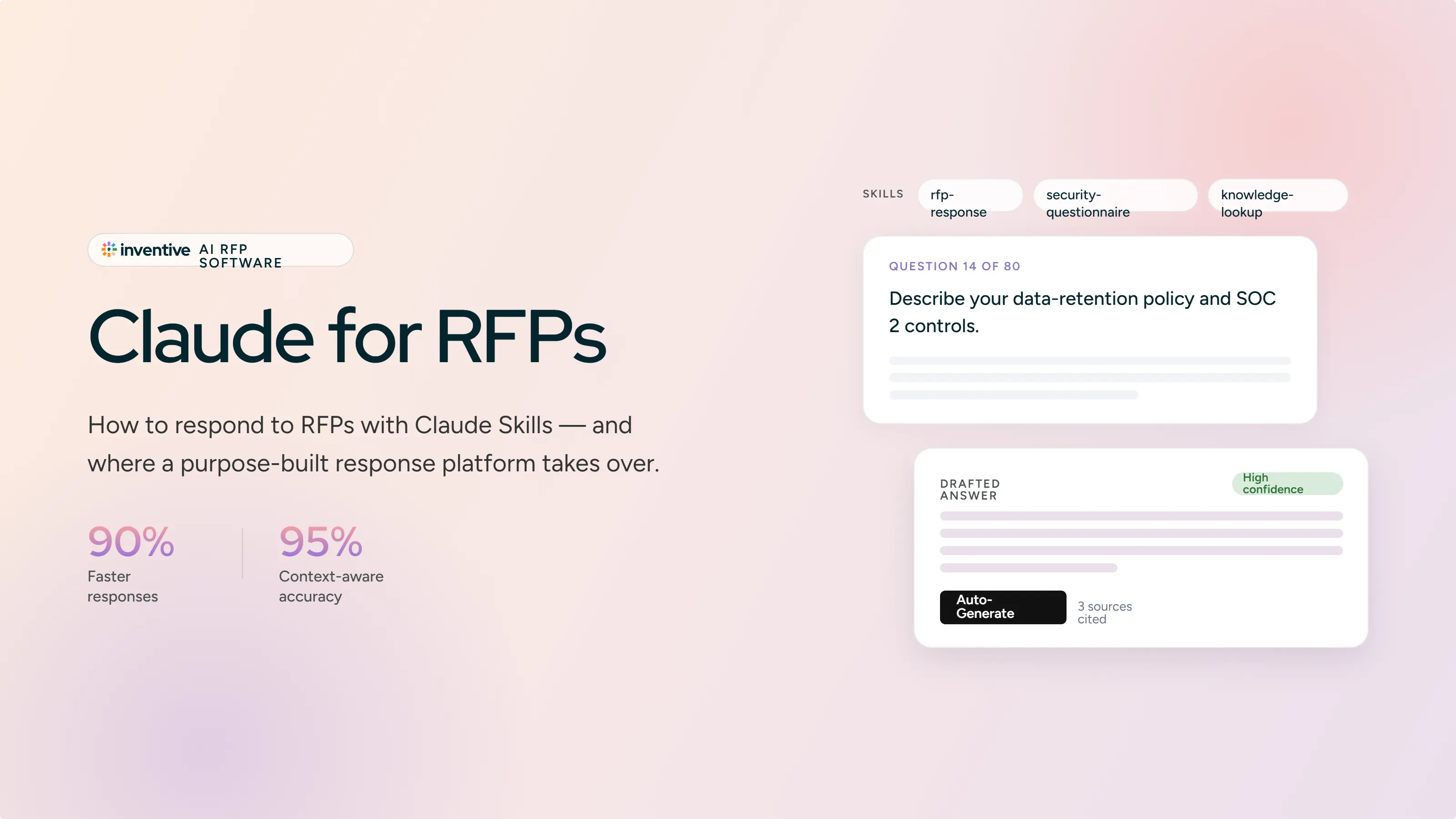
Claude for RFPs: How to Respond to RFPs with Claude Skills
Proposal teams answered an average of 166 RFPs last year and spent about 25 hours on each one, according to Loopio's latest RFP Trends and Benchmarks research. Claude can read a 120-page RFP in under a minute and hand back a competent first draft before your coffee cools. Those two facts explain why "Claude for RFPs" keeps coming up in proposal team Slack channels.
This guide takes the question seriously. It covers whether Claude belongs in your RFP process at all, the honest pros and cons, and a complete workflow built on five custom Claude Skills: a requirement extractor, a go/no-go analysis, a full RFP analysis, a responder, and a final proofreader. We build RFP response software at Inventive AI, so we watch this space closely and we will be upfront about our perspective. Claude is genuinely useful for some teams. This guide shows you how to get the most out of it, and where it runs out of road.
Should You Use Claude for RFP Response Management?
It depends on two numbers: how many RFPs you answer a year, and how many people touch each response.
Claude works well when one person owns the process and volume stays low. If you respond to a handful of RFPs a year, your source material fits in a few dozen documents, and you personally review every answer before it ships, Claude will save you real time. It reads long, messy documents better than almost any general-purpose AI available today. Paid plans handle PDFs up to 1,000 pages and give you a 200K token context window, roughly 150,000 words of working memory. That covers most mid-sized RFPs plus your supporting material.
The math changes as volume grows. Every new RFP means re-feeding Claude the same product specs, security posture, and pricing guardrails. Every question means a prompt, a review, a copy, and a paste. An RFP with 80 questions means running that loop 80 times, and the formatting is on you. When four or more collaborators need to review and approve answers, a chat window has no way to assign question 12 to Legal or track who signed off on question 45.
Here is a reasonable line in the sand. Under 10 to 15 RFPs a year with one or two owners, Claude plus the skills in this guide will genuinely change your workload. Above that, the manual overhead starts eating what the drafting saves. Loopio found that 68% of proposal teams used generative AI in the past year, and the teams running at volume mostly pair a general AI assistant with purpose-built response software rather than picking one or the other.
.png)
Pros and Cons of Using Claude for RFP Responses
Where Claude genuinely shines
Long-document comprehension. RFPs arrive as sprawling PDFs with appendices, amendment letters, and buried submission rules. Claude holds all of it in one context and reasons across the full package. This is its single biggest advantage over older AI tools that choked past 20 pages.
Structured analysis. Ask for a compliance matrix, an evaluation criteria breakdown, or a gap analysis against your product docs and you get organized, usable output. The analysis is often more valuable than the prose.
Claude Projects. A Project gives you a persistent workspace where your past proposals, product documentation, and boilerplate live across conversations. Set project instructions once and every chat inherits them.
Claude Skills. Skills let you package your RFP workflow into reusable instructions that Claude applies automatically. This is the feature that turns Claude from a clever intern into something closer to a process. The entire third section of this guide is built on it.
Cost. A paid Claude seat costs a small fraction of dedicated proposal software. For a team of one, that matters.
Where it costs you
Context needs constant babysitting. Claude does not know which product details apply to which customer. You feed it background for every new RFP, and when your product changes, you update the files yourself. Teams consistently report that this maintenance quietly consumes the hours the drafting saved.
Old content never dies. Uploading new files to a Project does not retire the old ones. Claude has no concept of a single source of truth, so a deprecated spec from last year's proposal can surface in this year's answer. On a security questionnaire, that is a real liability.
The copy-paste loop. Claude is a chat window. Each batch of questions goes in, each batch of answers comes out, and you carry every answer back into the issuer's template by hand.
No workflow layer. There are no assignments, no reviewer routing, no approval states, no audit trail. Five people using Claude are five people with five separate contexts, and nobody knows which answer is final.
It will guess unless you stop it. Claude fills gaps confidently. Without explicit instructions to cite sources and flag missing information, you will catch invented details late, or worse, after submission.
Security review is on you. Consumer Claude plans include a model-training setting and data retention policies you should read before uploading confidential bid material. Enterprise agreements differ. Check first.
None of these problems kill Claude at low volume. They compound at scale. Keep that pattern in mind as you build the workflow below.
How to Use Claude for RFP Response Management with Claude Skills
Claude Skills are the difference between prompting from scratch every time and running a repeatable process. A Skill is a folder with a SKILL.md file inside: instructions, output formats, and reference files that Claude loads automatically whenever a task matches the Skill's description. You write the workflow once. Claude applies it every time.
Two prerequisites. Custom Skills require a paid Claude plan (Pro, Max, Team, or Enterprise) with code execution enabled. To install one, open the Skills section in Claude's settings, choose Create skill, and upload your Skill folder as a ZIP file.
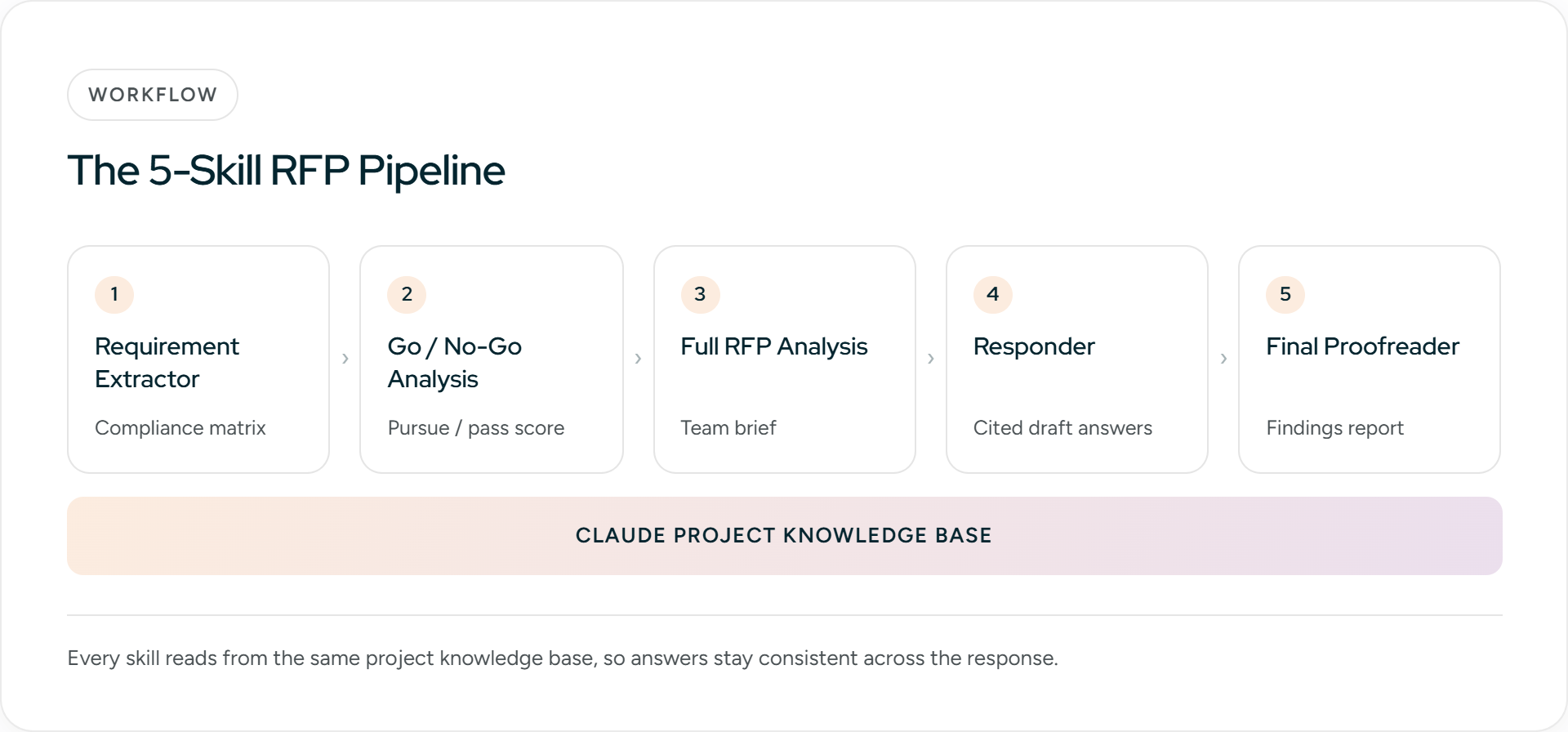
Step 1: Build your project knowledge base
Before any Skill runs, create a Claude Project for RFP work and upload:
- Three to five recent winning proposals
- Current product and security documentation
- Approved boilerplate: company overview, implementation methodology, support tiers
- Pricing guardrails, meaning what you can and cannot commit to
- A short tone guide, or a few answers you consider the gold standard
Then set the project instructions: answer only from the uploaded files, name the source document for every claim, and write "Information unavailable" when the files do not cover a question. These three rules prevent most hallucination problems before they start.
Keep the folder clean. Every stale file in your Project is a wrong answer waiting to happen.
Skill 1: Requirement Extractor
Miss one mandatory requirement and the rest of your proposal may never be read. This Skill reads the full RFP package and produces a numbered requirements table you can use as a compliance matrix.
One caution from experience: spot-check the output against the original document, especially appendices and dense tables. Claude is good at this task. It is not perfect, and a missed "shall" is expensive.
You are helping me build a custom Claude Skill. Generate the complete contents
of a SKILL.md file for a skill named "rfp-requirement-extractor".

The YAML front matter must contain a name field and a description field. The
description should tell Claude to use this skill whenever a user uploads an
RFP, RFI, or questionnaire and asks for requirements, a compliance matrix, or
extraction.

The skill instructions must tell Claude to:
1. Read every page of the attached RFP, including appendices, footnotes,
   amendment letters, and embedded tables.
2. Extract every requirement into a table with these columns:
   ID | Requirement (verbatim) | Source section | Type | Suggested owner | Status
3. Quote requirement text verbatim, never paraphrase.
4. Classify Type as Mandatory, Optional, or Informational. Treat "shall" and
   "must" as Mandatory in every case.
5. Include submission requirements (format, deadline, page limits, required
   forms, certifications) as their own rows.
6. End with a count of total requirements found, broken down by type, plus a
   list of any sections it could not fully parse so a human can check them.

Output only the SKILL.md content in a single markdown code block.
Skill 2: Go/No-Go Analysis
The average RFP win rate sits around 45%, and the fastest way to raise yours is to stop chasing bids you were never going to win. This Skill scores each opportunity against your ideal customer profile before anyone spends a week writing.
Give the Skill reference files that define your ICP, your disqualifiers, and your minimum deal economics. Then have it score the RFP on:
- Solution fit against the mandatory requirements
- Incumbent signals, such as requirements written suspiciously close to one vendor's spec sheet
- Timeline feasibility against your team's current load
- Compliance blockers you cannot meet
- Deal size against the effort a full response demands
Output: a weighted score, a pursue-or-pass recommendation, and the three factors that drove it. Prompt: "Run go/no-go analysis on this RFP using our ICP criteria."
The Skill is only as sharp as the criteria you give it. A vague ICP file produces a shrug with numbers attached.
You are helping me build a custom Claude Skill. Generate the complete contents
of a SKILL.md file for a skill named "rfp-go-no-go-analysis".

The YAML front matter must contain a name field and a description field. The
description should tell Claude to use this skill when a user asks whether to
pursue, bid, or pass on an RFP or opportunity.

The skill instructions must tell Claude to:
1. Read the full RFP and compare it against our ideal customer profile:
   [DESCRIBE YOUR ICP: industry, company size, use cases, regions]
2. Apply our hard disqualifiers: [LIST DISQUALIFIERS, e.g. on-premise-only
   deployments, certifications we lack, unacceptable liability terms]
3. Respect our minimum deal economics: [e.g. estimated contract value must
   exceed $X, response effort must stay under Y person-days]
4. Score the opportunity from 0 to 100 across five weighted factors:
   solution fit against mandatory requirements (30%), incumbent signals such
   as requirements written around one vendor's spec sheet (20%), timeline
   feasibility (20%), compliance blockers (20%), deal size versus effort (10%).
5. Return the weighted score, a clear PURSUE or PASS recommendation, the three
   factors that drove the decision, and any assumptions it made due to missing
   information.

Output only the SKILL.md content in a single markdown code block.
Skill 3: Full RFP Analysis
Once you decide to pursue, this Skill produces the brief your whole team reads before anyone writes a word. It digs out:
- Evaluation criteria and their weighting, stated or implied
- The buyer's priorities, including the ones between the lines
- Competitive hints, like spec'd-in features that suggest who else is bidding
- Red flags: vague scope, compressed timelines, unusual liability terms
- Submission logistics: deadline, format, page limits, required certifications and forms
Ask it to end with the three themes your response should hammer. A response shaped around what the evaluator actually scores beats a generic feature tour every time.
You are helping me build a custom Claude Skill. Generate the complete contents
of a SKILL.md file for a skill named "rfp-full-analysis".

The YAML front matter must contain a name field and a description field. The
description should tell Claude to use this skill when a user asks for a full
analysis, briefing, or breakdown of an RFP they have decided to pursue.

The skill instructions must tell Claude to produce a pre-writing brief with
these sections:
1. Evaluation criteria and their weighting, both stated and implied. Where
   weighting is not stated, infer it from emphasis and section length and say
   so explicitly.
2. The buyer's priorities, including unstated ones visible between the lines
   (repeated themes, pain points implied by requirements, political context).
3. Competitive hints: features or language that suggest which vendors shaped
   the requirements or are likely bidding.
4. Red flags: vague scope, compressed timelines, unusual liability or IP
   terms, budget signals that conflict with the scope.
5. Submission logistics: deadline, format, page limits, required forms and
   certifications, submission portal details.
6. A closing list of the three win themes our response should be built
   around, each tied to a specific evaluation criterion.

Output only the SKILL.md content in a single markdown code block.
Skill 4: Responder
This is the drafting engine. The Skill instructs Claude to answer each question strictly from project knowledge, name the source document per answer, note its confidence, and flag anything the files do not cover instead of improvising.
Work in batches of 10 to 20 questions rather than the whole document at once. Answer quality drifts on very long generations, and smaller batches keep your review manageable.
Now the honest part. This is where the chat-window ceiling becomes physical. Every batch needs review, then copying, then re-formatting into the issuer's template, and an 80-question RFP means doing that dance all afternoon. Inventive AI was built around this exact gap: you upload the full RFP file, AI agents draft every answer with citations from governed company knowledge, and the export comes back in the issuer's original formatting. If the loop is your daily reality, book a 20-minute Inventive AI demo and watch a full RFP get drafted in one pass.
You are helping me build a custom Claude Skill. Generate the complete contents
of a SKILL.md file for a skill named "rfp-responder".

The YAML front matter must contain a name field and a description field. The
description should tell Claude to use this skill when a user asks it to draft,
answer, or respond to RFP or questionnaire questions.

The skill instructions must tell Claude to:
1. Answer strictly from the project knowledge files. Never use general
   knowledge to fill gaps about our product, security posture, or pricing.
2. For every answer, output: the question number, the draft answer, the name
   of the source document the answer came from, and a confidence level of
   High, Medium, or Low.
3. Write "Information unavailable - needs SME input" instead of guessing
   whenever the files do not cover a question, and add the question to a
   gap list at the end of the batch.
4. Match our voice: [DESCRIBE TONE, e.g. plain, direct, confident, no
   superlatives, US spelling]. Follow the gold-standard answers in
   [REFERENCE FILE NAME] for length and structure.
5. Respect answer length limits when the question states one, and default to
   [X] words otherwise.
6. Work only on the batch of questions provided in the current message, and
   remind the user to review each batch before requesting the next.

Output only the SKILL.md content in a single markdown code block.
Skill 5: Final Proofreader
The last Skill runs before submission and checks the assembled document, not the chat history. It verifies that:
- Every requirement in the extractor's table has a corresponding response
- Product names, version numbers, and terminology stay consistent throughout
- Tone matches your voice guide from the project files
- No two sections contradict each other on pricing, timelines, or scope
- Word and page limits are respected
Have it return a pass/fail list with exact locations instead of rewritten text. You want a findings report you can act on, with a human making every correction.
You are helping me build a custom Claude Skill. Generate the complete contents
of a SKILL.md file for a skill named "rfp-final-proofreader".

The YAML front matter must contain a name field and a description field. The
description should tell Claude to use this skill when a user asks for a final
check, proofread, or pre-submission review of an assembled RFP response.

The skill instructions must tell Claude to check the attached assembled
document (not the chat history) and verify that:
1. Every requirement in the attached compliance matrix has a corresponding
   response in the document, mapped by requirement ID.
2. Product names, version numbers, and terminology are consistent throughout.
3. Tone matches the voice guide in the project files.
4. No two sections contradict each other on pricing, timelines, scope, or
   commitments.
5. Stated word, page, and format limits are respected.
6. All placeholder text, internal comments, and draft markers are removed.

The skill must return a findings report, never a rewritten document: a
pass/fail line per check, and for every failure the exact location (section
heading and quoted sentence) plus a one-line description of the problem, so a
human makes every correction.

Output only the SKILL.md content in a single markdown code block.
Five Best Practices That Keep Claude Honest on RFPs
Make citations mandatory. Every answer names its source document. This one rule catches most hallucinations at review time instead of after submission, because an answer with no source is a guess wearing a suit.
Replace files, never accumulate them. When product docs change, delete the old version from your Project the same day you upload the new one. Claude treats everything in context as equally true, and a quarterly purge is cheaper than one wrong security answer. The habits in our guide to building a competitive RFP answer library apply directly to Claude Projects.
Batch by section. Feed the responder 10 to 20 questions at a time, grouped by topic. You get better answers, and your SME reviewers can work in parallel on different sections.
Keep a human gate on every answer. AI drafts, subject-matter experts verify, someone accountable approves. Issuers increasingly ask whether AI was used in a response, and some require disclosure. A real review gate means you can answer that question comfortably.
Check your data settings before the first upload. Confirm the model-training setting is off, understand the retention policy on your plan, and check your customer contracts for confidentiality clauses that cover sharing bid material with third-party services. Five minutes of reading beats one awkward conversation with Legal.
When Claude Stops Being Enough
Watch for these signals:
- You answer more than 10 to 15 RFPs a year and the context babysitting has become someone's part-time job
- Four or more people review each response and version control lives in a Slack thread
- Your product changes faster than your Project folder, and stale answers keep slipping through
- Security questionnaires arrive as rigid multi-tab Excel workbooks that a chat window cannot fill or export cleanly
- A prospect or auditor asks who approved an answer, and you have no record
Two or three of these at once means the chat window is now the bottleneck. The drafting was never the hard part. The process around it is.
How Inventive AI Handles RFP Response Management
Inventive AI is an agentic RFP response platform built for exactly the workflow this guide assembles by hand. You upload the full RFP in PDF, Word, Excel, or PowerPoint. AI agents extract the questions, pull the right context per question from a Knowledge Hub connected to the systems you already use, and draft every answer with source citations and a confidence score. Your team reviews, refines, and approves in one shared workspace.
What that replaces from this guide:
- Full-document intake instead of pasting question batches: extraction, drafting, and formatted export in one pass
- Knowledge Hub with live sync to SharePoint, Google Drive, Salesforce, Confluence, and Notion, so there is no separate library to babysit
- Content Governance Agent that flags conflicting, outdated, and duplicate content automatically, retiring the stale-file problem
- Citations and confidence scores on every answer, with "Information unavailable" instead of guessing
- Built-in Go/No-Go and Full Response Analyzer agents, the same analysis Skills above, run automatically
- Assignments, reviewer workflows, and approvals with progress tracking across every active RFP, RFI, DDQ, and security questionnaire
- SOC 2 Type II compliance, and customer data is never used to train public models
The results hold up in production. Insider cut response time by 90% and lifted its win rate from 30% to 50%. AssetWorks Facilities measured a 422% ROI with $105K in net savings. MaxVal completed 80 RFP questions in 3 hours, work that used to take most of a week.
If your team has outgrown the copy-paste loop, book a demo with Inventive AI and bring the most difficult RFP you have.
FAQs
Is it safe to upload confidential RFP documents to Claude?
It depends on your plan and settings. On consumer plans, check whether the model-training setting is enabled and review the data retention policy before uploading anything sensitive. Team and Enterprise agreements carry different terms, so read yours. Also check the RFP itself: many issuers include confidentiality clauses that restrict sharing bid material with third-party services. Purpose-built RFP platforms typically address this with SOC 2 compliance and contractual no-training commitments.
Can Claude fill out an Excel questionnaire directly?
Claude can read Excel files and draft answers to the questions inside them. It struggles with complex workbooks that use multiple tabs, merged cells, or hidden rows, and it cannot reliably write answers back into a rigid template without breaking the formatting. For SIG, CAIQ, and similar structured questionnaires, expect to re-enter answers manually.
Is Claude better than ChatGPT for RFP responses?
Claude's advantages are long-document handling and writing quality: a 200K token context on paid plans and support for PDFs up to 1,000 pages. ChatGPT counters with its own ecosystem of tools. For RFP work specifically, the gaps are identical in both: no governed content library, no approval workflow, and a per-question loop. Choose either for drafting. Neither one manages the process.
Do we have to disclose that we used AI in an RFP response?
Read the submission instructions. Some issuers, particularly in government procurement, now ask directly whether AI was used and how. Whatever the requirement, run every answer through human review and approval so you can stand behind the final document as your own work.
How many RFP questions can Claude handle in one go?
The context window can hold an entire RFP, but answer quality drifts on very long generations. Batches of 10 to 20 questions produce noticeably better drafts than a single 80-question run. Re-run weak answers individually with extra context rather than regenerating the whole batch.

90% Faster RFPs. 50% More Wins. Watch a 2-Minute Demo.
.avif)
Mukund Kumar
Mukund Kumar is Growth Marketing Manager at Inventive AI. An IIT Jodhpur graduate with 3+ years in growth and performance marketing, he specializes in data-driven strategies that connect sales and RFP teams with the automation they actually need, helping revenue teams cut through generic AI hype and win more deals.