Prompt Engineering for RFP Responses: Best Practices and ready-to-use prompt examples
ChatGPT and Claude can draft RFP responses surprisingly well. But "answer this RFP" is not a prompt. Give a model that little to work with and you get generic answers, confident claims nobody can verify, and an editing job that takes longer than writing from scratch.
The model is rarely the problem. The prompt is. A good RFP prompt doesn't just tell the AI what to write. It tells it what information to use, what to ignore, when to stop and ask for help, and what the finished answer should look like.
This guide skips prompt engineering 101. It gives you the prompts themselves: a master template you can reuse on any RFP question, and a six-prompt workflow that takes you from a raw RFP document to a checked, submission-ready draft.
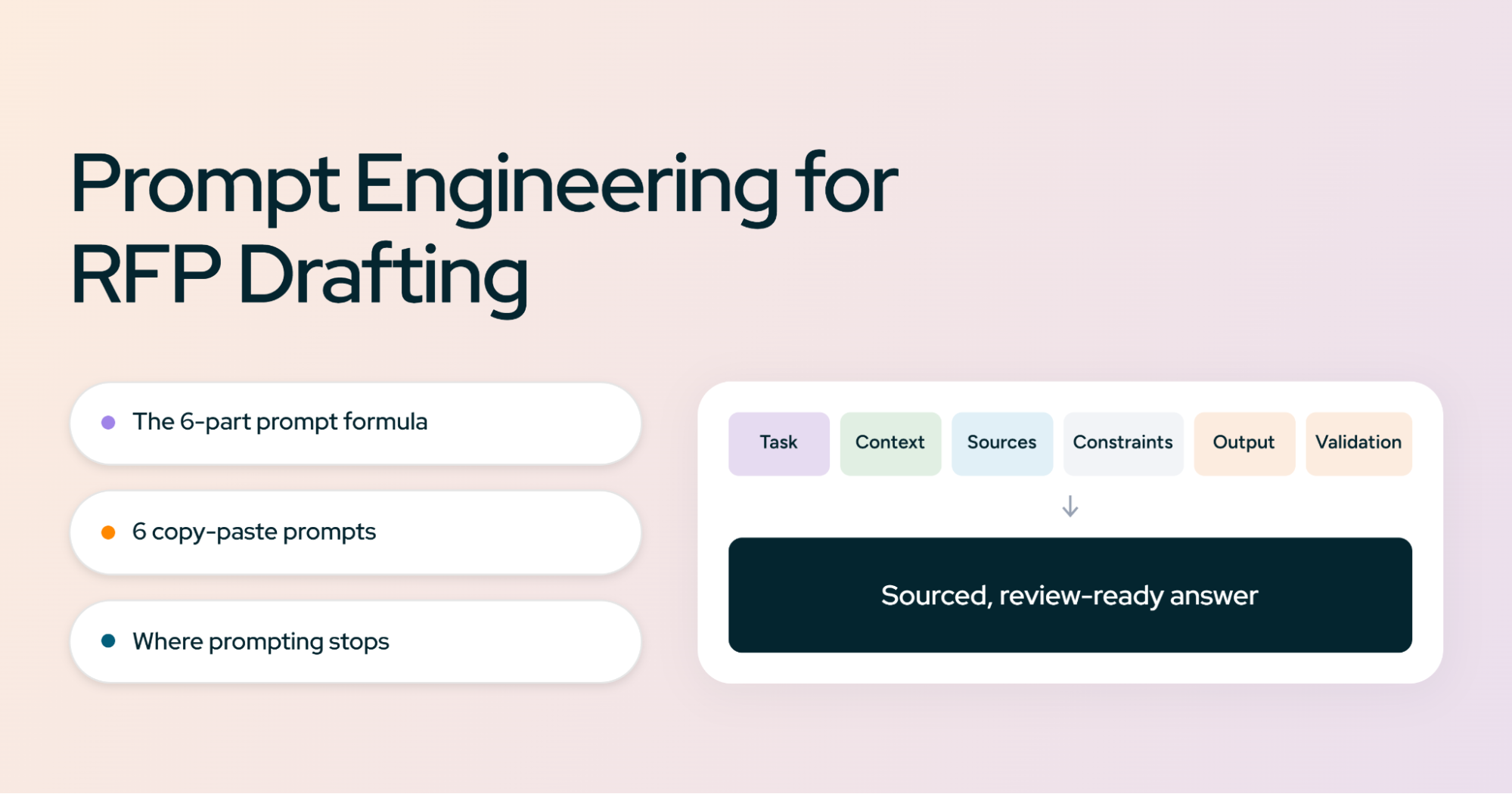
The 6 parts of a good RFP drafting prompt
Every prompt in this guide is built from the same six parts. Leave one out and you'll usually see the gap in the output.
| Part | What it tells the model | What goes wrong without it |
|---|---|---|
| Task | Exactly what to produce | Summaries when you wanted drafts, or the reverse |
| Context | Who you are, who the buyer is, what they need | Answers that could be about any vendor |
| Sources | Which material it may draw on | Facts pulled from general knowledge or invented outright |
| Constraints | What it must never do | Made-up certifications, customers, and metrics |
| Output | The format and structure of the answer | Unusable formatting and missing pieces |
| Validation | How to check its own work | Gaps nobody notices until the evaluator does |
The last two are the ones most people skip, and they're the ones that save the most review time.
The master RFP prompt template
This is the prompt to copy. It works in ChatGPT and Claude for almost any single RFP question. Fill in the brackets, paste your source material below it, and run it.
ROLE
You are an RFP response specialist for [COMPANY].

TASK
Answer the following RFP question: [QUESTION]

CONTEXT
Our company provides [PRODUCT/SERVICE].
The buyer is [BUYER NAME], a [INDUSTRY / SIZE] organization.
The requirements relevant to this question are: [REQUIREMENTS].
The buyer's stated priorities are: [PRIORITIES].

SOURCE RULES
Use only the information in the SOURCE MATERIAL section below.
Do not use general knowledge to make claims about our company,
product, customers, certifications, or results.
If the source material does not contain the answer, write exactly:
"Information unavailable - needs SME input."

ANSWER REQUIREMENTS
- Answer the question directly in the first sentence.
- Address every requirement in the question, in the order asked.
- Use specific evidence (numbers, names, documents) where available.
- Do not introduce claims the source material does not support.
- Match the tone and level of detail of the approved examples.
- Stay under [WORD LIMIT] words.

OUTPUT
Return four parts:
1. Draft answer
2. Sources used (document name and section for each claim)
3. Missing information (what an SME needs to supply)
4. Confidence: High / Medium / Low, with one line explaining why

SOURCE MATERIAL
[PASTE APPROVED CONTENT HERE]

APPROVED EXAMPLES
[PASTE 1-3 PAST ANSWERS YOU WERE HAPPY WITH]
Why each section is there
Role is the least important part. It sets tone, but it won't fix a vague task or missing sources. Keep it to one line.
Task names one question. Ask for one answer at a time, or one tightly related group, and quality goes up noticeably.
Context is what separates a tailored answer from boilerplate. The buyer's industry and stated priorities tell the model which of your capabilities to lead with.
Source rules are the most important lines in the prompt. Without them, the model will fill gaps with plausible-sounding guesses about your company. The fixed fallback phrase matters too. It gives the model a safe thing to say instead of inventing, and you can search for it later to find every gap.
Answer requirements turn your style guide into instructions. "Answer directly in the first sentence" alone removes most of the throat-clearing AI drafts are known for.
Output makes the review step fast. A reviewer who sees sources, gaps, and a confidence rating can triage twenty answers in the time it takes to fact-check five bare ones.
Don't use one giant RFP prompt
The most common mistake is uploading a 60-page RFP and typing "answer everything." The model has to read, interpret, plan, and write all at once. It skims requirements, forgets the evaluation criteria by page 40, and gives every question the same generic treatment.
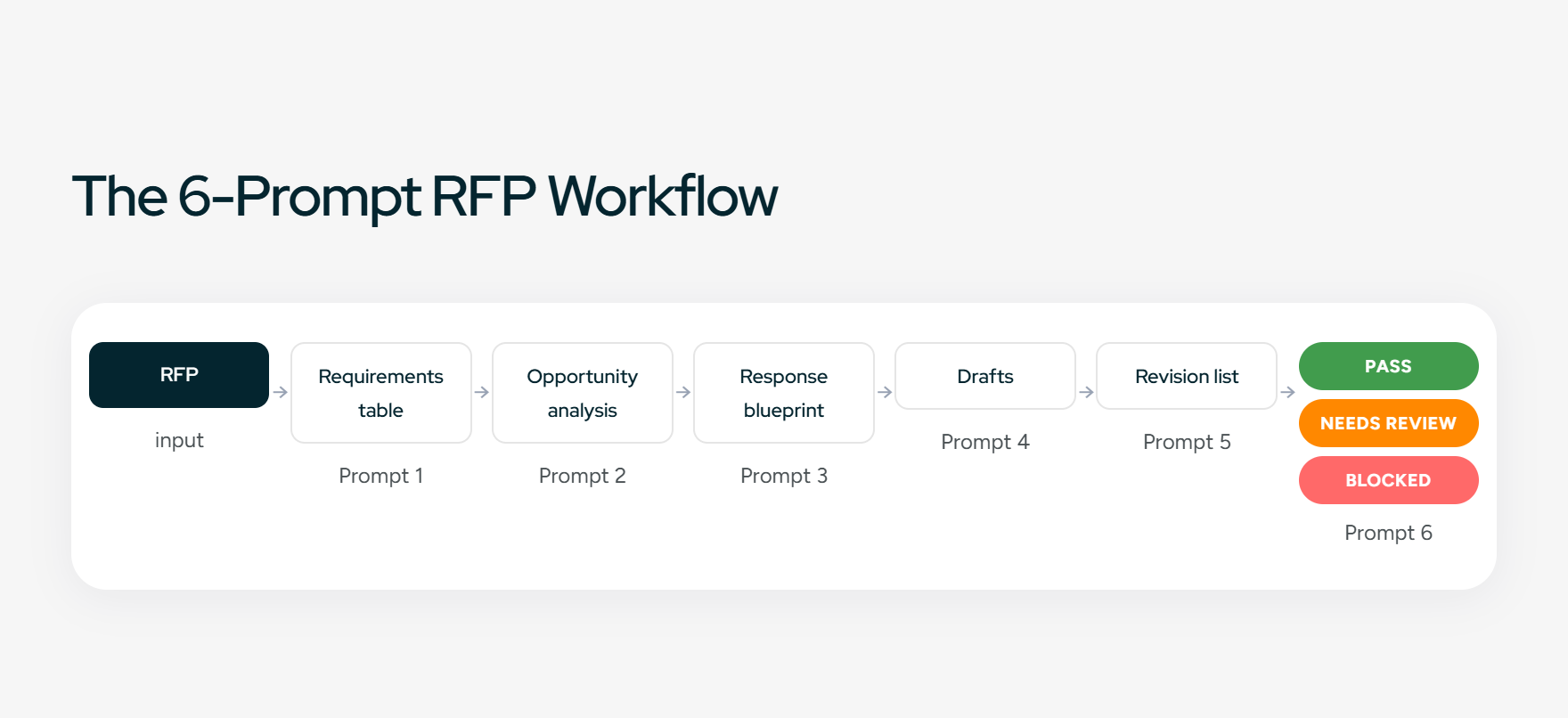
Good RFP prompting is a sequence. Each prompt does one job and hands its output to the next. That's also how experienced proposal teams work: nobody writes answers before they know what's being scored.
The 6-prompt RFP workflow:
- Extract requirements. Turn the RFP into a structured list of everything you must respond to.
- Analyze the opportunity. Work out what the buyer actually cares about and where you're weak.
- Build the response strategy. Decide what each section should say and what evidence backs it.
- Draft answers. Write each response against the strategy, using only approved sources.
- Critique the answers. Have the model find what's missing, vague, or unsupported.
- Run a final compliance check. Confirm nothing is unanswered, inconsistent, or over limit.
Run them in the same conversation, or carry the output of each into the next. The sections below give you each prompt in full.
Prompt 1: Extract every RFP requirement
A missed requirement can disqualify a response no matter how good the writing is. So the first prompt doesn't write anything. It builds the checklist everything else runs against.
Weak prompt:
Read this RFP and summarize the requirements.
You'll get a tidy paragraph that drops half the details, especially the ones buried in appendices and submission instructions.
Better prompt:
You are analyzing an RFP so our team can build a compliant response.
Read the entire attached RFP, including appendices, attachments,
and submission instructions.

Extract every requirement and return a table with these columns:
| # | Requirement | RFP section/page | Mandatory (Y/N) | Response needed (Y/N) | Likely owner | Notes |

Include every item in these categories, even if minor:
- Mandatory requirements ("must", "shall", "required")
- Evaluation criteria and their weighting
- Submission requirements (format, portal, copies, file types)
- Required certifications, licenses, and insurance
- Deadlines (questions due, intent to bid, submission, presentations)
- Pricing requirements and pricing format
- Page limits and word limits
- Required attachments and forms
- Contractual terms that need a response or acceptance
- Questions that will clearly need SME input

Rules:
- Quote the RFP's own wording in the Requirement column. Do not paraphrase.
- Cite the section or page number for every row.
- If a requirement is ambiguous, mark it "CLARIFY" in Notes
  and suggest a clarifying question we could submit to the buyer.
- Do not skip anything because it seems obvious.

After the table, list:
1. Every deadline in date order
2. Any requirement we could be disqualified for missing
The output looks like this:
| # | Requirement | RFP section | Mandatory | Response needed | Owner | Notes |
|---|---|---|---|---|---|---|
| 1 | "Vendor must hold a current SOC 2 Type II report" | 4.2 | Y | Y | Security | Attach report |
| 2 | "Responses shall not exceed 25 pages" | 1.6 | Y | N | Proposal lead | Applies to main volume only? CLARIFY |
| 3 | "Describe your implementation methodology" | 5.1 | Y | Y | Services | Scored at 20% |
Two instructions do the heavy lifting here. Quoting the RFP's exact wording stops the model from softening "must" into "should." Citing a section for every row lets you spot-check the table in minutes instead of rereading the RFP.
Get all six prompts in one place. Download the RFP Prompt Pack: every prompt in this guide, formatted to paste straight into ChatGPT or Claude.
Prompt 2: Analyze the RFP before drafting
This is the step most AI-assisted teams skip, and it's the one that separates winning responses from compliant ones. Before you write a word, you want the model to read the RFP the way an evaluator would.
Ask it to identify six things:
- Buyer priorities. What does the buyer care about most, beyond what they literally asked?
- Evaluation criteria. What will actually decide the score, and how is it weighted?
- Win themes. Which 3 to 5 messages should run through the whole response?
- Competitive signals. Does the RFP seem written around an incumbent or a specific kind of solution?
- Risks. Where are you weak, partially compliant, or non-compliant?
- Gaps. What will you need that isn't in your source material?
Using the requirements table from the previous step and the full RFP,
analyze this opportunity as an experienced bid manager would.

Our company: [ONE-PARAGRAPH COMPANY DESCRIPTION]
Our approved source material: [PASTE OR ATTACH]

Return:

1. BUYER PRIORITIES
   The 3-5 outcomes this buyer most wants. For each, cite the RFP
   language that signals it. Distinguish stated priorities from
   ones you are inferring, and label inferences clearly.

2. EVALUATION CRITERIA
   How the response will be scored, with weightings if given.
   Note which criteria carry the most points.

3. WIN THEMES
   3-5 themes we should repeat across the response. Each must connect
   a buyer priority to a capability supported by our source material.

4. COMPETITIVE SIGNALS
   Any wording that suggests an incumbent, a preferred vendor, or a
   preferred type of solution. Explain what in the RFP suggests it.

5. RISKS
   Requirements we may not fully meet, based only on our source material.
   Rate each: Disqualifying / Point loss / Minor.

6. GAPS
   Information the response will need that our source material does
   not contain. Name the likely SME for each.

Do not assume capabilities we have not documented. If you are unsure
whether we meet a requirement, list it under RISKS, not WIN THEMES.
That last instruction matters. Left alone, models are optimistic about your capabilities. Telling them to default uncertain items to "risk" gives you a more honest go/no-go picture, and that's often the most valuable output of the whole workflow.
Prompt 3: Build a response strategy
If you prompt for answers one question at a time with no plan, you get a stack of independent answers. Each might be fine. Together they don't tell a story, they repeat each other, and your win themes show up in one section and vanish from the rest.
The fix is a response blueprint: one table that sets out what every major section needs to say before anything gets drafted.
Using the RFP requirements, the opportunity analysis, and our approved
source material, create a response strategy for this proposal.

For each major section of the response, return a table row with:
| Section | Buyer's underlying concern | Lead message | Evidence we can use | Win theme it supports | Gaps / SME needed |

Rules:
- "Buyer's underlying concern" is the worry behind the question,
  not the question restated.
- "Evidence" must name a specific document, metric, certification,
  or case study from our source material. If none exists, write NONE.
- Every win theme from the analysis must appear in at least two sections.
- Flag any section where our lead message is weak or unsupported.
Here's what a good output looks like:
| Section | Buyer's concern | Lead message | Evidence | SME |
|---|---|---|---|---|
| Security | Their data being exposed | Enterprise-grade controls, independently audited | SOC 2 Type II report, security policies | Security |
| Implementation | A long, disruptive rollout | A proven, phased process with a fixed timeline | Implementation plan, customer case study | Services |
| Support | Being left alone after go-live | A named team and defined response times | Support SLA document | Customer Success |
This table becomes the brief for every drafting prompt in the next step. When you draft the Security answer, you paste in the Security row, and the model knows what to lead with and what to prove.
Prompt 4: Draft the actual RFP responses
Now the model writes. Use the master template from earlier as your base and add the matching strategy row. Then adjust for the type of question in front of you, because RFP questions don't all fail the same way.
A. A standard RFP question
The master template handles this on its own. Add one line that ties it to the strategy:
Use this strategy for the section: [PASTE THE STRATEGY ROW]
Lead with the lead message. Support it with the listed evidence.
B. A question with a word limit
Tell a model to "keep it under 200 words" and it often writes 400 words of thinking, then cuts the end off. The ending is usually where your proof was. Tell it to prioritize instead:
This answer has a hard limit of [N] words.
Before writing, rank the points you could make by how directly they
address the question and the buyer's priorities. Include points in
that order until you reach the limit. Cut background and context first,
never evidence. Report the final word count.
C. A question with multiple requirements
RFP questions often pack three or four asks into a single sentence. Models tend to answer the first two thoroughly and the rest in passing. Make the structure explicit:
This question contains multiple requirements. First, list each
separate requirement as a numbered item. Then answer each one in
the same order, using the buyer's own wording as a lead-in so the
evaluator can find each answer. Do not merge requirements.
D. A security or compliance question
This is where an invented answer does real damage. A made-up encryption standard or data-residency claim can become a contractual commitment. Add stricter rules:
This is a security/compliance question. Additional rules:
- Never infer certifications, controls, policies, encryption standards,
  data center locations, retention periods, or audit dates.
- State only what the source material says, in its terms.
- If the source material partly answers the question, answer that part
  and mark the rest "Information unavailable - needs SME input."
- Quote the source document name and date for every claim.
E. A question where information is missing
You want a flag, not a guess. The master template's fallback phrase covers this, but strengthen it when you already suspect a gap:
If you cannot answer fully from the source material, do not write a
plausible answer. Return:
"Information unavailable - needs SME input."
Then list the specific facts an SME would need to supply, phrased as
questions we can send them directly.
The last line is the useful one. Instead of a vague gap, you get a ready-made question for the SME, which cuts the back-and-forth with Security, Legal, or Product.
F. A question that needs a customized answer
Generic boilerplate is the fastest way for an AI-drafted answer to lose an evaluator's attention. The fix is giving the model a chain to follow for every claim:
Buyer requirement → our capability → evidence → buyer outcome
Structure this answer so each point follows this chain:
1. The buyer's requirement (in their words)
2. The capability of ours that meets it
3. The evidence that proves it (from source material)
4. The outcome for this buyer specifically

Do not describe a capability without linking it to a stated buyer
requirement. Remove any sentence that could appear unchanged in a
response to a different buyer.
That final rule is a quick test for boilerplate. If a sentence would work for any buyer, it isn't doing any work for this one.
The most underused technique: show the model good answers
Instructions tell a model what you want. Examples show it. If you only add one thing to your RFP prompts after reading this, make it two or three approved answers from past proposals.
In AI terms this is called few-shot prompting. In RFP terms, it's handing a new writer your best past responses and saying "write like this."
Here's the difference it makes:
A typical unguided answer:
Our platform provides a comprehensive, secure, and scalable solution that helps organizations streamline their RFP processes and drive efficiency.
Every word could describe any vendor. Nothing in it can be checked.
An approved answer:
Inventive automatically extracts questions from the buyer's RFP and drafts responses using approved company knowledge. Each answer includes source citations and a confidence score, so proposal teams can quickly identify responses requiring SME review.
It says what the product does, how it does it, and why that matters to the reader. A model that sees this example will reach for the same level of specificity.
Add this block to any drafting prompt:
APPROVED EXAMPLES
Below are answers our team has approved for past RFPs. Use them as the
reference for tone, specificity, structure, and level of detail.
Do not copy their wording or reuse their facts unless those facts
also appear in the SOURCE MATERIAL for this question.

Example 1 - Question: [PAST QUESTION]
Answer: [APPROVED ANSWER]

Example 2 - Question: [PAST QUESTION]
Answer: [APPROVED ANSWER]
Two tips. Pick examples that match the question type, so a security example for a security question. And include the instruction about not reusing facts, otherwise the model may lift a customer name or metric from an old answer into a new one where it doesn't belong.
How to stop ChatGPT and Claude from making things up
In most writing, a hallucination is embarrassing. In an RFP, it can be a commitment. If your response says you hold a certification you don't, or names a customer who never agreed to be a reference, that claim may end up in a contract.
You can't fully eliminate this with prompting, but you can make it rare and easy to catch. The approach is a control layer: a fixed block of rules you paste into every drafting prompt, unchanged, every time.
The seven rules:
- Use only approved source material.
- Never infer company-specific facts.
- Never invent certifications, standards, or audits.
- Never invent customer names, quotes, or results.
- Flag missing information instead of filling it.
- Cite a source for every factual claim.
- Assign a confidence level to every answer.
The copy-paste control layer:
ACCURACY RULES - these override every other instruction.

1. Use only the SOURCE MATERIAL provided. Treat anything you know from
   general training as unavailable for claims about our company.
2. Do not infer. If the source says we support SSO, do not conclude we
   support a specific SSO provider unless it is named.
3. Never state a certification, compliance standard, audit, or policy
   unless it appears in the source material with its name.
4. Never name a customer, quote a customer, or cite a result (%, time
   saved, revenue) unless it appears in the source material.
5. Where information is missing, write:
   "Information unavailable - needs SME input."
   A flagged gap is always better than a plausible guess.
6. After the answer, list each factual claim with the source document
   and section it came from. Any claim you cannot source, remove.
7. Rate confidence:
   High = fully supported by source material
   Medium = supported but source is old, partial, or indirect
   Low = significant gaps; needs SME review before use
Rule 6 is the one that does the most. Asking the model to source every claim after writing forces a second pass, and claims it can't source tend to get dropped. It also gives your reviewer a checklist instead of a blank page.
Treat the confidence rating as a triage signal, not a guarantee. A "High" answer still needs a human read. But it tells reviewers where to spend their time first.
Prompt 5: Make the AI critique its own answers
Ask a model "is this answer good?" and it will almost always say yes, with a few cosmetic suggestions. To get a useful review, give it a specific job: find the problems, list them, and don't fix anything yet.
You are a strict RFP evaluator scoring this response for the buyer.
Review the draft answer below against the original question, the
requirements table, and our source material.

Identify every instance of:
- Requirements in the question that are not addressed, or only partly
- Claims not supported by the source material
- Vague statements that make no checkable claim
- Claims that are true but irrelevant to this question
- Places where evidence exists in the source but wasn't used
- Contradictions with the source material or other answers
- Language that sounds generic, salesy, or AI-generated
- Missed chances to tie the answer to this buyer's priorities

Return a numbered revision list. For each item give:
the exact sentence, the problem, and a specific fix.
Do not rewrite the answer yet. Score it 1-10 as the buyer would.
Then review the list yourself. Accept the fixes you agree with, reject the rest, and run one more prompt:
Revise the draft applying only revision items [1, 3, 4, 7].
Keep everything else unchanged.
This draft, critique, revise loop catches far more than asking for a better version outright. Separating critique from rewriting stops the model from quietly introducing new problems while fixing old ones, and it keeps you in charge of what changes.
Prompt 6: The final RFP quality check
The last prompt looks at the whole response at once. Individual answers can each pass review and still contradict each other: a 6-week implementation in one section and 8 weeks in another, or two different product names for the same module.
Run a final pre-submission check on the complete RFP response below,
using the requirements table from Prompt 1.

Check five areas:

COMPLIANCE
- Every question answered
- Every mandatory requirement addressed
- Every required attachment and form referenced

ACCURACY
- No claims unsupported by source material
- No outdated product names, features, or figures
- No "Information unavailable" flags left unresolved

CONSISTENCY
- Product and module names
- Pricing figures and terms
- Implementation timelines
- Security terminology
- Customer references and their details

STYLE
- Consistent voice and tense
- No generic filler or repeated paragraphs
- No unsupported superlatives ("best", "leading", "unmatched")

SUBMISSION
- Word limits per answer
- Page limits overall
- Required formatting, fonts, and file naming
- Question numbering matches the RFP exactly

For each area, return one status:
PASS / NEEDS REVIEW / BLOCKED

For anything not PASS, give the exact location (question number or
section), the issue, and the fix. List BLOCKED items first.
BLOCKED means you can't submit until it's fixed, like an unanswered mandatory question. NEEDS REVIEW means a human should decide. That split tells you where to spend the last hours before the deadline.
ChatGPT vs Claude: which is better for RFP drafting?
For this workflow, the honest answer is that it matters less than you'd think. Both handle long RFP documents, both follow structured prompts well, and every prompt in this guide works in either.
| Use case | ChatGPT | Claude |
|---|---|---|
| RFP analysis | Strong | Strong |
| Long documents | Strong | Strong |
| Drafting | Strong | Strong |
| Custom workflows | Strong (custom GPTs, projects) | Strong (projects, Skills) |
| Knowledge management | Depends on your setup | Depends on your setup |
| Collaboration and review | Limited | Limited |
| Structured RFP workflow | Manual setup required | Manual setup required |
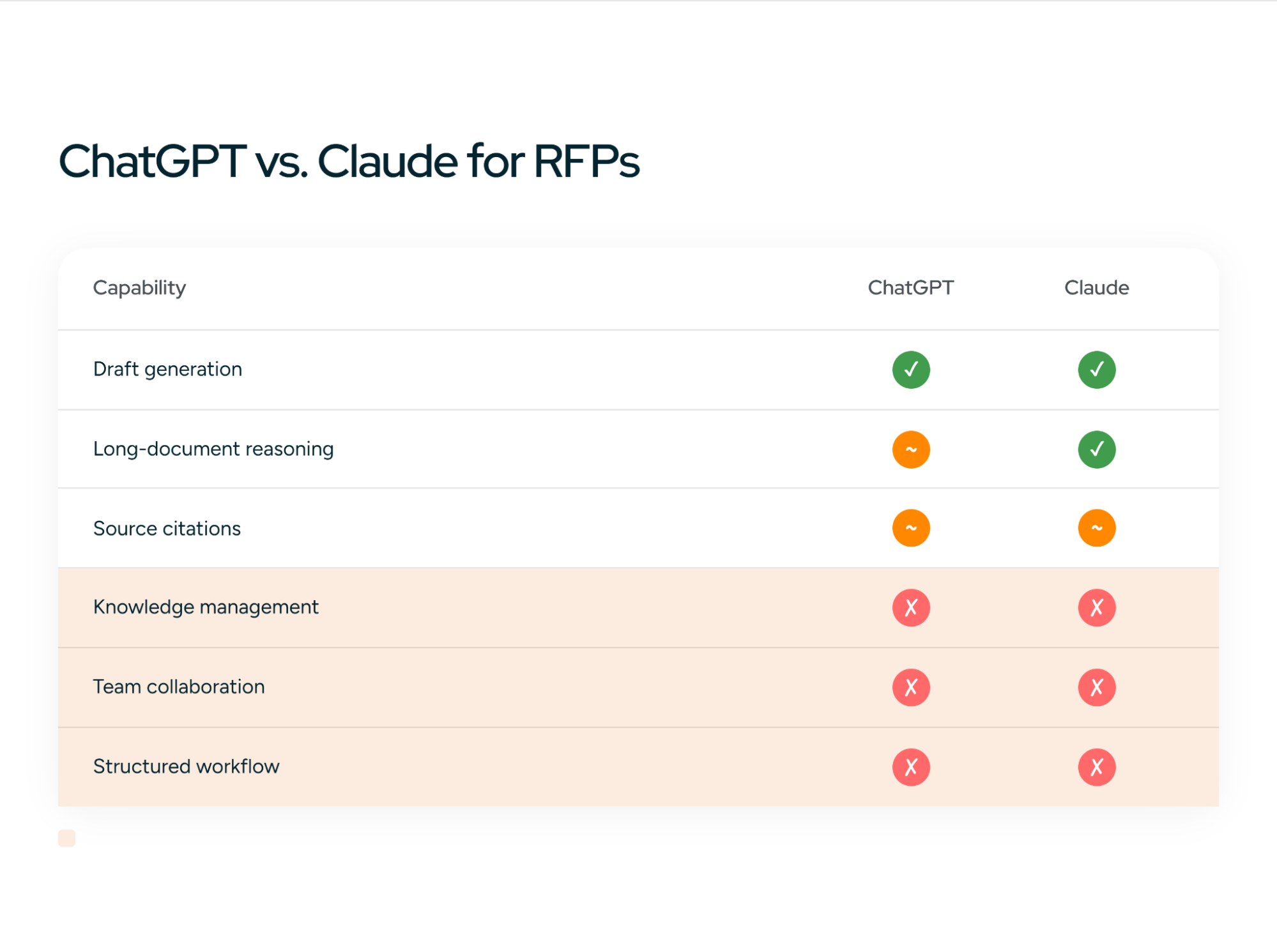
The gaps that matter are in the bottom three rows, and they're the same for both tools. Neither is built to manage a content library, route work to reviewers, or run a multi-person RFP process.
The quality of your output depends far more on your source material, your instructions, and your review process than on which model you pick. If you want to go deeper on either tool, see our guides to ChatGPT for RFPs and Claude for RFPs.
Limitations of using generic AI for RFP drafting
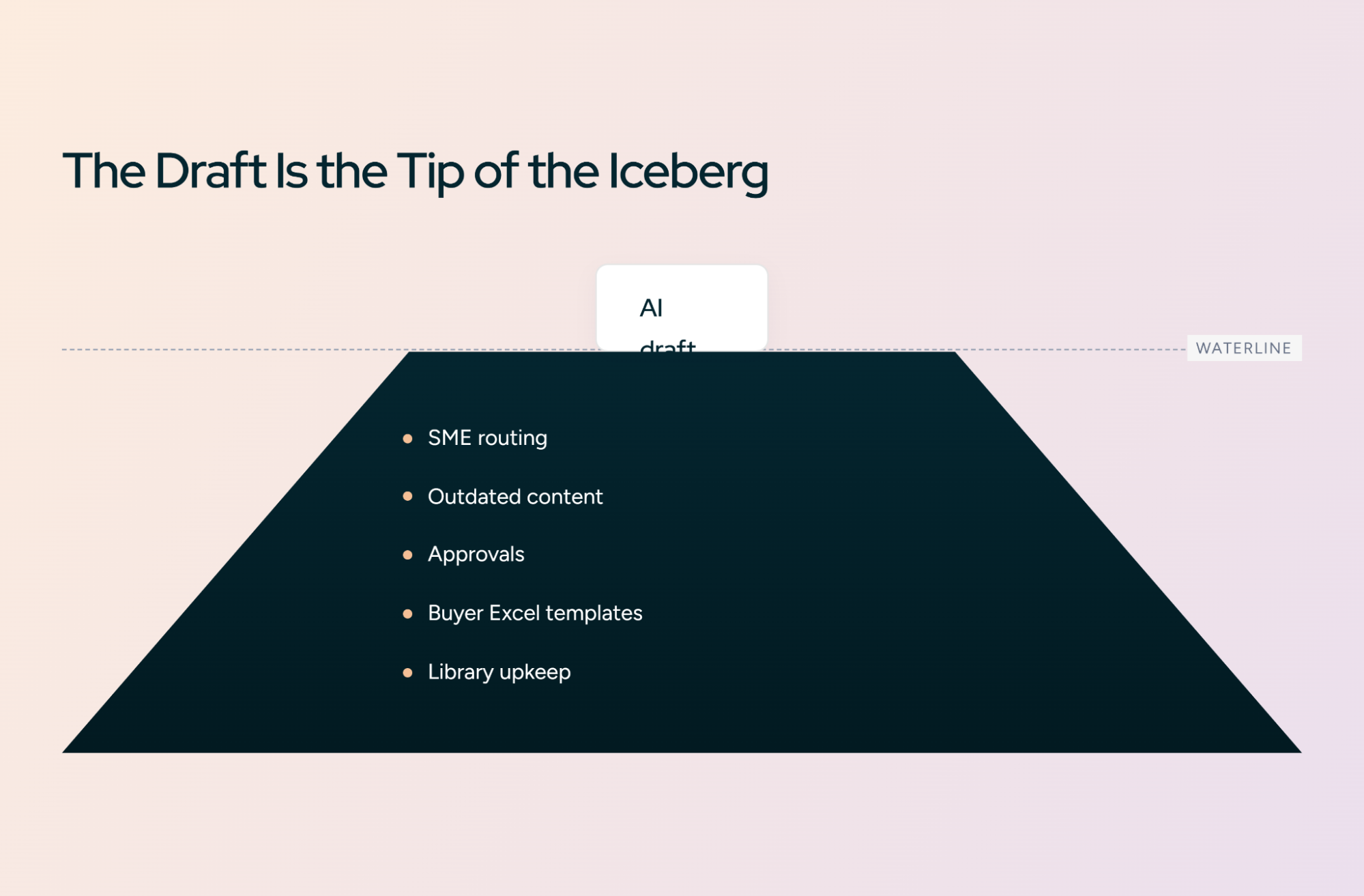
Good prompts make ChatGPT and Claude much better at drafting RFP responses. They don't touch the operational work around the draft. And on most proposal teams, that work is where the hours go.
Prompting doesn't give you a single source of truth. Every prompt depends on the source material you paste in. Someone has to keep those files current, complete, and in one place.
Prompting doesn't know which content is current. If last year's security policy and this year's both sit in your folder, the model can't tell which one is right. It may quote either, or blend them.
Prompting doesn't route questions to SMEs. The model can flag "needs SME input" beautifully. Someone still has to work out who that is, send the question, chase the reply, and paste it back in.
Prompting doesn't manage reviewers. There are no assignments, approvals, version history, or audit trail. Feedback lives in email threads and chat messages.
Prompting doesn't fill the buyer's template. Security questionnaires and RFQs often arrive as Excel workbooks with hundreds of rows. Moving drafted answers into the right cells by hand is slow and error-prone.
Prompting doesn't keep your answer library current. When an SME corrects an answer, that correction lives in one proposal. Next quarter, the model may draft from the old version again.
Prompting doesn't scale indefinitely. One person running five RFPs a quarter through this workflow is manageable. A team running a hundred hits a ceiling, and it's the upload, prompt, copy, paste, chase loop that breaks first, not the model.
When to move from ChatGPT or Claude to RFP software
There's no fixed number of RFPs that tips you over. It's more about how many people, documents, and handoffs are involved. Use these two lists as a gut check.
ChatGPT or Claude is probably enough if:
- You handle a relatively small number of RFPs each year
- One person owns most of each response
- Your knowledge base is small and changes rarely
- You don't need formal review or approval workflows
- You're comfortable copying answers into the final document by hand
You probably need dedicated RFP software if:
- You're handling dozens or hundreds of RFPs and questionnaires a year
- Multiple SMEs contribute to and review each response
- Your source content changes often (products, pricing, security posture)
- You need source citations and an audit trail for every answer
- You need a governed knowledge base, not a shared folder
- You regularly fill buyer-supplied Word or Excel templates
- You need assignments, approvals, and deadlines tracked in one place
- Leadership wants reporting across all active RFPs
If three or more of the second list sound familiar, the bottleneck has moved. Better prompts won't fix it, because the problem is no longer the draft.
How Inventive AI handles RFP workflows
Everything in this guide works, and plenty of teams run RFPs this way. The difference with a purpose-built platform is that the workflow is built in, so you're not rebuilding it by hand for every RFP.
With ChatGPT or Claude: Upload → Prompt → Draft → Copy → Review → Reformat → Repeat
With Inventive: Upload RFP → Analyze → Draft → Review → Approve → Export
Here's how each manual step in this guide maps across:
| What you do manually | What Inventive does |
|---|---|
| Gather and upload source files for every prompt | A governed Knowledge Hub the AI drafts from |
| Write and maintain six prompts | AI agents that run analysis and drafting |
| Ask the model to cite its sources | Source citations on every answer |
| Tell the model not to guess | Confidence scores and automatic gap detection |
| Spot outdated or conflicting files yourself | Content Governance that flags stale and conflicting content |
| Copy answers into the buyer's template | Export into the buyer's Word or Excel format |
| Email SMEs with gap questions | Assignments and workflows that route questions to owners |
| Track reviews in threads and spreadsheets | Built-in review and approval workflow |
The prompting principles stay the same: approved sources only, cite everything, flag gaps, review before submitting. Inventive turns them from instructions you repeat into defaults you don't have to think about.
Your prompts can only take you so far
If you're still uploading documents, prompting AI, copying answers into the RFP, and chasing SMEs for reviews, the problem isn't the prompt anymore. It's the workflow.
See how Inventive AI handles the full RFP response process.
Book a demoNot ready yet? Download the RFP Prompt Pack and run all six prompts on your next RFP.
Frequently Asked Questions
What is prompt engineering for RFPs?
It's the practice of writing structured instructions that get AI models like ChatGPT and Claude to produce accurate, compliant, buyer-specific RFP responses. A good RFP prompt defines the task, context, approved sources, constraints, output format, and how the model should check its own work.
What's the best prompt for writing RFP responses?
There isn't one prompt. There's a sequence. The most reliable approach is six prompts in order: extract requirements, analyze the opportunity, build a response strategy, draft answers, critique them, and run a final compliance check. For individual answers, use a template that limits the model to approved source material and requires citations.
How do I stop ChatGPT from making up information in RFP answers?
Tell it to use only the source material you provide, never to infer company facts, and to write a fixed phrase such as "Information unavailable - needs SME input" when it can't answer. Then require a source for every claim and a confidence rating. This makes invented claims rare and easy to spot, though a human should still review every answer.
Is ChatGPT or Claude better for RFP responses?
Both handle long documents and structured prompts well, and every prompt in this guide works in either. Output quality depends more on your source material, instructions, and review process than on the model.
Can I use AI to answer security questionnaires?
Yes, with stricter rules. Instruct the model never to infer certifications, controls, encryption standards, or data locations, and to cite the source document for every claim. Security answers can become contractual commitments, so every one should be reviewed by your security team.
Should I upload the whole RFP and ask AI to answer everything?
No. One giant prompt leads to skimmed requirements and generic answers. Break the work into stages so the model extracts and analyzes the requirements before it drafts anything.
When should I switch from ChatGPT or Claude to RFP software?
When the work around the draft becomes the bottleneck: several SMEs per response, frequently changing content, buyer templates to fill, approvals to track, or a high volume of RFPs. At that point the problem is the workflow, not the prompt.
.avif)