ChatGPT for RFPs: How to Respond to RFPs with Custom GPTs and Projects
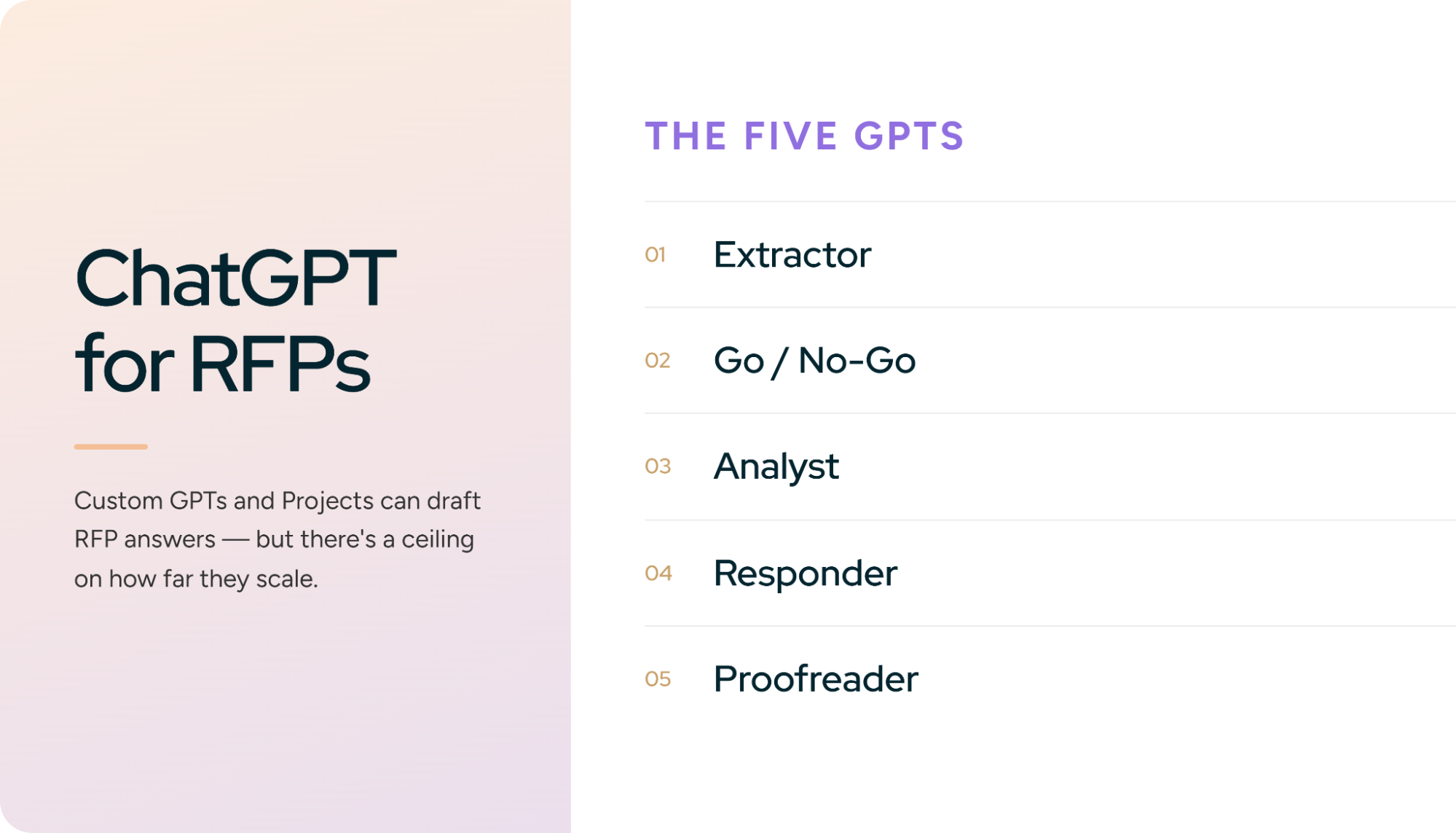
A solutions engineer on r/salesengineers described building a Custom GPT during a company hackathon to help answer the roughly 200 RFPs and RFIs his team handles every year. His estimate of how often it produced a correct answer: 20-30% of the time. That number is the most honest place to start a guide on ChatGPT for RFPs. The tool is genuinely capable. The distance between a hackathon demo and a dependable response process is where teams lose months.
Proposal teams answered an average of 166 RFPs last year and spent about 25 hours on each one, according to Loopio's RFP Trends and Benchmarks research. ChatGPT can cut a real share of those hours if you set it up properly. This guide shows you how: whether ChatGPT belongs in your RFP process at all, the honest pros and cons, a six-step workflow built on Projects and five purpose-built Custom GPTs, and the point at which the workflow quietly turns into software your team has to maintain. We build RFP response software at Inventive AI, so we have a perspective. We will be upfront about it. Most of this guide is for the reader who wants to make ChatGPT work today.
Should You Use ChatGPT for RFP Response Management?
The same two numbers decide it here that decided it in our guide to Claude for RFPs: how many RFPs you answer a year, and how many people touch each response.
ChatGPT is a good fit when volume is low and ownership is narrow. A proposal manager who answers a dozen RFPs a year, keeps the source material in a few dozen documents, and reviews every answer personally will save real time. ChatGPT Projects hold 25 files on Plus and 40 on Pro, Business, and Enterprise, with project-level instructions and memory that stays inside the project. Custom GPTs carry up to 20 knowledge files each. Together they are enough to hold a knowledge base for one product line and one voice.
The ceiling shows up at volume. Every new RFP means re-explaining which product tier, which security posture, and which pricing rules apply. ChatGPT Enterprise can pull roughly 110,000 tokens of uploaded document content into a conversation, about 200 pages, so a large RFP package plus your supporting material already has to be split up. Answers still come out one batch at a time and get carried back into the issuer's template by hand. Once four or more people review a response, there is no way to assign question 12 to Legal, lock question 45 after Security approves it, or see who changed what.
A reasonable line in the sand: under 10 to 15 RFPs a year, one or two owners, and a Business or Enterprise workspace, ChatGPT plus the workflow below is worth building. Above that, the coordination cost overtakes the drafting savings. Loopio found that 68% of proposal teams used generative AI in the past year, and the teams running at scale mostly pair a general assistant with dedicated response software instead of choosing one.
Pros and Cons of Using ChatGPT for RFP Responses
Where ChatGPT genuinely shines
Projects as a bid workspace. One Project per RFP, with the solicitation, amendments, your proposal template, and reference material in one place. Project instructions override your global settings, and project-only memory keeps unrelated conversations from bleeding into a bid. Shared Projects let a second reviewer work in the same context.
Custom GPTs for repeatable jobs. A Custom GPT packages instructions and knowledge files into a reusable tool. Build one for requirement extraction and another for proofreading, and the method stays consistent no matter who on the team runs it.
Canvas for long narrative sections. Executive summaries, implementation approaches, and management plans are easier to shape in Canvas than in a chat thread. Highlight a paragraph, ask for a tighter version, keep the rest untouched.
Deep Research for the intelligence work. Incumbent research, agency background, competitor positioning, and regulatory context come back as a cited report you can hand to the capture lead.
Connectors. Google Drive and SharePoint connectors let ChatGPT search approved content where it already lives, subject to the permissions of whoever is asking.
Spreadsheet analysis. ChatGPT reads Excel workbooks and CSVs, and the ChatGPT for Excel add-in can review formulas and multi-tab pricing models directly in the sheet.
Where it costs you
The context ceiling is real. Roughly 200 pages of uploaded material per conversation on Enterprise sounds generous until an RFP arrives with 300 pages of attachments. You become the retrieval system.
Knowledge files never retire themselves. Upload the new security whitepaper to a Custom GPT and the old one stays right beside it. ChatGPT has no idea which is current, and a deprecated data-residency answer can surface in a live questionnaire.
The question-by-question loop. Ten to twenty questions in, ten to twenty answers out, then review, copy, and paste. An 80-question RFP means running that loop until the afternoon is gone.
No workflow layer. No assignments, no reviewer routing, no approval states, no audit trail. Five people using ChatGPT are five separate contexts and five versions of the truth.
Confident guessing. Without an explicit rule to answer only from the files and flag gaps, ChatGPT fills them. The 20 to 30 percent accuracy figure above came from exactly that failure.
Consumer plans train by default. Individual ChatGPT accounts may use your conversations to improve OpenAI's models unless you turn that setting off. Business and Enterprise workspaces are excluded from training by default. Know which one your team is on before the first upload.
None of these problems disqualify ChatGPT at low volume. They compound as volume grows. Build the workflow below with that curve in mind.
How to Use ChatGPT for RFP Response Management: A Six-Step Workflow
Step 1: Pick the plan and lock the data settings
Use a Business or Enterprise workspace for anything confidential. Your data is not used for training by default, administrators control retention, and Enterprise supports data residency. If you are on a personal Plus or Pro account, open Data Controls and turn off model improvement before you upload a single bid document, and use project-only memory for every RFP project.
Then read the RFP itself. A growing number of solicitations, especially in public procurement, include language about generative AI use. Some prohibit it. Some require disclosure. Find the clause before you build the workflow.
Step 2: Build the proposal Project
Create a Project for RFP work and upload:
- Three to five recent winning proposals
- Current product and security documentation
- Approved boilerplate: company overview, implementation methodology, support model
- Pricing guardrails, meaning what you can and cannot commit to
- Two or three answers you consider the gold standard for voice and length
Set project instructions with three rules. Answer only from the uploaded files. Name the source document for every claim. Write NO_DATA when the files do not cover a question. Those three lines prevent most hallucination problems before they start.
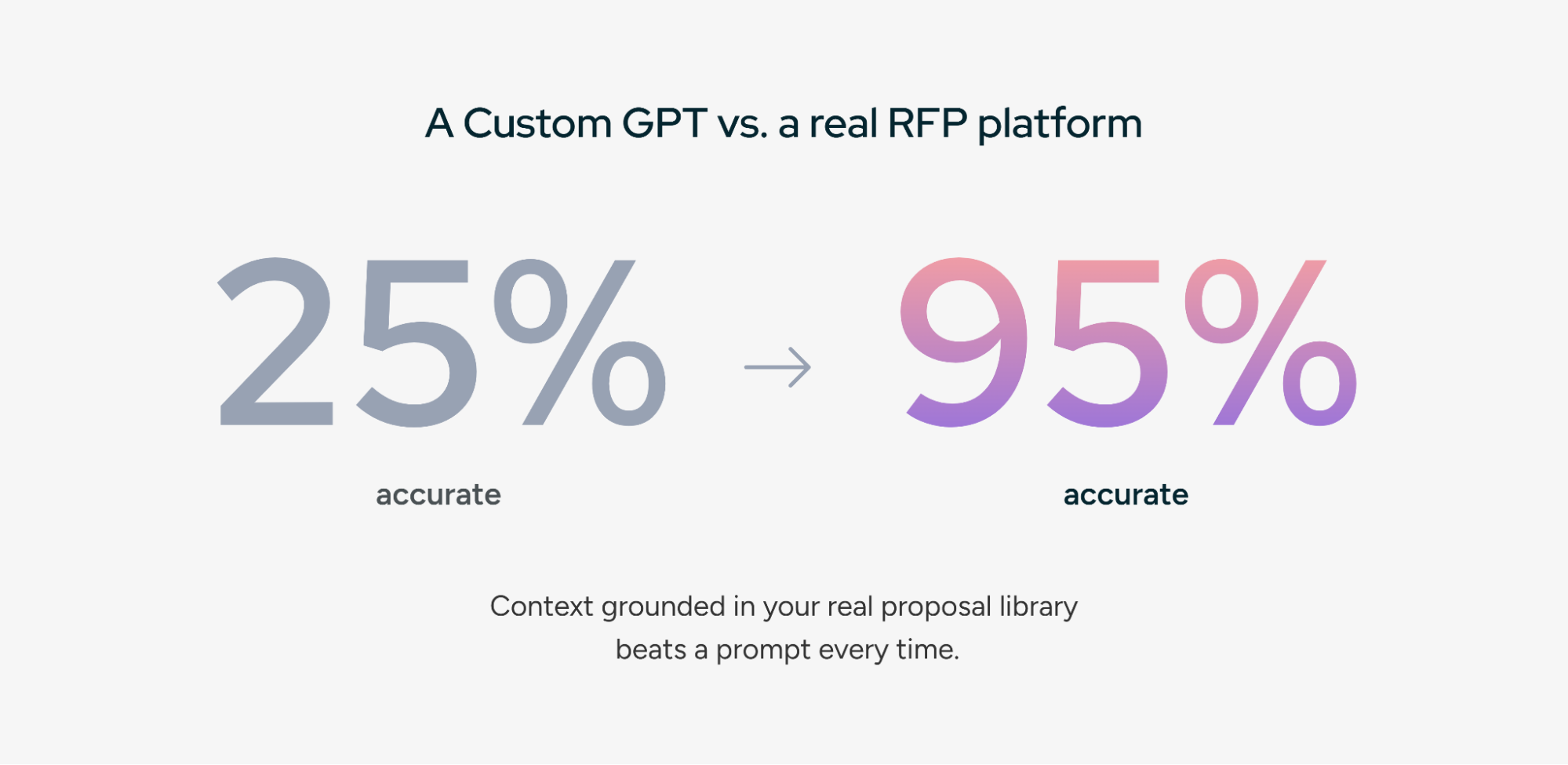
Step 3: Build five Custom GPTs, one per job
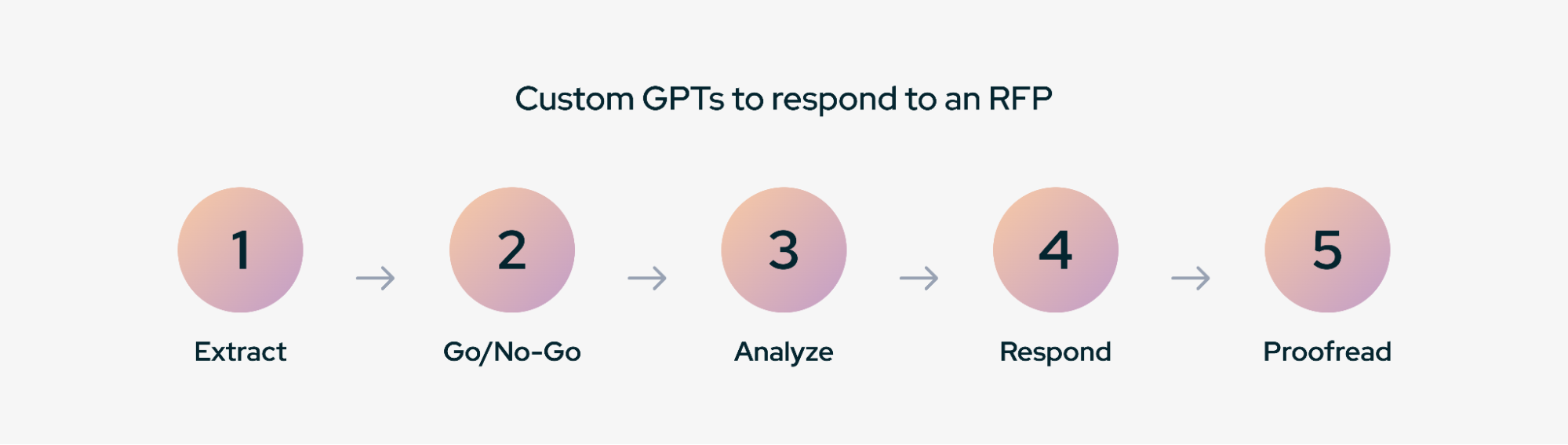
Custom GPT creation needs a Plus, Pro, Business, or Enterprise plan. Open the GPT editor, configure each GPT with the instructions from the companion download, attach the relevant knowledge files, and share it with your workspace. Five jobs, five GPTs:
GPT 1: Requirement Extractor GPT
Reads the full RFP, including appendices and amendment letters, and returns a numbered table: ID, requirement quoted verbatim, source section, type (mandatory, optional, informational), suggested owner, status. Submission rules get their own rows. This table becomes your compliance matrix. Spot-check it against dense tables and appendices, because a missed "shall" is expensive.
Knowledge files: none required (the RFP is attached per conversation).
You are an RFP Requirement Extractor for a vendor response team.

When the user attaches an RFP, RFI, or questionnaire, read every page,
including appendices, footnotes, amendment letters, and embedded tables.

Extract every requirement into a table with these columns:
ID | Requirement (verbatim) | Source section | Type | Suggested owner | Status

Rules:
- Quote requirement text verbatim. Never paraphrase.
- Type is Mandatory, Optional, or Informational. "Shall" and "must" are
  always Mandatory.
- Include submission requirements (format, deadline, page limits, required
  forms, certifications) as their own rows.
- Suggested owner is one of: [Product, Security, Legal, Finance, Sales,
  Implementation]. Choose the best fit.
- Status starts as "Open" for every row.
- End with a count of requirements by type and a list of any sections or
  tables you could not fully parse so a human can check them.
- If asked to output a file, produce an .xlsx with one row per requirement.
GPT 2: Go/No-Go GPT
Scores the opportunity against your ideal customer profile, disqualifiers, and minimum deal economics. Output is a weighted score, a pursue-or-pass call, and the three factors that drove it. The average RFP win rate sits near 45%, and the cheapest way to raise yours is to stop bidding on the ones written around another vendor's spec sheet.
Knowledge files: icp_and_disqualifiers.md (your ideal customer profile, hard disqualifiers, minimum deal economics).
You are a Go/No-Go analyst for a vendor response team.

When the user attaches an RFP, compare it against the ideal customer
profile, disqualifiers, and deal economics in icp_and_disqualifiers.md.

Score the opportunity from 0 to 100 using these weights:
- Solution fit against mandatory requirements: 30%
- Incumbent signals (requirements written around one vendor's spec): 20%
- Timeline feasibility against stated deadlines: 20%
- Compliance blockers we cannot meet: 20%
- Deal size versus estimated response effort: 10%

Output:
1. Weighted score
2. PURSUE or PASS recommendation
3. The three factors that drove the decision, each with a quote from the
   RFP as evidence
4. Assumptions made because information was missing
5. Questions to submit during the issuer's Q&A window
GPT 3: RFP Analyst GPT
Produces the pre-writing brief: evaluation criteria and their weighting, buyer priorities stated and implied, competitive hints, red flags in scope or terms, and the three win themes your response should be built around.
GPT 4: Responder GPT
Drafts answers strictly from project knowledge, one batch at a time. Every answer carries the question number, the draft, the source document, and a confidence level. Anything the files do not cover comes back as NO_DATA - needs SME input and lands in a gap list at the end of the batch.
GPT 5: Proofreader GPT
Runs on the assembled document, never the chat history. It checks every requirement ID against a response, flags inconsistent product names and version numbers, catches contradictions in pricing and timelines, and confirms page and word limits. It returns findings with exact locations, never a rewrite.
Step 4: Run the Responder in batches of 10 to 20
Group questions by section so the Security reviewer gets the security batch and Legal gets the terms batch. Answer quality drifts on long generations, and smaller batches keep human review manageable. Re-run weak answers individually with added context instead of regenerating the batch.
This is the step where the chat-window ceiling becomes physical. Each batch needs review, then a copy, then reformatting into the issuer's template, and by question 60 the time saved on writing has been spent on logistics. Inventive AI was built around exactly this gap: upload the full RFP, get every answer drafted with citations from governed company knowledge, and export back into the issuer's original format in one pass. If the loop is your daily reality, book a 20-minute demo.
Step 5: Track your edit rate
Almost nobody measures this, and it is the single most useful number in an AI-assisted RFP process. After each bid, count the answers your SMEs rewrote substantially versus the ones they accepted or lightly edited. If more than 40% needed real rework, the problem is almost always the knowledge base, not the model: stale files, missing product docs, or contradictory past answers. Fix the inputs and the rate drops.
Step 6: Get the answers back into the issuer's template
Word templates are manageable. Excel questionnaires are where it hurts. ChatGPT can read a multi-tab workbook, but writing answers back into the right cells without disturbing merged headers, dropdown validation, hidden rows, and character limits is manual work. The ChatGPT for Excel add-in helps with formulas and review. It does not fill a SIG or CAIQ for you. Budget the time.
Five Best Practices for ChatGPT RFP Responses
Write the NO_DATA rule into every GPT, the Responder included. An extractor that invents a requirement is as dangerous as a responder that invents a certification. Every GPT should know how to say it does not know.
One Project per bid, one owner per knowledge base. Shared Projects invite everyone to upload. Within a month you have three versions of the security overview and no way to tell which is approved. Give one person the keys to the knowledge files, and route everything through them. The same discipline that keeps a competitive RFP answer library trustworthy applies here.
Retire files the same day you replace them. Delete the old version from the Project and from every Custom GPT that carries it. ChatGPT treats every file in context as equally true.
Cite, then sample. Every answer names its source document. Then pull a random 10% of answers per bid and check that the cited document actually supports the claim. A citation to a related document is still a hallucination if the sentence is not there.
Keep a human gate on every answer. AI drafts, an SME verifies, someone accountable approves. If an evaluator asks whether AI was used, you want to answer with a review process, not a shrug.
Build vs. Buy: When Your ChatGPT Workflow Becomes Software You Have to Maintain
The workflow above works. Here is how it plays out over a year at a team doing 20 or more RFPs, because the pattern repeats across companies.
Phase 1: the hackathon prototype. Someone builds a Custom GPT in an afternoon, connects it to a folder of past answers, and it feels like magic on simple text questions. Leadership decides the RFP problem is solved.
Phase 2: the unstructured data wall. A real enterprise RFP arrives as a 40-tab Excel workbook with merged cells and conditional questions. The GPT garbles the intake. An engineer spends two weeks writing a parser that breaks on the next issuer's template.
Phase 3: the project management gap. Six months in, the sales team explains that drafting was 30% of the work. The other 70% is review, assignment, and approval, and the GPT has no interface for any of it. Tracking moves to a side spreadsheet and a Slack thread.
Phase 4: the maintenance burden. The engineer who built the parser and the Custom GPT instructions gets reassigned. OpenAI updates the model. Answers drift, nobody owns the fix, and the team goes back to answering RFPs manually.
The questions to ask before you reach Phase 3: Who owns the knowledge files when the product changes? Who writes the code that gets 200 answers back into the issuer's Excel template? Who builds assignments and approvals for five reviewers? Are you willing to pull two or three engineers off the product roadmap for six to twelve months to build and maintain an internal tool?
The principle we use internally: build where you differentiate your product, buy where you run your operations. Unless your company sells RFP software, an in-house response engine spends engineering capacity your customers never see. Our full build vs. buy guide for RFP software walks through the economics in more depth.
How Inventive AI Handles RFP Response Management
Inventive AI is an agentic RFP response platform built for the workflow this guide assembles by hand. Upload the full RFP in PDF, Word, Excel, or PowerPoint. AI agents extract the questions, pull the right context per question from a Knowledge Hub connected to the systems you already use, and draft every answer with source citations and a confidence score. Your team reviews, refines, and approves in one shared workspace.
What that replaces from this guide:
- Full-document intake and formatted export, so the copy-paste loop and the Excel round-trip disappear
- Knowledge Hub with live sync to SharePoint, Google Drive, Salesforce, Confluence, and Notion, with no separate library to babysit
- Content Governance Agent that flags conflicting, outdated, and duplicate content automatically
- Citations and confidence scores on every answer, and "Information unavailable" instead of a guess
- Built-in Go/No-Go and Full Response Analyzer agents
- Assignments, reviewer workflows, and approvals with progress tracking across every RFP, RFI, DDQ, and security questionnaire
- SOC 2 Type II compliance, and customer data is never used to train public models
The results hold up in production. Insider cut response time by 90% and lifted its win rate from 30% to 50%. AssetWorks Facilities measured a 422% ROI with $105K in net savings. MaxVal completed 80 RFP questions in 3 hours, work that used to take most of a week.
If your team has outgrown the Custom GPT, book a demo with Inventive AI and bring the messiest questionnaire you have.