
How to Build an AI RFP Agent: Architecture, Components, and Six Ways to Build
.png)
Most teams start in the same place. Someone pastes an RFP question into a chat window, gets a passable answer, pastes it into the issuer's template, and does that eighty more times. It works, in the sense that a bicycle works for a cross-country move. The question that follows, usually from someone who has done this for a week, is different: could we build something that reads the whole RFP, figures out what it needs, drafts every answer from our own material, checks its own work, and only interrupts a human when it should? That thing is an agent, and it is a different animal from a chatbot with your documents attached.
This guide is about building that animal: what separates an agent from a retrieval script, the components an RFP agent needs, the orchestration pattern that holds them together, and the parts of the build that never show up in a Friday demo. We make RFP response software at Inventive AI, so we have both opinions and a product, and we will say where the line is. Most of this is useful whether you build or buy.
The prize is real. Proposal teams answered an average of 166 RFPs last year at about 25 hours each, according to Loopio's RFP Trends and Benchmarks research, and 68% used generative AI somewhere in the process. The gap between "used AI" and "trusts AI to run the response" is what this guide is about.
What’s the difference between an RFP agent and an RFP chatbot?
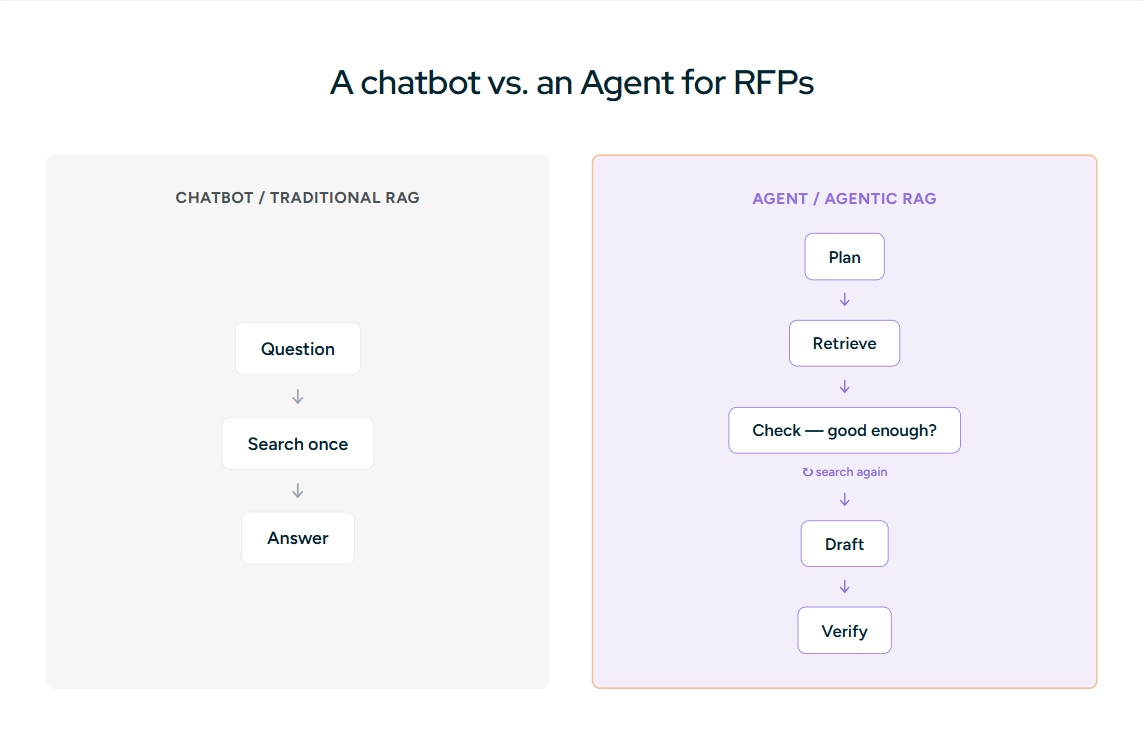
The word "agent" gets stretched to mean anything with an API call in it, so start with a working definition. A chatbot answers the question in front of it. An agent decides what to do next. Anthropic's own framing is the clean one: workflows follow predefined code paths, while an agent directs its own process and tool use, keeping control over how it accomplishes a task. An RFP agent, given a 200-page package, plans the work, chooses when to search, when to draft, when to ask for help, and when it is done.
The retrieval side shows the difference plainly. Traditional RAG is a straight line: take the question, search once, generate an answer. That is fine when the question is clean and the answer sits in one place. RFP questions are neither. "Describe your data residency posture for EU public-sector customers, including subprocessors" is three questions wearing a trench coat, and a single vector search returns a blurry average of everything vaguely related. Agentic RAG treats retrieval as a tool the model uses on purpose. It can rewrite the query, search again with tighter terms, notice that it found the policy but not the subprocessor list, and go back for the second thing. NVIDIA describes the loop as identify what you need, generate queries, retrieve, check relevance with reasoning, and repeat until the answer holds up. That iteration is most of what makes an agent worth building.
The practical test: if your system always answers in one pass and never decides to look again, you have built a fast RAG pipeline, not an agent. Nothing wrong with that, but name it correctly, because the two fail in different ways and cost different amounts to maintain.
The Anatomy of an RFP Agent
An RFP agent is not one model with a long prompt. It is a small set of specialized workers, each good at one job, coordinated by something that knows the plan. Build these six pieces and you have covered the real workflow.
The orchestrator. This is the piece that reads the intake, breaks the RFP into work, and decides the order. It does not write answers. It routes: this batch is security, that batch is legal, these forty questions are boilerplate the drafting worker can clear without help. The orchestrator also owns state, which questions are drafted, approved, blocked, and waiting, so the whole run is inspectable rather than a black box that returns 200 answers at once.
The intake and requirement worker. RFPs arrive as two-column PDFs, Word files with nested tables, and Excel workbooks with merged cells and hidden rows. This worker parses them with layout intact and turns them into records: an ID, the requirement quoted verbatim, its source location, whether it is mandatory, the deadline, and the evidence it needs. "Shall" and "must" are mandatory, always. Submission rules, page limits, and required forms are requirements too, and they are the ones a hurried human misses.
The retrieval worker. This is agentic RAG in one box. Given a requirement, it pulls candidate evidence from your governed knowledge, combining keyword search for exact identifiers (SOC 2 Type II, control numbers, SKUs, version strings) with dense retrieval for meaning, then reranks and hands the model a tight, cited set. When the first pass comes back thin, it reformulates and tries again rather than shrugging and letting the drafter guess.
The drafting worker. It writes the answer strictly from retrieved evidence, in your voice, at the right length. Every material claim carries a source ID that maps back to a chunk. When the evidence does not support an answer, it does not invent one. It returns "not found in approved sources" and marks the requirement for a subject-matter expert. An agent that always produces an answer is an agent that sometimes lies confidently, and confident lies are how you lose a bid on a clause you never actually meet.
The verification worker. This is the critic, and it is the piece most builds skip. A second, often cheaper, pass reads each drafted answer against its own citations and asks whether the cited text actually supports the sentence. It scans for unsupported numbers, invented certifications, contradictory product names, and pricing that drifts between questions. In agent terms this is the evaluator-optimizer pattern: one worker produces, another judges, and weak answers loop back with feedback instead of shipping. It is the difference between a draft and a draft you would sign.
The human-in-the-loop layer. The agent does not approve its own work. Low-confidence answers, mandatory requirements, and anything touching legal or pricing route to a named person with the context attached. This is not a fallback for when the AI fails; it is the design. The most reliable production agents in 2026 are explicit about where a human has to say yes, and they escalate on a rule, not a vibe.
The Orchestration Pattern That Holds It Together
Those six pieces map cleanly onto two well-worn agent patterns, and you do not need to invent anything exotic.
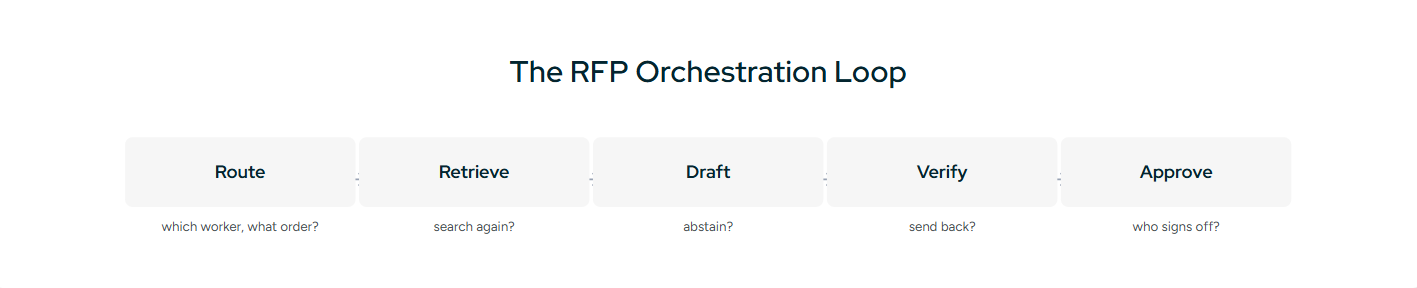
The backbone is orchestrator-workers. A lead component decomposes the RFP and dispatches self-contained jobs to specialized workers running in parallel where the work is independent, which most requirement drafting is. The verification step is evaluator-optimizer: the critic scores an answer, and anything below the bar goes back to the drafter with specific notes rather than a blanket "try again." Around both sits the thing that makes it an agent rather than a pipeline, a loop that keeps going until every requirement is either approved or parked with a human.
Resist the urge to make it more autonomous than the task needs. A fully open-ended agent that can do anything is harder to test, harder to trust, and harder to debug at 2 a.m. before a deadline. Give each worker a narrow job and a clear handoff, and let autonomy live in the loops that genuinely benefit from it, retrieval and verification, not in a single model improvising the whole bid.
Choosing Your Building Blocks
You have three decisions: the framework, the models, and the tools the agent can reach.
On frameworks, the field settled into a few honest choices. LangGraph fits when you want explicit state and resumable loops, which an RFP run needs, because you will want to inspect and restart the graph mid-bid. CrewAI is faster if you think in roles, an extractor, a drafter, a reviewer as named crew members. The OpenAI Agents SDK is lean for tightly scoped delegation, and LlamaIndex Workflows is built for document-centric, event-driven systems, which describes RFP work well. Pick for how much control you want over state, not for the logo.
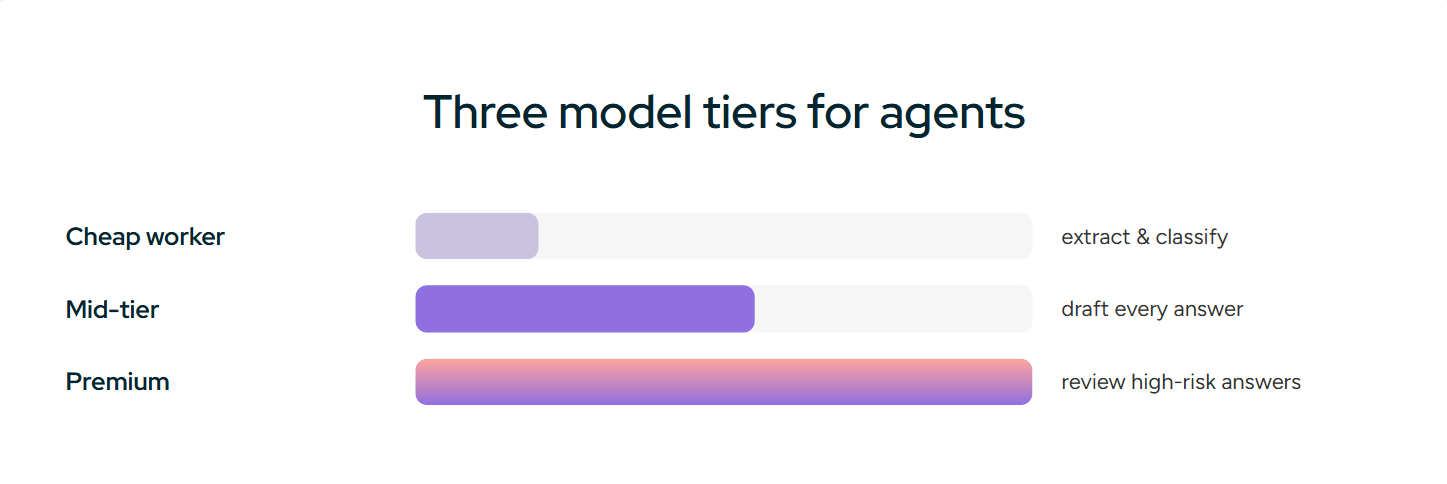
On models, use more than one. A cheap worker extracts requirements and classifies pages, a mid-tier model drafts, and a premium model reviews the high-risk answers. Designing this cascade from the start keeps the bill sane, because drafting a year of RFPs costs less in model fees than the engineers cost in a week. The expensive part was never the tokens.
On tools, the agent is only as useful as what it can reach. Connectors into where your approved content already lives, SharePoint, Google Drive, Salesforce, Confluence, let it retrieve from the source of truth instead of a second copy that goes stale the day you build it.
How to Build an AI RFP Agent with n8n (No-Code Path)
If nobody on the proposal team writes Python, n8n is the shortest route from the architecture above to something that answers a real RFP. It self-hosts, it ships LangChain-based AI nodes, and its AI Agent node can call a vector store as a tool, which is the one capability a chatbot lacks. What follows is the workflow we would build, node by node. Expect a working draft generator in a day and a trustworthy one in a few weeks, for the reasons in the last part of this section.
The shape of the whole thing:
Google Drive Trigger (new file in /RFP Intake)
  → Switch (PDF / DOCX / XLSX)
  → Extract from File
  → Code (strip headers, footers, page numbers)
  → Information Extractor (requirement register, JSON)
  → Split Out (one item per question)
  → Loop Over Items
      → AI Agent  [tool: Vector Store retriever, filtered by metadata]
      → Basic LLM Chain (verifier)
      → IF status == READY  →  collect
        ELSE                →  Slack DM to SME + Wait for approval
  → Merge
  → Google Docs (append Q&A + source notes)
  → Slack (summary to #bids)
Step 1: Intake. A Google Drive Trigger watching a folder called RFP Intake is enough to start. Webhook, Gmail Trigger, and Form Trigger all work if RFPs reach you a different way. Whichever you pick, normalize the payload immediately in a Set node: rfp_id, customer, deadline, response_format, reviewers. Every later node reads from these fields, so fixing them here saves you rewiring the flow when the next RFP arrives by email instead of Drive.
Step 2: Parse. Route by file type with a Switch node, then run Extract from File. For text PDFs and DOCX this is fine. For scanned PDFs it silently returns nothing, so add an OCR step (an HTTP Request to a document AI API is the usual move) or the extractor in step 3 will happily produce an empty register. A Code node afterwards strips repeated headers, footers, and page numbers, which otherwise leak into every question.
Step 3: Extract the requirement register. Use the Information Extractor node with a fixed JSON schema rather than asking a chat model for "a list of questions." The schema forces the fields the rest of the pipeline depends on:
{
  "question_id": "SEC-014",
  "section": "3.2 Security",
  "question": "Describe your incident response process, including notification timelines.",
  "mandatory": true,
  "max_length": 500,
  "format": "text",
  "source_location": "page 18",
  "evidence_needed": ["incident response policy", "breach notification SLA"]
}
Step 4: Build the knowledge base as a separate workflow. Do this once, not per RFP. A second n8n workflow watches your approved-content folders (Drive, SharePoint, or OneDrive), extracts text, runs it through a Recursive Character Text Splitter, generates embeddings, and inserts into a vector store. n8n supports PGVector, Qdrant, Pinecone, Supabase, Weaviate, and Redis. PGVector is the pragmatic choice if you already run Postgres.
The part most n8n RFP templates skip is metadata. Attach it at insert time:
{
  "document_type": "security_answer",
  "owner": "infosec",
  "approval_status": "approved",
  "approved_until": "2026-12-31",
  "product": "Platform X",
  "region": "US"
}
Then filter on it at query time: approval_status = approved AND approved_until >= today. Without the filter, last year's SOC 2 answer and this year's sit in the index with equal authority, and cosine similarity picks the winner. That is the governance problem from the architecture section, and n8n does nothing about it unless you do.
Step 5: Draft with the AI Agent node. Split Out turns the register into one item per question, Loop Over Items processes them in sequence (or in batches if you are comfortable with parallel model calls), and each item hits an AI Agent node with the vector store attached as a tool. The system prompt does the heavy lifting:
You are an RFP response drafter for {{company}}.
You receive one RFP question and can search approved company sources with the retriever tool.

Rules:
1. Answer only what is asked, within {{max_length}} words.
2. Every factual claim must come from a retrieved source. Cite it as [doc, page].
3. Never state a certification, customer name, SLA, integration, roadmap item, or price
   that does not appear in retrieved text.
4. If retrieval returns nothing relevant, search once more with narrower terms.
   If it is still thin, stop drafting and set status to NEEDS_REVIEW.
5. If two sources conflict, do not pick one. Set status to NEEDS_REVIEW and list both.

Return JSON only:
{"question_id": "...", "answer": "...", "status": "READY|NEEDS_REVIEW",
 "confidence": 0.0, "sources": [{"doc": "...", "page": "...", "quote": "..."}],
 "issues": []}
Turn on the node's structured output option so a malformed reply fails loudly instead of flowing downstream as text.
Step 6: Verify, then route. A second, cheaper LLM node reads the answer and its own citations and asks one question: does the quoted text support each sentence? It downgrades anything that fails. An IF node then sends READY answers to the collector and everything else to a Slack DM for the owner named in the metadata, followed by a Wait node that resumes when the reviewer replies. Mandatory questions and anything tagged legal or pricing route to a human regardless of confidence. Encode that as a rule in the IF, not as a hope in the prompt.
Step 7: Output. Google Docs is the natural review surface: one document per RFP, questions appended in order, a "Needs review" section, and a source-notes appendix so a reviewer can check a citation without opening the vector store. Slack gets the summary, not the answers:
RFP-2026-014 draft ready
Questions: 86 | Ready: 64 | Needs SME review: 17 | Blocked: 5
Doc: <link> | Deadline: 2026-05-30
Templates to start from. n8n's library has three worth importing before you build from scratch: "Generate RFP response documents with OpenAI Assistants, Google Docs, Gmail, and Slack" (webhook intake, question extraction, per-question drafting, Google Doc output), "Automate Your RFP Process with OpenAI Assistants," and "Generate RFP proposal drafts from Google Drive with Groq AI, Salesforce and Slack," which adds a Salesforce opportunity update. All three are orchestration skeletons. None ships with metadata filtering, a verifier pass, or approval state, so treat them as a starting layout and add steps 4 and 6 yourself. Read any imported workflow's credentials and HTTP nodes before you run it against real security content.
Where the n8n path breaks. Three places, predictably. First, a synchronous flow that fires 200 model calls inside one execution will time out or blow past memory on larger RFPs; move drafting to a sub-workflow and persist state in a Data Table or database so a run can resume. Second, writing answers back into the issuer's Excel template with merged cells intact is not something an n8n node does well, and you will end up in a Code node fighting cell ranges. Third, the knowledge base is only as current as your ingestion workflow, and nobody owns re-approving expired chunks. That last one is the governance line the architecture section warned about, and it is the reason most n8n RFP agents work beautifully for a quarter and then quietly start citing retired facts.
How to Build an AI RFP Agent with Claude Cowork Agents
The other fast path skips infrastructure entirely. Claude Cowork is Anthropic's desktop agent: you grant it access to specific folders, it reads and writes real files there (DOCX, XLSX, PDF), it can split a task across sub-agents, and it loads reusable skills when they apply. That maps onto the RFP architecture surprisingly well, because a proposal manager already thinks in folders, and the six workers become six prompts. There is no vector store to run. The tradeoff is that nothing happens unless a person opens the laptop and asks, so this is an assistant you drive, not a service that watches an inbox.
Set up the workspace first. Give Cowork one folder and nothing else. A layout that keeps evidence, drafts, and audit separate is what makes the review step possible later:
RFP-2026-014/
├── 00_input/            the RFP package and the issuer's response template
├── 01_source_library/   approved content only, nothing unvetted
├── 02_requirements/     the register the extractor produces
├── 03_evidence/         per-question evidence files from the researchers
├── 04_drafts/           customer-facing answers, one file per section
├── 05_review/           reviewer findings
├── 06_final/            the filled template
└── 07_audit/            citations and decisions
Add a one-page STYLE.md to the root with your voice rules, banned phrases, and the company's correct legal name. Every prompt below points to it.
Prompt 1: the extractor (do this before anything gets drafted).
Read every file in 00_input. Do not draft customer-facing answers yet.

Produce 02_requirements/register.xlsx with one row per question or requirement:
question_id, section, exact question text (verbatim), mandatory (yes/no based on
"shall", "must", "required"), max length, required format, source file and page,
and the evidence each answer will need.

Also produce 02_requirements/submission_rules.md: page limits, fonts, required
forms, delivery method, deadline, and Q&A cutoff.

Flag anything ambiguous or unreadable in 02_requirements/open_questions.md.
Guessing is not allowed. Show me the register before you continue.
Prompt 2: parallel research with sub-agents.
Using 02_requirements/register.xlsx, run research in parallel with one sub-agent
per domain: security and compliance, product capabilities, implementation and
support, references and case studies, commercial and contractual terms.

Each sub-agent may read only 01_source_library. For every question in its domain it
writes 03_evidence/<question_id>.md containing: the quoted passages that answer it,
the source filename and page or heading for each quote, a finding of Supported,
Partially supported, or Not found, and the gaps.

Sub-agents do not write answers. They collect evidence. When all are done, give me a
count of Not found items by domain.
Prompt 3: the drafter.
Draft answers for every question marked Supported or Partially supported, using
only the passages in 03_evidence. Follow STYLE.md.

Rules: respect the max length in the register; every factual sentence traces to a
quoted passage; no certification, customer name, SLA, integration, or roadmap item
appears unless it is quoted in evidence; Partially supported answers include a
bracketed [SME: what is missing] note; Not found questions get a one-line
placeholder reading NEEDS_REVIEW and nothing else.

Save customer-facing text to 04_drafts/<section>.docx and the citation map to
07_audit/citations.csv (question_id, sentence, source, page).
Prompt 4: the reviewer, as a separate agent.
Act as a skeptical proposal reviewer who has never seen the drafts. Read 04_drafts
against 03_evidence and 02_requirements. Report in 05_review/findings.md:

1. Sentences whose cited passage does not actually support them.
2. Answers that contradict each other or contradict STYLE.md.
3. Mandatory questions with no answer or a NEEDS_REVIEW placeholder.
4. Accidental commitments: uptime figures, delivery dates, discounts, indemnities.
5. Answers over their length limit.
6. Certifications or dates in the evidence that expire before the contract start.

Do not fix anything. Cite question_id and the exact sentence for each finding.
Prompt 5: the final editor. Only after a human has cleared the findings file:
Apply the issuer's template in 00_input to the approved drafts. Preserve every table,
numbering scheme, and form field exactly. Save 06_final/response.docx and a PDF copy.
Then produce 07_audit/decision_log.md listing every NEEDS_REVIEW item and who
resolved it. Stop before anything is sent anywhere.
Run those five in order and you have the orchestrator-workers pattern with a human in the loop between every stage. The sub-agents give you parallel research. The separate reviewer gives you evaluator-optimizer. The folder permissions give you least privilege without configuring anything.
Turn the prompts into a skill. Cowork loads skills, small folders with a SKILL.md describing when they apply and what to do, only when a task matches. Once the five prompts above work for one RFP, save them as an rfp-response skill: the folder layout, the register schema, the five prompts, and the STYLE.md rules. The next RFP then starts with "Set up and run the rfp-response skill on the package in 00_input" instead of five pastes. Keep the skill narrow. A skill that tries to also handle security questionnaires and proposal decks stops firing reliably.
Use Claude to write the prompts. You do not have to write any of the above from scratch, and you probably should not. Anthropic documents a prompt generator and prompt improver in the Claude Console for exactly this, and the same technique works inside a normal chat: describe the job, the inputs, the failure modes you fear, and ask for the prompt plus the tests. The meta-prompt we use:
You are designing a system prompt for an AI agent that drafts RFP answers for human
review. It receives one question, its length limit, and retrieved evidence passages.

Hard requirements: never invent features, certifications, customers, dates, SLAs, or
legal terms; cite filename and page for every claim; return NEEDS_REVIEW when evidence
is missing, expired, or contradictory; obey the length limit; output JSON with answer,
status, confidence, sources, and review_owner.

Produce: (1) the system prompt, written as observable rules rather than adjectives
like "be accurate"; (2) the output schema; (3) five few-shot examples including two
NEEDS_REVIEW cases; (4) ten adversarial test questions designed to make the agent
overclaim; (5) a scoring rubric a reviewer could apply in under a minute.
Then run the adversarial tests, and feed the failures back:
Improve this system prompt. Observed failures: it answered from general knowledge when
no evidence was returned; it dropped page numbers on long answers; it promised a
feature that appears in a roadmap slide, not a product doc; it ignored a 300-word
limit twice. Rewrite so each failure becomes a testable rule. Keep the JSON schema
unchanged. Return the revised prompt, a change log, and a regression test for each
failure.
The principle worth remembering: ask for the schema, the adversarial tests, and the rubric along with the prompt. A prompt on its own is a guess. A prompt with tests is something you can improve on Tuesday when it fails on a real RFP.
Keeping the bill down. Use a smaller model for extraction and evidence collection and reserve the strongest model for drafting and review. Run the reviewer once per section rather than once per question. Cache the source library summaries in a 01_source_library/INDEX.md so researchers read one file before opening fifty. Most of the spend in a Cowork build goes to re-reading the same documents, and an index fixes that.
Where the Cowork path breaks. It has no live connection to SharePoint or Salesforce, so 01_source_library is a copy that ages from the day you export it. It does not watch for new RFPs. It runs on one person's machine with one person's permissions, which is fine for a proposal manager and a problem for a bid team of eight. And nothing in it re-approves expired content; the reviewer catches stale certifications only if the expiry date is in the evidence. Those are the same four walls the n8n build hits, reached from the other side.
Which path, then. n8n if RFPs arrive by email or portal and you want something running unattended, and you have an admin willing to own a vector store. Cowork if one proposal manager handles the queue, wants control at every stage, and would rather spend a day writing prompts than a week configuring nodes. Both get you a credible internal tool. Neither gets you governance, live connectors, or template export, which is where the next section picks up.
How to Build an AI RFP Agent with Microsoft Copilot Studio
Most mid-market and enterprise vendors already keep their approved content in SharePoint and their pipeline in Dynamics or Salesforce, and their RFPs arrive in Outlook. If that describes you, Copilot Studio is the build with the least new plumbing, because the knowledge, the identity, and the inbox are already in the tenant. Microsoft even ships a "Respond to an RFP" agent scenario in its adoption library, which is a reasonable skeleton to start from rather than a finished tool.
The shape:
Power Automate: new email with attachment in rfp@ mailbox
  → save attachment to SharePoint /RFP Intake, create Dataverse row (rfp_id, customer, deadline)
  → call Copilot Studio agent: extract requirements → rows in Dataverse table Requirements
  → per requirement: generative answers grounded ONLY on /Approved Content library
  → Approvals action → SME in Teams for anything flagged
  → Word template (Populate a Word template) → save draft to SharePoint → Teams post
Step 1: Fence the knowledge. Add one SharePoint library, the approved-content library, as the agent's knowledge source. Not the whole site. Then turn off the setting that allows ungrounded responses, so the model cannot fall back on general knowledge when the library has nothing. That single toggle is the difference between an RFP agent and a confident liar, and it is easy to miss during setup. SharePoint knowledge respects the user's Entra permissions, so a reviewer only ever sees answers built from content they could already open.
Step 2: Intake by flow. A Power Automate flow triggered on a new email to a shared mailbox saves the attachment, creates a Dataverse row with the deal metadata, and kicks off the agent. Keep the flow asynchronous. A flow the agent calls synchronously has to return inside 100 seconds, and a 200-question RFP will not.
Step 3: Extract into Dataverse, not into chat. Ask the agent to produce the requirement register as structured rows (id, verbatim text, mandatory, limit, page) and write them to a Dataverse table. That table becomes the state the architecture section asked for: every question has a status a human can filter on in a model-driven app or a simple Power App.
Step 4: Draft with citations, route on rules. A second topic loops the Requirements table, drafts each answer from the fenced library with the citation the generative answers node returns, and writes the draft plus its source back to the row. Anything without a citation, anything mandatory, and anything tagged pricing or legal goes through an Approvals action to a named person in Teams. The rule lives in the flow, where it is visible, not in the prompt, where it is a suggestion.
Step 5: Output. The Word connector's "Populate a Word template" fills a response template you built once with content controls. It handles narrative sections well and issuer Excel grids badly, which is the same wall every path hits.
Where it breaks. The agent is limited to 500 knowledge sources, generous for most teams but tight if someone points it at fifty libraries. Generative answers over SharePoint use Microsoft Graph search rather than a vector index you control, so retrieval quality follows how well the library is titled and tagged; a folder named "Final_v3_Copy" gets found poorly. Governance is still yours: nothing expires a SharePoint document, so the approved library needs an owner and a review cadence, or it becomes the archive the architecture section warned about.
How to Build an AI RFP Agent with OpenAI (Custom GPT to Agent Builder)
The OpenAI route has two rungs, and most teams should climb them in order. The first is a custom GPT with your approved content attached. It takes an afternoon and tells you within a week whether your content library is good enough to answer real questions. The second is Agent Builder, the visual canvas that ties models, file search, guardrails, and tools into a multi-step workflow you can export as Agents SDK code when you outgrow the canvas.
Rung one: the custom GPT. Upload up to 20 files of approved content (merge small documents into themed PDFs to stay under the cap: security, product, implementation, legal boilerplate). Paste instructions that do three things: answer only from the attached files, cite the file name for each claim, and reply "Not in approved sources" when the files do not cover the question. Then feed it last quarter's RFP one question at a time and count the misses. The misses are your content gaps, and finding them here is cheaper than finding them in production. What a custom GPT cannot do is read a whole RFP package, keep state across 200 questions, or refuse to guess reliably. It is a probe, and a good one.
Rung two: Agent Builder. Lay the six workers out as nodes on the canvas:
Start (RFP file upload)
  → Agent: Extractor  (structured output: requirement register)
  → Loop over requirements
      → Agent: Drafter  [tool: File Search over vector store "approved-content"]
      → Guardrail node: reject if no citation or if output names a certification
                        absent from retrieved text
      → Agent: Reviewer (cheaper model, checks sentence vs. quoted source)
      → If status != READY → human approval (Approval node)
  → Agent: Assembler → Word document via tool
Three settings matter more than the rest. Turn on structured outputs for every agent node so a malformed reply stops the run. Put the approved content in a vector store with metadata attributes (approval status, expiry, product) and filter on them in the File Search tool, exactly as in the n8n build. And give the Drafter and the Reviewer different models; a reviewer that shares the drafter's blind spots agrees with it.
The drafter prompt is the same one from the n8n section, and the meta-prompt in the Cowork section will write it for you. Prompts port across every path in this guide; the wiring does not.
Where it breaks. File Search is a managed service, so the chunking and ranking are not yours to tune when retrieval comes back thin on tabular content. Custom GPT knowledge is not an authorization system; anyone who can open the GPT can query everything in it, so keep customer-specific material out. And Agent Builder is young enough that the export-to-code step is where you should expect to land within a year, which means the Python section below is not optional reading if you start here.
How to Build an AI RFP Agent in Python with LangGraph or CrewAI
When the low-code paths run out of room, and on a real RFP queue they do, the code path is where the architecture from the top of this guide becomes literal. Every worker is a function. State is a typed object. You choose the parser, the chunker, the vector store, the models, and the retry policy, and you own all of it afterwards.
LangGraph, if you want state you can inspect. LangGraph's orchestrator-workers tutorial is nearly a diagram of the RFP agent. The orchestrator node reads the register and fans out one worker per requirement with the Send API; each worker retrieves, drafts, and returns a typed Answer; an aggregator collects them; a reviewer node scores each one and routes low scorers back through the drafter with notes. The pieces that make it worth the extra code:
class RFPState(TypedDict):
    requirements: list[Requirement]        # from the intake worker
    answers: Annotated[list[Answer], add]  # workers append here
    review: dict[str, Verdict]             # reviewer writes here
    blocked: list[str]                     # question_ids parked for a human

# Orchestrator fans out one worker per requirement
def orchestrate(state):
    return [Send("draft_worker", {"req": r}) for r in state["requirements"]]

# Human-in-the-loop: pause the graph, resume after approval
graph.add_node("sme_gate", interrupt_before=True)
Checkpointing is the feature the RFP use case actually needs. A run that dies at question 140 of 200 resumes at 141, and a reviewer can approve blocked answers hours later and let the graph continue from the pause. No other path in this guide gives you that for free.
CrewAI, if you think in roles. Define four agents with a role, a goal, and a backstory each: Extractor, Researcher (with a retrieval tool over the approved store), Writer, and Reviewer. Give them tasks and run the crew sequentially for a predictable pipeline, or hierarchically so a manager agent delegates and re-delegates. CrewAI gets a working prototype faster than LangGraph and gives you less control over what happens when the Reviewer rejects an answer the third time. Start here if the team is new to agents; migrate to a graph when you need resumability.
The parts that are yours either way. Parse with a layout-aware library (tables are where PDF text extractors fail). Chunk approved content with metadata and filter on approval status before similarity. Combine BM25 for exact identifiers with dense retrieval for meaning, then rerank. Validate deterministically wherever you can: a regex for certification names against an allowlist, a date check against expiry, a word count against the limit. Models are bad at counting and good at prose; split the jobs. Then build the golden set from the evaluation section and run it in CI on every prompt change.
Where it breaks. Parallel workers produce inconsistent answers to related questions (two different uptime figures, two product names) unless the aggregator normalizes against a shared fact table. The frameworks do nothing about permissions, tenancy, or observability; you add each. And this is the path with the maintenance line: a model retirement, a parser update, or a chunking change means a full golden-set run, which is the point of having one.
Lighter Paths Worth Knowing: Google, Zapier, and Make
Not every team needs a system. Three lighter options cover specific situations.
Google Gems and NotebookLM. A Gem is a saved Gemini persona with instructions and Drive files attached; it does for a Google Workspace shop what a custom GPT does for everyone else, and it hits the same ceiling. NotebookLM is the more interesting tool for RFP work, because it answers only from the sources in the notebook and cites them inline. Load the RFP package plus your approved content into one notebook and it becomes an excellent requirement-reading and gap-finding assistant: which of these 90 questions do we have evidence for, and which do we not? It will not run a loop, keep state, or fill a template. For production on Google Cloud, the RAG Engine and Agent Development Kit in the Gemini Enterprise Agent Platform are the equivalent of the Python section above with Drive connectors built in.
Zapier Agents and Make AI Agents. Both excel at the intake edge: watch a mailbox or form, save the attachment, create the CRM record, notify the bid channel, open a review task. Both can attach knowledge files and draft, but the limits show quickly. Zapier caps agents at 500 messages a day; Make caps knowledge at 20 files of 20 MB and documents that agents can loop, so cap the steps. Use them to feed one of the heavier builds rather than as the build itself, and put a human approval step before anything leaves the tenant.
Vendor templates (Stack AI and similar). Several visual agent platforms publish RFP drafter templates. They are honest orchestration skeletons: upload, extract, retrieve, draft, output. None ships with governance, and the limits change by plan, so test on last quarter's RFP before committing.
Limitations of building AI RFP Agents
A weekend prototype answers clean questions from clean PDFs. Then reality arrives.
Governance is the actual product. No model knows which of two similar documents is the approved one. Last year's data-residency answer and this year's sit in the index with equal authority, and semantic similarity, not correctness, decides which one your prospect reads. You have to build the metadata model: every source gets an owner, an approval status, an effective date, an expiry date, and product and region tags, and the retrieval worker filters on them. Skip this and your agent will cite deprecated facts with total confidence.
Memory is not the same as governance. An agent that remembers what it approved on the last three security questionnaires answers the fourth faster and more consistently, but memory that never expires is just another way to serve a stale answer with conviction. Treat the answer library as a governed store, not a scratchpad the agent writes to freely.
Evaluation has to test the path, not just the answer. Because an agent takes multiple steps, a right answer reached by a lucky retrieval is not a system you can trust. Build a golden set of 100 to 500 real questions with verified answers and the documents that should have been retrieved, then measure retrieval recall, citation coverage, the unsupported-answer rate, and the trajectory, whether the agent took a sane path to get there. Run it after every change to prompts, chunking, models, or tools. Teams that skip this make decisions on demo vibes and reverse them in production.
Export is a product of its own. Writing 200 answers back into the issuer's rigid Excel template without breaking merged cells, dropdowns, or validation is document automation, and it has nothing to do with AI. It is also where a lot of the time you saved on drafting quietly comes back.
Model churn is scheduled, not surprising. Models retire on a cadence now. Every migration means re-running your full evaluation set and sometimes rewriting prompts and parsers. Pin your versions, keep the golden set current, and budget for one migration a year as a normal project rather than a fire.
Build or Buy
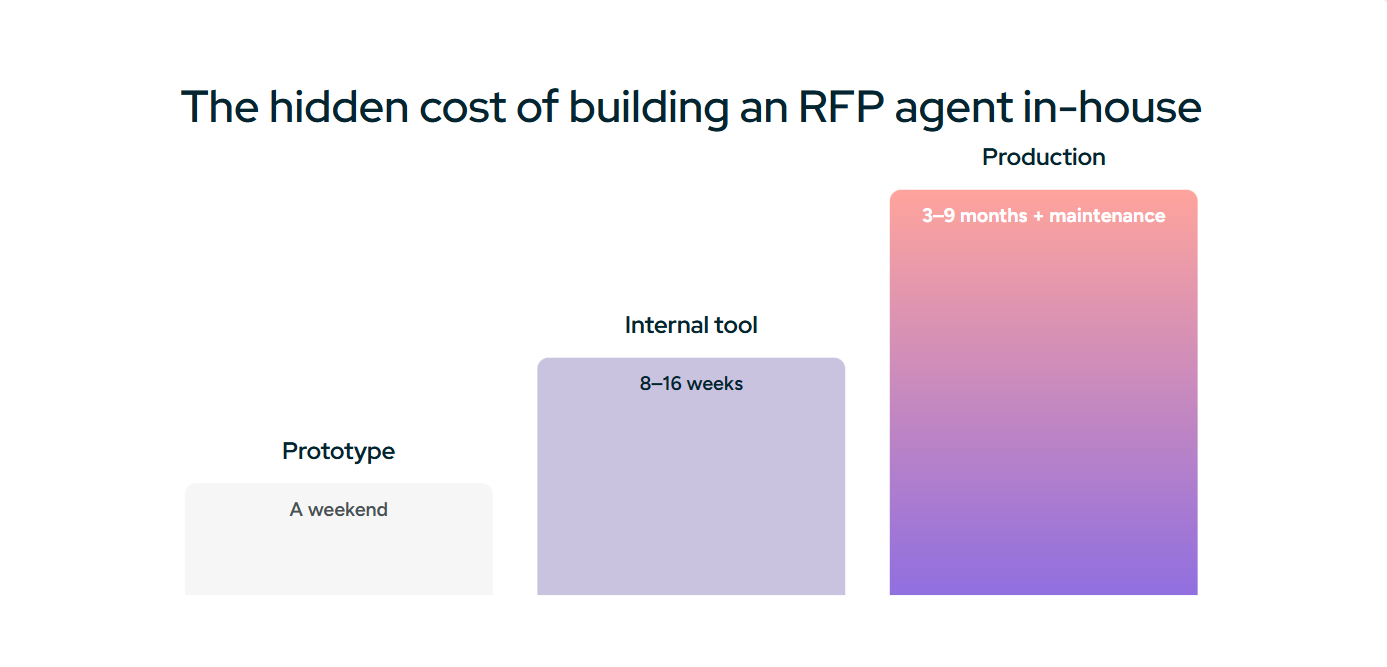
Build the prototype whenever you want; it is a good way to learn where the walls are. Build the internal tool if one proposal manager owns the process, reviews everything, and the drafting savings alone justify it. Think hard before the production system, the one with connectors, governance, approvals, evaluation, and formatted export, because that is three to nine months and a permanent maintenance line, and none of it is your company's product unless RFP software is. The old rule holds: build where you differentiate, buy where you operate.
How Inventive AI Handles It
Inventive AI is an agentic RFP platform that runs this architecture so your engineers do not have to rebuild it. Upload the full RFP in PDF, Word, Excel, or PowerPoint. Agents extract every requirement, retrieve the right evidence per question from a Knowledge Hub that syncs live with SharePoint, Google Drive, Salesforce, Confluence, and Notion, and draft each answer with citations and a confidence score. A Content Governance Agent flags conflicting, outdated, and duplicate sources before they reach an answer. When the evidence is not there, you get "Information unavailable," not a guess. Your team reviews and approves in one shared workspace, with assignments, reviewer routing, and an audit trail, and exports back into the issuer's original template in one pass.
The results are measured, not promised. RAD AI found Inventive AI's answers 2x more accurate than other RFP AI tools. Insider cut response time by 90% and moved its win rate from 30% to 50%. AssetWorks Facilities reported a 422% ROI with $105K in net savings.
If you have sketched the architecture above and the governance and export sections gave you pause, book a 20-minute demo and bring the RFP that broke your prototype.


.jpg)
