
RFQ Management Software: A Complete Guide
.png)
A buyer sends an RFQ to twelve suppliers and spends two weeks chasing replies in four different formats. A supplier receives that same RFQ, along with thirty others that month, and spends hours combing through old quotes and spec sheets just to answer it accurately.
Both sides eventually go looking for the same three words: RFQ management software.
What they find, though, are two very different categories of tool. Choosing the wrong one can mean evaluating software that was never designed for your workflow in the first place.
This guide covers what RFQ management software actually is, the two distinct types on the market, the features that matter for each, how to choose between them, and where AI has changed what's realistic to automate.
Key Takeaways
- RFQ management software falls into two categories: buyer-side software for procurement teams issuing RFQs and respondent-side software for suppliers and sales teams answering them.
- Buyer-side tools focus on supplier management, quote collection, comparison, and sourcing workflows.
- Respondent-side tools focus on finding information, drafting accurate responses, collaborating with subject matter experts, and submitting on time.
- The simplest way to choose the right category is to ask: Are you sending RFQs out, or are you the one answering them?
- AI is increasingly being used to extract requirements, retrieve relevant information, draft responses, and flag missing or conflicting content.
- The right software depends less on the number of features and more on where your current RFQ process creates the most manual work.
What Is RFQ Management Software?
RFQ management software is software that helps businesses create, send, receive, manage, compare, or respond to requests for quotation. It replaces some of the email, spreadsheet, document, and manual follow-up involved in an RFQ workflow.
But "managing an RFQ" means something different depending on which side you're on.
If you're issuing RFQs, you're trying to find suppliers, collect comparable bids, evaluate them, and select the right offer.
If you're receiving RFQs, you're trying to understand the customer's requirements, find accurate information, build a competitive response, and get it submitted before the deadline.
The software built for each job looks very different, even though both categories are commonly described as RFQ software.
If you need a refresher on the terminology first, see this guide to RFI vs. RFQ vs. RFP.
The Two Types of RFQ Software: Buyer-Side vs. Respondent-Side
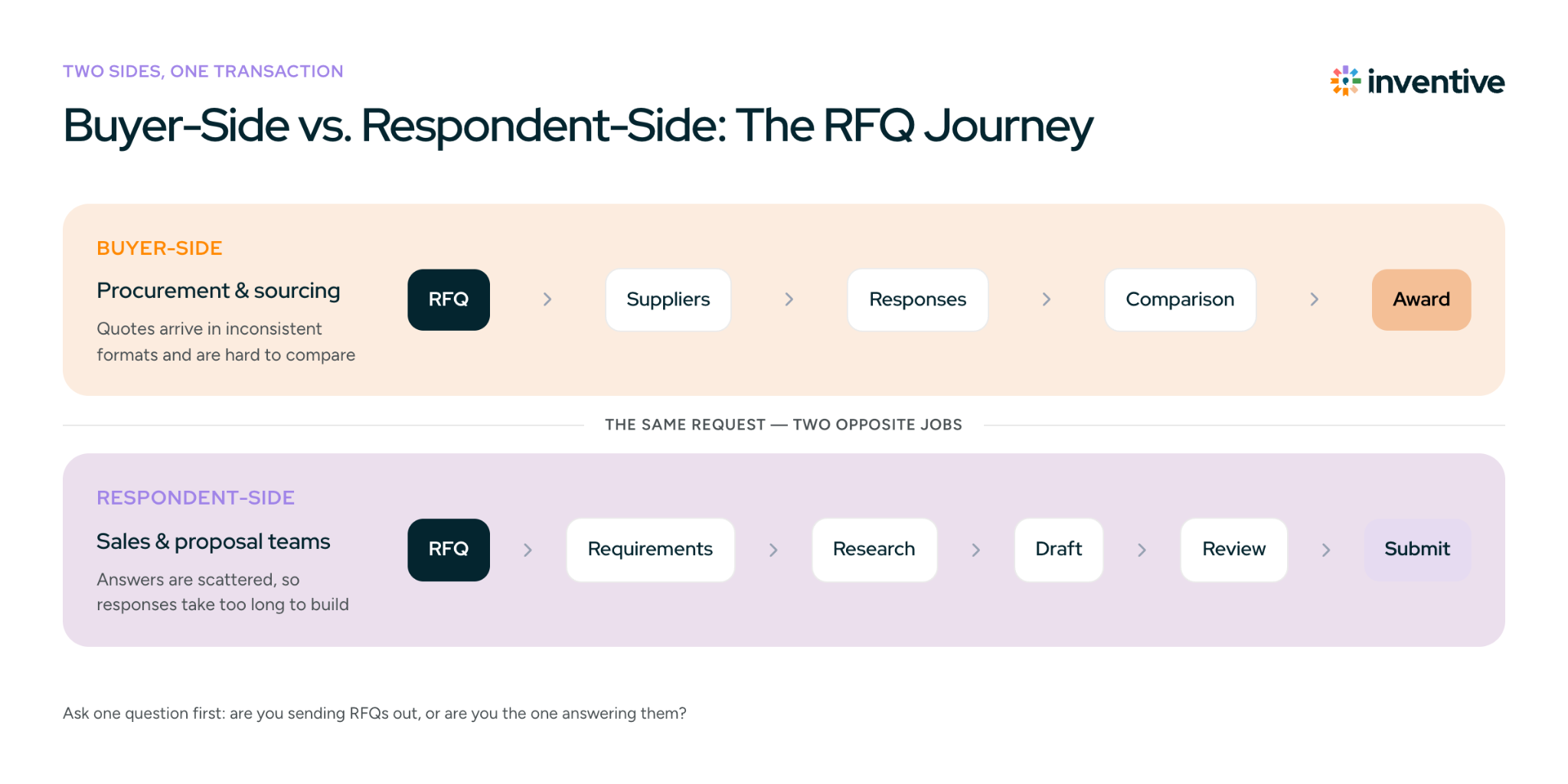
| Buyer-side RFQ software | Respondent-side RFQ software | |
|---|---|---|
| Who uses it | Procurement, sourcing, and purchasing teams | Suppliers, vendors, sales, and proposal teams |
| What it does | Issues RFQs, collects supplier responses, and compares quotes | Helps teams understand incoming RFQs and build responses |
| Core problem | Supplier quotes arrive in inconsistent formats and are difficult to compare | Responses take too long to research, draft, review, and format |
| Typical workflow | RFQ → suppliers → responses → comparison → award | RFQ → requirements → research → response → review → submission |
| Typical integrations | ERP, procurement, accounting, supplier systems | CRM, content repositories, document management systems |
| Example tools | SAP Ariba, Coupa, Ivalua, Zycus, Procol, Tropic, QuoteWerks | Inventive AI, Responsive, Arphie |
Buyer-side RFQ software
Buyer-side software is built around sourcing and supplier evaluation. The buyer creates the request, sends it to suppliers, collects bids, and compares commercial terms before making a purchasing decision.
Respondent-side RFQ software
Respondent-side software is built around response production. The supplier or sales team receives the request, works out what the customer is asking for, finds the relevant information, and turns it into a complete response.
A procurement team searching for software to compare supplier bids needs something very different from a sales team trying to answer 30 incoming RFQs a month.
What Does Buyer-Side RFQ Software Do?
Buyer-side RFQ software helps procurement, sourcing, and purchasing teams create RFQs, distribute them to suppliers, collect responses, compare quotes, and manage supplier selection.
The main challenge is consistency.
A procurement team may receive one supplier quote as an Excel file, another as a PDF, and a third through email. Prices may use different currencies or units. Delivery terms, shipping charges, discounts, and taxes may also be presented differently.
Before the team can make a decision, someone has to turn those responses into information that can actually be compared.
RFQ software puts that process into a structured workflow.
Core features
- Supplier management: Maintain supplier profiles, qualifications, certifications, compliance information, and performance history.
- RFQ templates: Create reusable requests with standardized specifications, line items, attachments, and custom fields.
- Supplier response portal: Give suppliers a central place to receive requests, submit quotes, and track deadlines.
- Quote comparison and normalization: Standardize currencies, units, quantities, shipping costs, discounts, and delivery terms for comparison.
- Reverse auctions: Run competitive bidding when suppliers need to adjust pricing in real time.
- Approval workflows: Route supplier selections to the right stakeholders for review and approval.
- PO conversion: Convert an approved quote into a purchase order without manually re-entering the same information.
- Reporting and audit trails: Track supplier participation, responses, approvals, awards, and sourcing performance.
Buyer-Side RFQ Software in Practice
Consider a manufacturer sourcing raw materials from eight suppliers.
The procurement team sends the same requirements to all eight, but the responses come back differently. One supplier quotes per unit, another quotes by weight, and a third includes shipping separately. Some suppliers respond on time while others need reminders.
With RFQ software, the team can send a standardized request, collect responses through a central workflow, normalize relevant pricing and commercial terms, and compare bids before routing the decision for approval.
The software can also connect the selected quote to the next step in the purchasing process, such as creating a purchase order.
Buyer-side RFQ software can range from focused quote-comparison tools to broader e-sourcing and procurement platforms that also cover supplier management, contracts, purchasing, and spend management.
For smaller teams that aren't ready for dedicated software, a standardized RFQ template can still provide a consistent starting point for collecting supplier quotes.
What Does Respondent-Side RFQ Software Do?
Respondent-side RFQ software helps suppliers, vendors, and sales or proposal teams prepare responses to incoming RFQs faster while keeping the information accurate and consistent.
The problem here is less about comparing bids and more about finding the information needed to answer the request.
A complex RFQ may contain hundreds of requirements across Word documents, Excel spreadsheets, PDFs, product specifications, and customer instructions. The answers may be scattered across a CRM, shared drives, product documentation, previous proposals, and information held by subject matter experts.
That makes response preparation a research and coordination problem as much as a writing problem.
Key capabilities
- Centralized content: Pull product information, pricing, certifications, past responses, and approved company content from connected sources.
- AI-assisted drafting: Generate draft answers using relevant company information and deal-specific context.
- Source verification: Show where an answer came from so reviewers can validate it before submission.
- Content governance: Flag outdated, conflicting, or unavailable information instead of relying on potentially incorrect answers.
- Collaboration: Assign questions to sales, product, legal, security, or other subject matter experts and track their progress.
- Version control: Keep the latest response and supporting content organized throughout the review process.
- Format-preserving export: Return completed responses in the buyer's required Word, Excel, PDF, or other format.
- Response analytics: Track turnaround time, response volume, bottlenecks, and outcomes.
For teams handling complex RFQs, these capabilities can reduce the manual work involved in responding to an RFQ. Instead of searching across multiple sources and rebuilding every answer manually, teams can spend more time reviewing the response and tailoring it to the opportunity.
The time involved can add up quickly. Inventive's RFQ and RFP response benchmarks put average manual response effort at around 24 hours across contributors, although actual effort varies based on the complexity of the request and the number of people involved.
.png)
Key Features to Look for in RFQ Software
The right feature set depends on which side of the RFQ you're on.
For Procurement and Sourcing Teams
Look for software that can handle:
- Supplier management: Profiles, qualifications, certifications, compliance, and supplier history
- RFQ templates: Reusable specifications, line items, attachments, and custom fields
- Quote comparison: Side-by-side comparison of pricing, quantities, currencies, shipping, discounts, and delivery terms
- Workflow automation: Reminders, deadlines, approvals, and supplier follow-ups
- Purchase order conversion: Moving an approved quote into the purchasing workflow
- Reporting and audit trails: RFQ status, supplier participation, approvals, awards, and sourcing metrics
- Reverse auctions: If competitive bidding is part of your sourcing process
For Sales and Proposal Teams
Look for:
- Centralized content retrieval: Product information, pricing, certifications, previous responses, and approved content
- AI-assisted drafting: Responses generated from relevant company and deal information
- Source citations: Visibility into the documents or content behind an answer
- Content governance: Identification of outdated, conflicting, or missing information
- Collaboration: Assignment and review workflows for subject matter experts
- CRM and content integrations: Connections to systems such as Salesforce, HubSpot, SharePoint, Google Drive, Confluence, or Notion
- Format-preserving export: Output in the customer's required Word, Excel, PDF, or other format
- Response analytics: Turnaround time, response volume, bottlenecks, win rates, and loss reasons
The point isn't to find the RFQ platform with the longest feature list. It's to find one that removes work your team currently has to do manually.
Is RFQ Software Worth It, or Is a Spreadsheet Enough?
Not every business needs dedicated RFQ software. For a small number of straightforward RFQs, a spreadsheet, shared template, and email may be enough. The calculation changes when RFQs become frequent, complex, or dependent on several people.
A spreadsheet may be enough if:
- You handle only a few RFQs each quarter
- RFQs involve a small number of suppliers
- Quotes are simple to compare
- One or two people manage the process
- Manual tracking and follow-ups are easy to maintain
RFQ management software may be a better fit if:
- You manage multiple RFQs every month
- Supplier quotes require currency, unit, quantity, or delivery-term comparisons
- Multiple teams need to review or approve RFQs
- Manual data entry and follow-ups take significant time
- RFQ status is difficult to track
- You need supplier, sourcing, or response analytics
- RFQs need to connect with ERP, accounting, CRM, or procurement systems
- Your sales team repeatedly searches through old documents to answer incoming RFQs
How do you know if you need RFQ software?
Consider four things: RFQ volume, complexity, team size, and manual workload.
If your current process is easy to manage and doesn't cause delays or errors, there's little reason to replace it.
If RFQs require extensive coordination, involve multiple stakeholders, or consume hours of repetitive work, dedicated software becomes easier to justify.
There is no universal RFQ volume at which software becomes necessary. The right choice depends on the complexity of your process and what that process currently costs your team in time and errors.
How to Choose RFQ Management Software
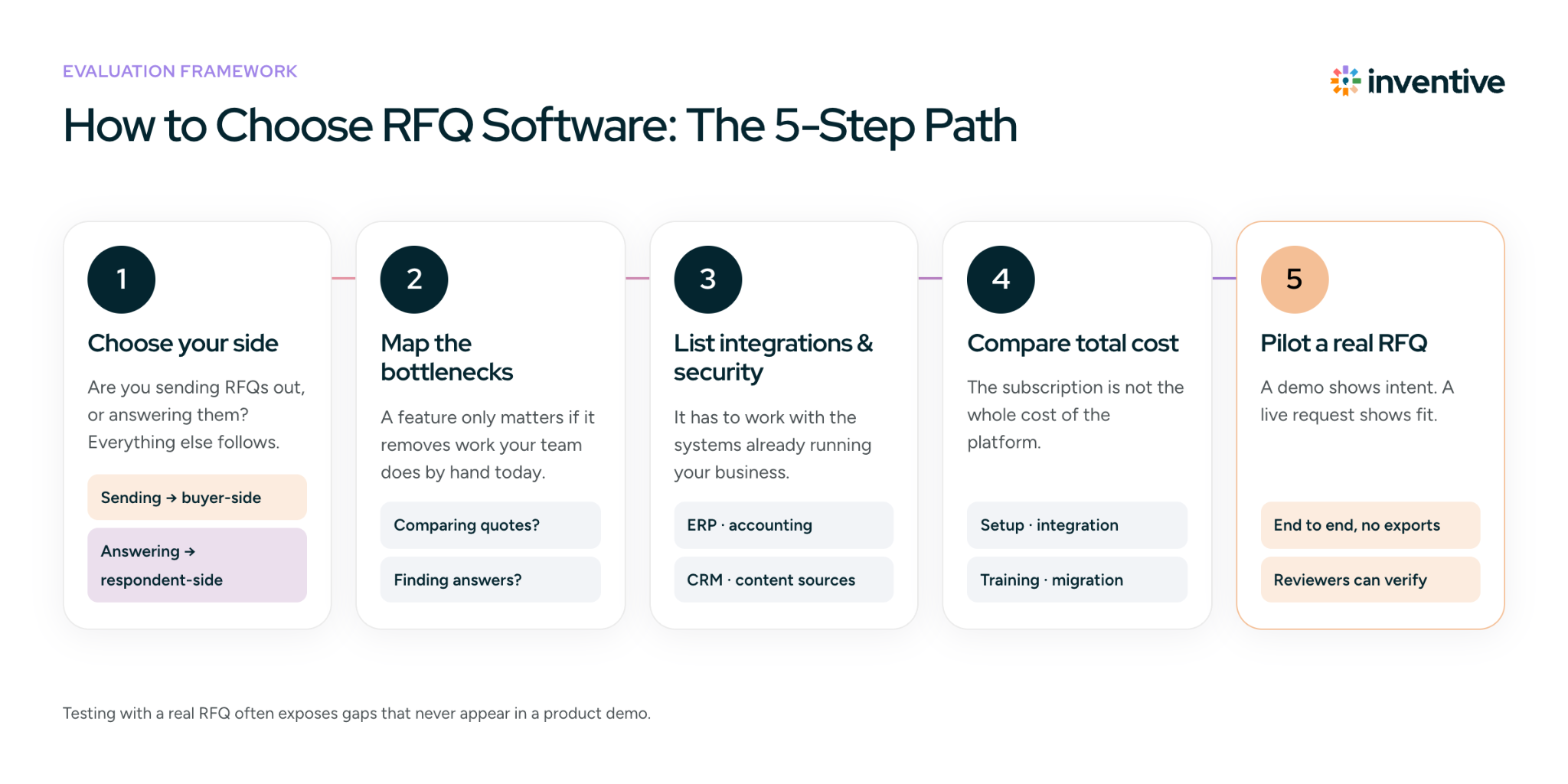
The right RFQ software depends on what you're buying or selling, how often you run or respond to RFQs, and how much of the surrounding workflow you want the software to handle.
Use these five criteria to narrow your options.
1. Start With Your Use Case and Spend Type
First, define what role RFQs play in your business.
Product-based businesses may need software that makes it easy to send requests to multiple suppliers, compare price and lead time, and collect responses.
Mid-market and enterprise procurement teams may need a broader platform if RFQs sit alongside purchase orders, supplier management, contracts, or spend tracking.
Logistics and freight teams may need purpose-built freight RFQ software if carrier rates, transport tenders, and rapid rate comparison are the main requirements.
On the respondent side, the requirements change. A supplier responding to complex technical RFQs may care more about document retrieval, product information, compliance content, and response collaboration than supplier portals or bid comparison.
The key question is: Do you need software focused specifically on RFQs, or a broader platform that includes RFQ management as part of a larger workflow?
2. Look for Features That Solve Your Actual Bottlenecks
Don't choose software because it has the longest feature list.
Start with where your process slows down.
For buyers, that might be:
- Comparing supplier quotes
- Chasing responses
- Normalizing different pricing structures
- Managing approvals
- Moving awarded quotes into purchasing
For respondents, it might be:
- Finding information
- Reusing previous answers
- Coordinating subject matter experts
- Checking whether information is current
- Formatting the final response
A feature matters if it removes one of those bottlenecks.
3. Check Integrations, Security, and Scalability
Your RFQ platform needs to work with the systems already running your business.
For procurement teams, check integrations with ERP, accounting, supplier, and purchasing systems.
For sales and proposal teams, look at CRM and content integrations. These can allow teams to use existing customer and company information instead of creating another isolated content repository.
Also check:
- Role-based access and permissions
- Data security
- Audit capabilities
- Number of users and suppliers supported
- RFQ or response volume limits
- Ability to add workflows or fields as requirements change
A tool that requires teams to repeatedly export, copy, and re-enter data can create another silo rather than fixing the original problem.
4. Compare Implementation and Total Cost
The subscription price isn't the whole cost of an RFQ platform.
Ask about:
- Implementation and setup fees
- Integration costs
- User or transaction limits
- Supplier onboarding
- Training
- Ongoing support
- Data migration
- Contract terms
Also consider how much process change the software requires. A cheaper tool that takes months to implement may be harder to justify than a focused platform that your team can start using quickly.
5. Test It With a Real RFQ
A demo shows what the software is designed to do. A real RFQ shows whether it works for your process.
Run a representative request through the platform and look at:
- How quickly can you create or process the RFQ?
- Can suppliers or internal contributors use it without unnecessary friction?
- Are quotes normalized correctly?
- Can your team compare responses without additional spreadsheet work?
- Can reviewers verify the information used in a response?
- Do approvals reach the right people?
- Does the data connect to your existing systems?
- Can you track the RFQ from request to completion?
Testing with a real RFQ often exposes gaps that aren't obvious during a product demo.
RFQ Software by Category: What to Expect at Different Price Points
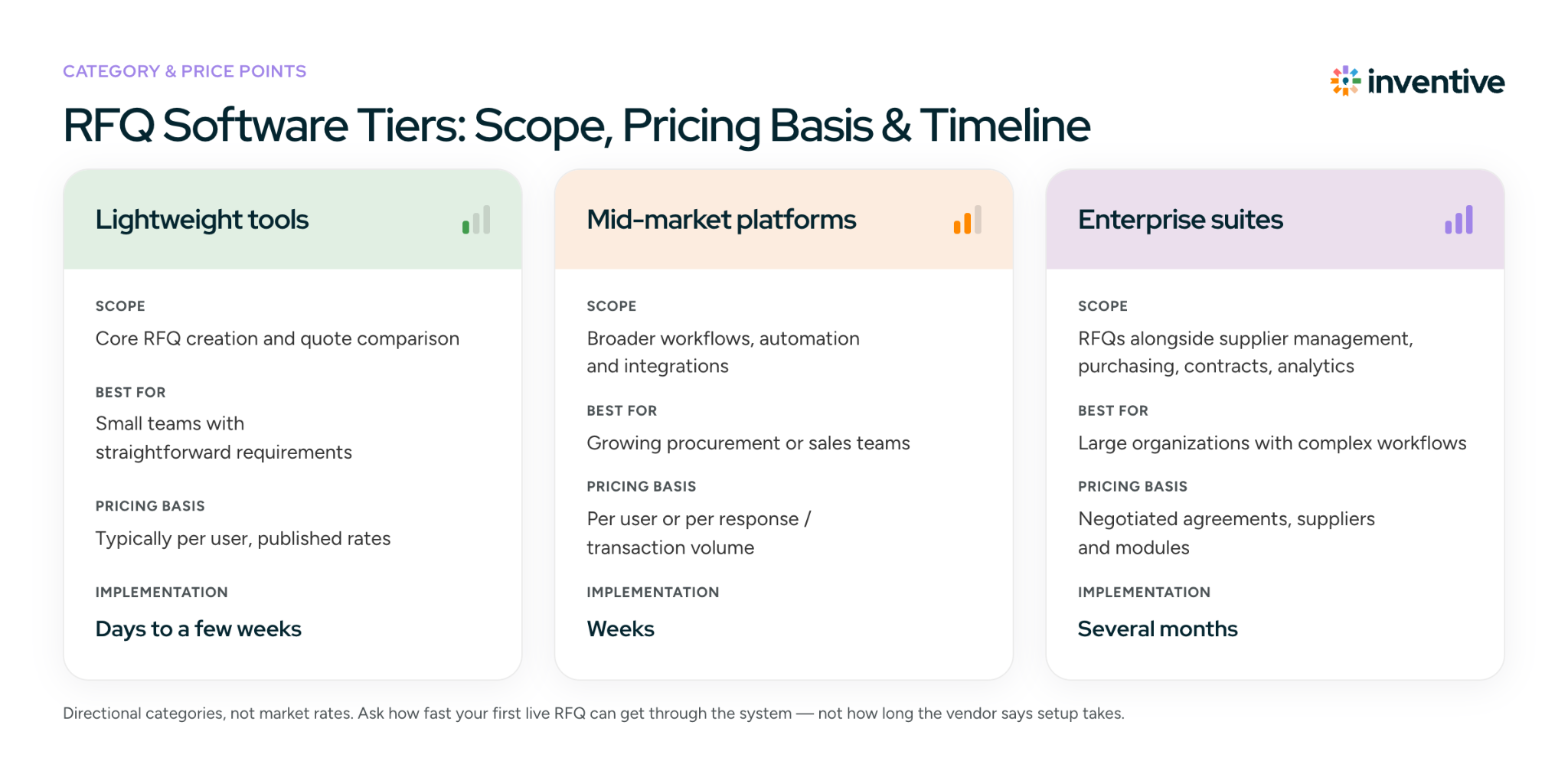
RFQ software ranges from focused tools for specific tasks to full procurement platforms. Pricing varies considerably based on the software category, number of users, RFQ volume, integrations, and implementation requirements.
Rather than treating the following as fixed market rates, use them as a rough way to think about the differences between software categories:
| Category | Typical positioning | Best for |
|---|---|---|
| Lightweight tools | Core RFQ or quote-comparison functionality | Small teams with straightforward requirements |
| Mid-market platforms | Broader workflows, automation, and integrations | Growing procurement or sales teams |
| Enterprise suites | RFQs alongside supplier management, purchasing, contracts, and analytics | Large organizations with complex workflows |
Some vendors charge per user, while others price based on transaction volume, suppliers, responses, features, or negotiated enterprise agreements.
Implementation time
Implementation can range from a few weeks to several months, depending on integrations, data migration, workflow complexity, and the number of teams involved.
The important thing isn't whether a vendor claims implementation takes two weeks or two months. Ask how quickly you can get your first live RFQ through the system and what has to happen before you can do it.
Industry-Specific RFQ Considerations
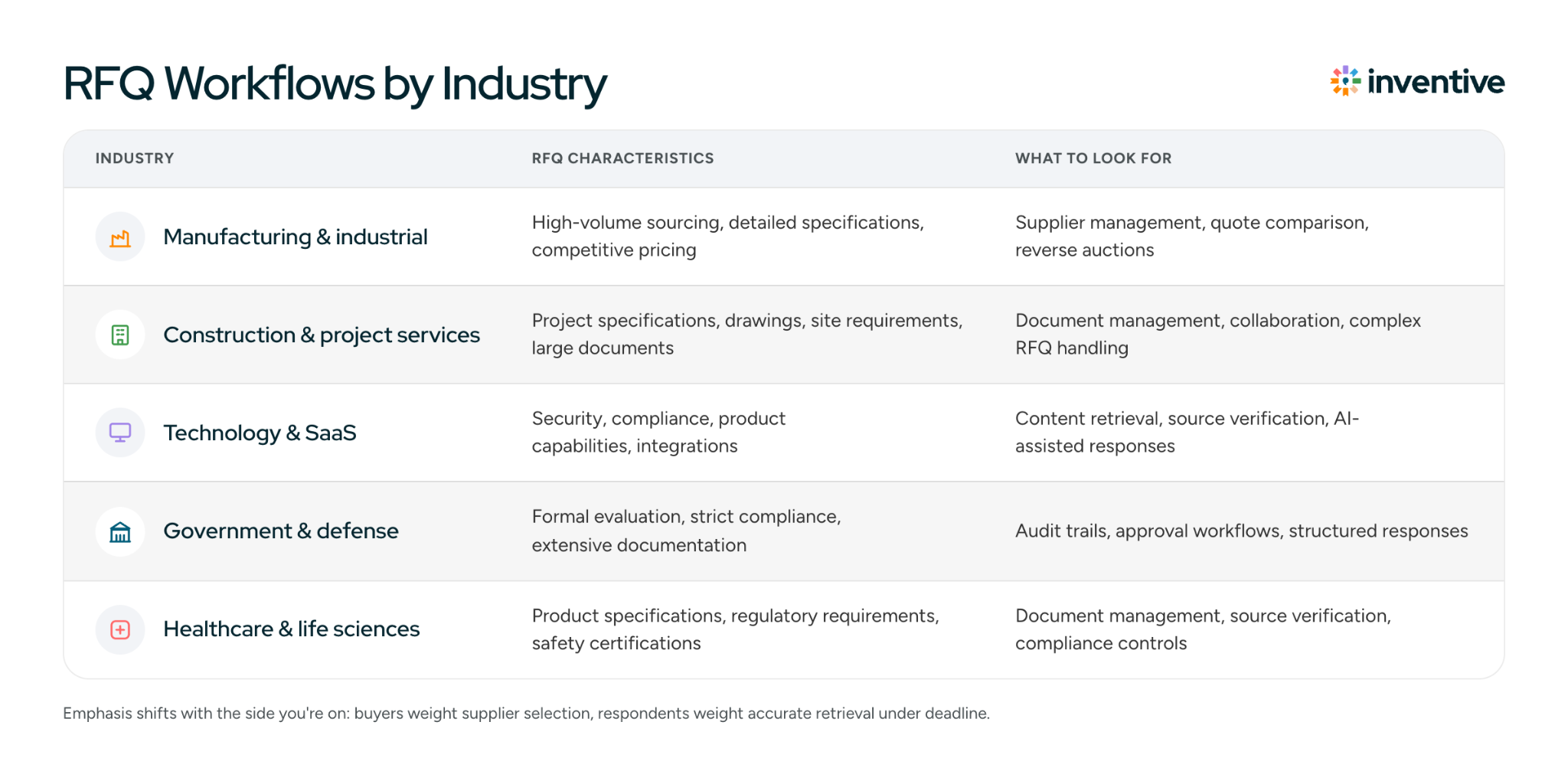
RFQ requirements vary by industry because the information being exchanged, the way suppliers are evaluated, and the consequences of an inaccurate response can be very different.
| Industry | RFQ characteristics | What to look for |
|---|---|---|
| Manufacturing & industrial | High-volume sourcing, detailed specifications, competitive pricing | Supplier management, quote comparison, reverse auctions, fast pricing updates |
| Construction & project services | Project specifications, drawings, site requirements, large documents | Document management, collaboration, complex RFQ handling |
| Technology & SaaS | Security, compliance, product capabilities, integrations | Content retrieval, source verification, compliance checks, AI-assisted responses |
| Government & defense | Formal evaluation, strict compliance, extensive documentation | Audit trails, approval workflows, compliance management, structured responses |
| Healthcare & life sciences | Product specifications, regulatory requirements, safety certifications | Document management, source verification, compliance controls |
The emphasis also differs by side of the RFQ.
A manufacturer buying components may care most about supplier selection and bid comparison.
A technology company selling into an enterprise account may care more about retrieving accurate product, security, and compliance information quickly enough to meet the customer's deadline.
How AI Is Changing RFQ Management
AI is changing RFQ software most noticeably on the respondent side. Traditional response workflows rely heavily on people reading the request, identifying requirements, searching through internal documents, copying relevant information into a response, and then asking subject matter experts to fill the gaps. AI can take over parts of that research and drafting process.
For example, an AI-enabled RFQ tool may be able to:
- Extract requirements from long RFQ documents
- Find relevant information across connected systems
- Draft answers using approved company content
- Identify questions that require expert input
- Flag conflicting or outdated information
- Identify requirements that don't have an available answer
But there is an important limitation: an AI-generated answer isn't automatically a trustworthy answer.
RFQ responses can contain pricing, product specifications, compliance claims, implementation commitments, and other information that needs to be accurate.
That's why source visibility matters. Teams should be able to see where an answer came from, review the underlying information, and know when the system couldn't find a reliable answer.
The useful role for AI isn't necessarily to remove people from RFQ responses. It's to reduce the amount of time they spend searching, copying, and assembling information, leaving them to review the response and make the decisions that require human judgment.
How Inventive AI Fits In
Inventive AI is respondent-side RFQ software for suppliers, sales teams, and proposal teams responding to RFQs, RFPs, RFIs, security questionnaires, and due diligence questionnaires.
The platform connects with the systems teams already use rather than requiring them to maintain another standalone content library.
- Knowledge Hub connects to sources such as Google Drive, SharePoint, Confluence, Notion, Salesforce, and past proposals into a single searchable knowledge base.
- Context Engine uses deal-specific information, customer priorities, and sales context to tailor responses to the opportunity.
- Content Governance Agent identifies conflicting, outdated, or unavailable information.
- Drafted answers include source citations and confidence information, while unavailable information is flagged instead of being guessed.
That last point is particularly relevant for RFQs. Speed matters, but a fast response containing an unsupported product claim or outdated specification can create a much bigger problem later.
Evaluating respondent-side platforms?
Book a DemoFrequently Asked Questions
What should I look for when evaluating RFQ software?
Look at how well the software handles your actual RFQ workflow, including document formats, collaboration, integrations, approvals, reporting, and the amount of manual work left after implementation. For respondent-side tools, also check how the platform handles source verification and information it cannot find.
Can RFQ software handle complex RFQs?
It depends on the platform. Complex RFQs may include hundreds of line items, technical specifications, attachments, compliance requirements, and input from multiple teams. Test the software using a real RFQ to see how it handles the volume and structure of information you work with.
What happens when RFQ information is missing?
This varies by platform. Some tools leave unanswered fields for users to complete, while AI-powered response software can identify missing information and route questions to the right subject matter experts. For customer-facing responses, the ability to flag unavailable information rather than generate an unsupported answer is particularly important.
Can RFQ software preserve the customer's original format?
Some respondent-side platforms can work with or export responses in formats such as Word and Excel, while others require teams to work within their own interface. If customers regularly provide templates that must be returned in a specific format, test this capability before choosing a platform.
Is AI-generated RFQ content safe to submit directly?
AI-generated content should be reviewed before submission, particularly when responses include pricing, technical specifications, compliance claims, or contractual commitments. Source-backed answers and clear indicators for uncertain or unavailable information can make that review more reliable.
How can I tell whether RFQ software is actually saving my team time?
Compare the workflow before and after implementation. Track response turnaround time, manual data entry, supplier follow-up, review cycles, and the number of people involved. The useful measure isn't how many features the platform has, but how much repetitive work it removes.



