RFP Workflow Automation: How to Run Content Reviews, AI Checks and Approvals
TL;DR
- What it covers: RFP workflow automation in Inventive AI runs three workflows in one workspace: content review, AI answer review, and assignment and approval.
- Content review: named owners, review cycles and AI flags keep the Knowledge Hub current.
- AI answer review: every draft cites approved content, and Strategic Agents check compliance and contradictions before submission.
- Approvals: a named reviewer signs off on each answer, and the activity log records who approved it and when.
- Access and security: four organization roles, Collaborator access for SMEs, SAML SSO and SOC 2 Type II compliance.
RFP workflow automation is the set of rules and AI checks that decides who owns each answer, who reviews it, who approves it and what gets checked before it ships. Inventive AI runs all of it in one workspace for RFPs, RFIs, security questionnaires and DDQs, so your team hits the deadline without chasing SMEs over email.
Most teams think RFP workflow means routing questions to SMEs. That's only the last step. The workflows buyers usually miss, keeping the knowledge base current and stopping AI from inventing answers, decide whether the final response is accurate at all.
Insider’s solutions team used to keep all their Q&A in Google Sheets and update it by hand. After connecting SharePoint, Notion and Google Drive, they had the Knowledge Hub live in 5 days. A 100-question RFP now takes 20 to 30 minutes instead of 4 to 5 hours, and their win rate went from about 30% to between 50% and 70%.
What is RFP workflow automation?
RFP workflow automation is the set of rules and AI checks that keeps your content accurate, reviews every AI draft and gets each answer approved by the right person. It covers everything that happens around the draft: who owns an answer, who checks it, who signs off, and whether the content behind it is still true.
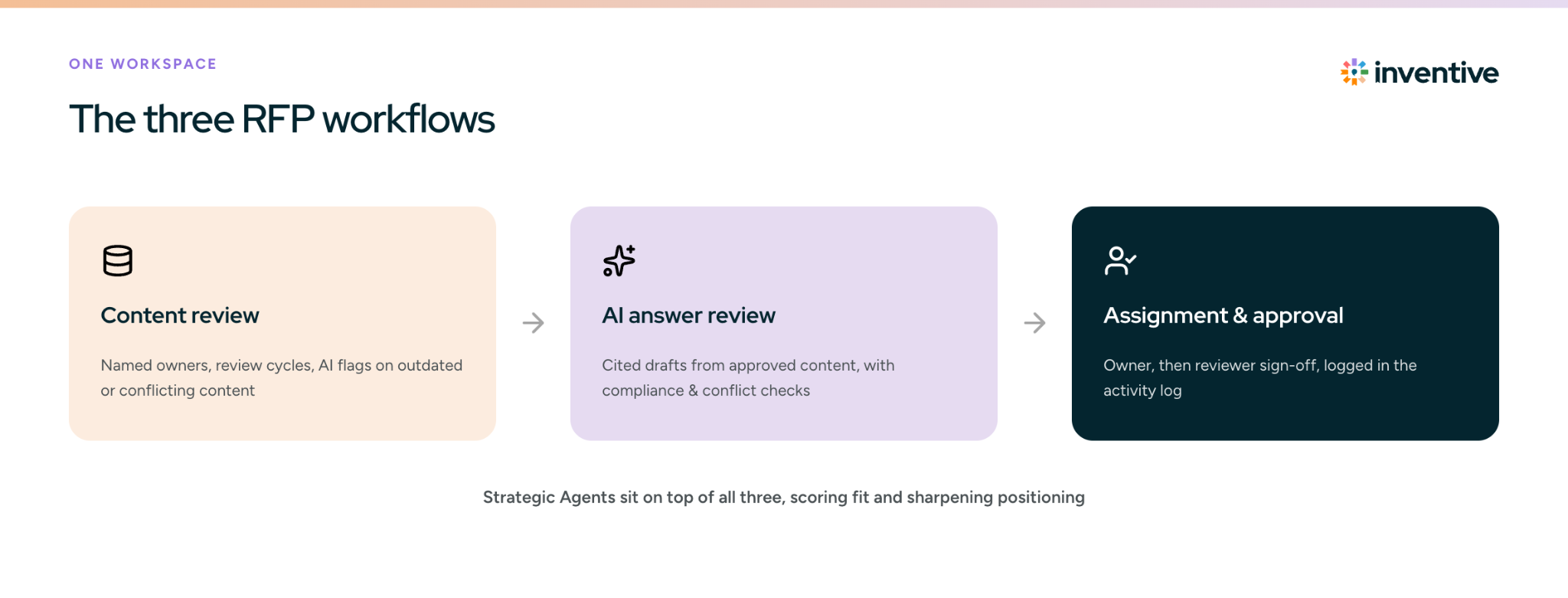
Most RFP tools handle some version of this. The real difference is how much of the work AI does, and how much still depends on someone remembering to run a review cycle. In Inventive AI, it runs as three workflows:
- Content review: keeps the Knowledge Hub current. Every content area has a named owner and a review cycle, and AI flags outdated or conflicting content before it reaches a draft.
- AI answer review: every draft comes from approved content and shows its source. Agents then check the full response for missed requirements and contradictions.
- Assignment and approval: each question goes to an owner and then to a reviewer, and the activity log records who approved it and when.
Analysts treat it the same way. Gartner’s RFP response management category lists workflow management, audit trails and knowledge management as core capabilities, right alongside answer matching.
Content review keeps your source material clean, and AI review keeps every draft tied to it. Assignment and approval gets each answer to the right people. Strategic Agents sit on top of all three, scoring fit and sharpening your positioning.
Workflow 1: content review
The content review workflow keeps your knowledge base accurate before any RFP arrives. Every content area gets a named owner and a review cycle, and the AI Content Manager watches connected sources and flags outdated, conflicting and duplicate content, so your team doesn't have to review the library by hand.
Who owns each part of the knowledge base?
Each content area has a named owner who reviews it on a set schedule. In the Knowledge Hub, you set this up with:
- Content ownership: assign one or more sources to a specific SME for review, so every content area has a named owner
- Review cadence: set review cycles, such as quarterly or semi-annual, and add priority and deadlines so owners know what to update first
- Automated reminders: owners get notified as review deadlines approach
- Source flags: anyone can flag an issue on a source so its owner reviews and resolves it
How does Inventive AI flag stale and conflicting content?
Inventive AI tracks how recent each source is and pinpoints conflicts down to the section:
- Last reviewed date: each source carries a modified date and last reviewed date, and the AI prioritizes recent sources when drafting
- Section-level conflict resolution: when two sources contradict each other, Inventive flags the conflict instead of picking one. The reviewer can mark a source irrelevant for that project, regenerate the answer, or archive just the outdated section instead of the whole document
- Content addition: new material enters through connected sources like SharePoint, Google Drive, Confluence, Notion and Zendesk, or as curated Q&A pairs, and updates show up in the Knowledge Hub without a manual re-import
Approved RFP answers can also be saved back to the Knowledge Hub, so every corrected answer improves the next response.
How does the Knowledge Hub learn from every edit?
Memory (beta) captures each edit and approval a team makes on a response, along with the context it was made in, and applies it the next time a similar question comes up. The Knowledge Hub keeps getting sharper without anyone re-uploading documents or retraining the AI.
Memory stores three kinds of information:
- Factual memory: details like headcount or office locations, corrected once and reused everywhere
- Tone and style memory: how the team prefers answers to read
- Instruction and process memory: recurring guidance, like how to treat a specific term
It works at the organization, deal and question level, so context from one deal stays with that deal while company-wide corrections carry into every response.
Why do stale and conflicting answers matter?
A general AI chat tool uses whichever version of an answer it finds first. If your library holds two security policies from different years, the buyer may get the wrong one. Flagging the conflict before drafting stops it reaching a proposal.
Workflow 2: AI answer review
The AI answer review workflow makes sure every draft comes from approved content and that the finished response is complete and consistent. Inventive AI works as a closed system: it drafts only from your approved company content, never from the open web or model memory. Every answer shows its source citations and a confidence score, and when information is missing it flags the gap instead of making something up.
How does Inventive AI prevent hallucinated answers?
Three checks run on every response:
- Grounded drafting: response generation pulls only from approved Knowledge Hub content, with a citation on every answer
- Requirement tracking: every mandatory item, certification and eligibility criterion is extracted when the RFP comes in and tracked against the draft
- Full response analysis: before submission, the Compliance Checker reviews the finished response for missed requirements, contradictions between sections and tone that drifts across contributors, all in one run or one check at a time
The AI Content Manager and the Compliance Checker check different things. The first keeps the Knowledge Hub clean, and the second checks one finished response.
Can you limit an answer to specific documents?
Yes. Attach the Knowledge Hub files you want as context and Inventive drafts only from those, flagging clearly when it needs more information. Labels work the same way, restricting an answer to one part of the Knowledge Hub.
Which answers should never be reworded?
Legal clauses, security controls and certification language should go out exactly as approved. Verbatim Responses, available on request, handle this: when a question closely matches a past answer, Inventive surfaces that exact answer with its source and a similarity score, so you insert pre-approved language as-is instead of having AI rewrite it.
Which AI agents check the response before it ships?
Five Strategic Agents add checks and strategy on top of drafting: Go/No-Go, Competitive Intelligence, Compliance Checker, Win Theme and Executive Summary. Each works on its own, so you can turn on one agent without the others.
Do AI agents replace human approval?
No. Agents score, check and suggest. A person still decides whether to bid, which win themes to use and whether each answer is approved.
Workflow 3: assignment and approval
The assignment and approval workflow moves every answer through four statuses: Draft, In Review, Reviewed and Complete. Each question gets an owner, a named reviewer signs off, and the activity log records who changed each status and when. RFP collaboration happens in the same place, so proposal managers, SMEs and reviewers work in one live response.
A reviewer who requests changes sends the answer back to its owner; an approved answer can be saved to the Knowledge Hub before it ships.
Which roles does each person need?
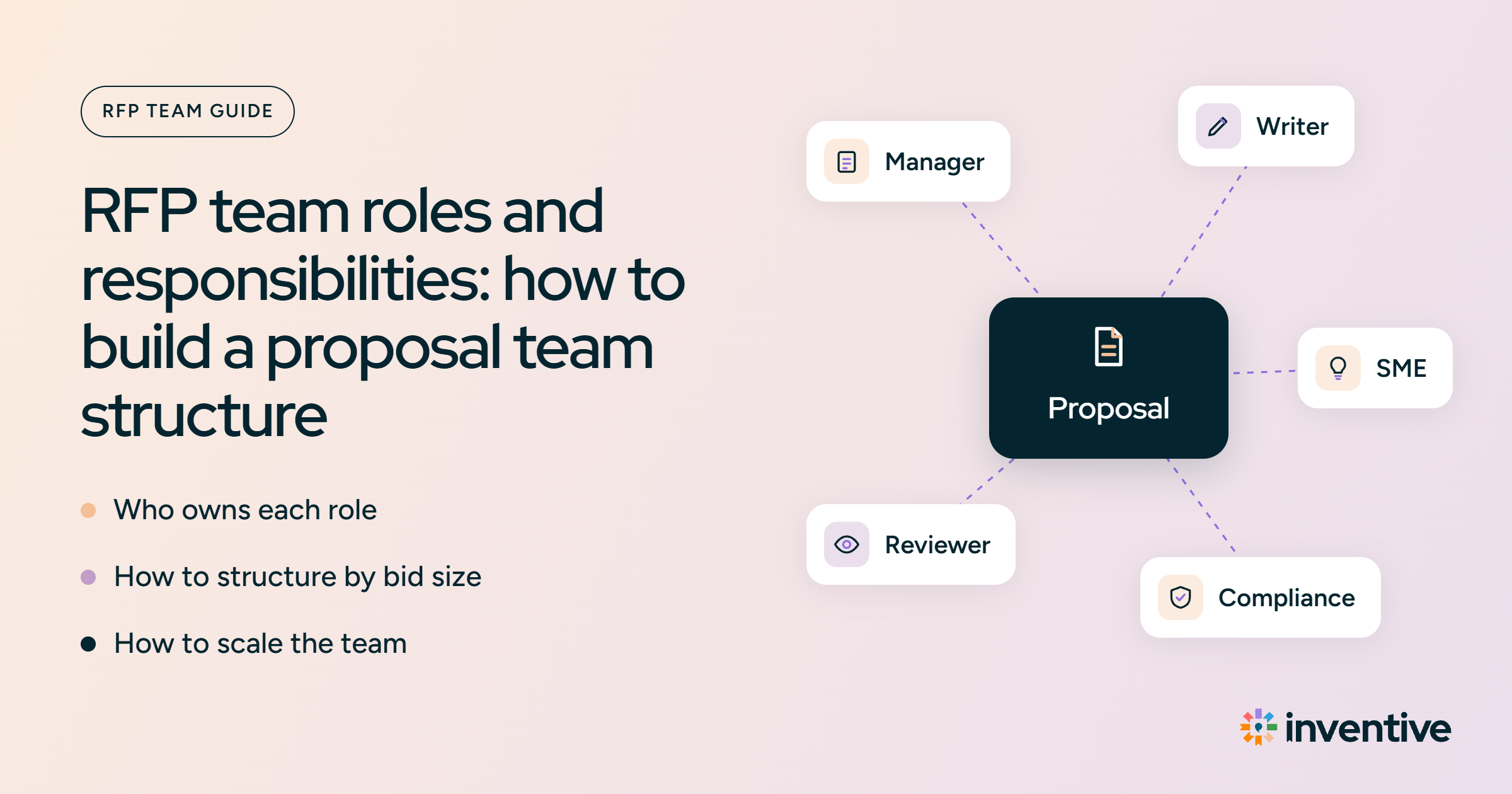
Roles decide who can do what in the approval workflow. Inventive AI has four organization roles: Base, Base Plus, Manager and Admin. On top of the role, Collaborator access limits SMEs and outside reviewers to the questions assigned to them.
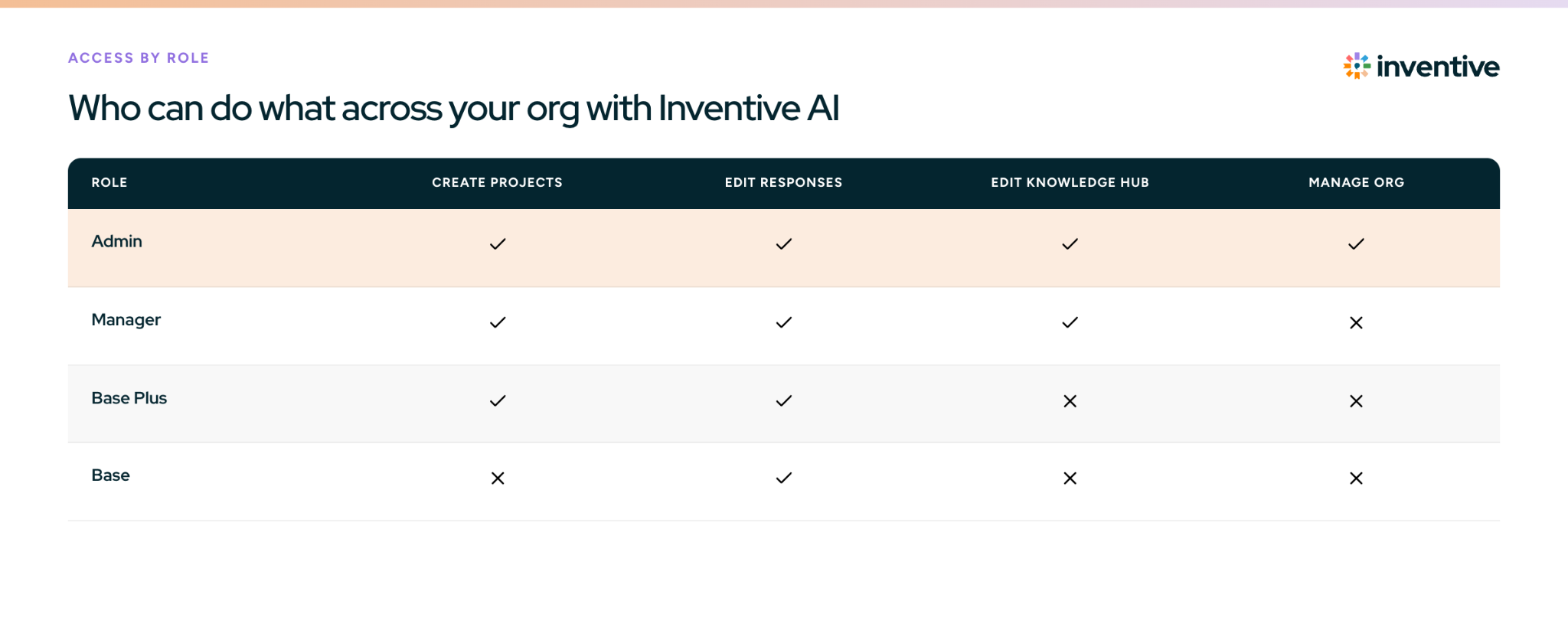
Assign roles by what each person does on an RFP:
- Admin: proposal ops or RevOps owners who manage users, integrations and org-wide AI instructions for tone and brand voice
- Manager: proposal leads and content owners who run projects and keep the Knowledge Hub current
- Base Plus: sales engineers and solutions consultants who start their own RFPs and answer them
- Base: SMEs and writers who answer and edit the questions assigned to them
Unlimited users are included and pricing is usage-based, so adding an occasional SME or reviewer never costs a seat license.
How do permissions protect RFP content?
Permissions in Inventive AI are role-based, so access is tied to the job each person does. Admins control what each user and the AI can see, with sign-in through SAML SSO. Role-based access control is a model NIST helped develop and standardize; it maps access to your org structure, which cuts admin work as people join, move or leave.
Can a Collaborator see more than their assigned questions?
Yes, but only when a user with full project access grants it. Treat that as an exception and remove it once the project ships.
How are questions assigned and routed for review?
Each answer is assigned to an owner, drafted, reviewed and marked complete. Assignment works at whatever level the document needs:
- Question-level assignment: the proposal lead assigns each question to a writer, SME or reviewer
- Row-level assignment: in large table questionnaires, individual rows get their own assignee, status and comments, so one table can be split across people
- Bulk actions: select many questions at once to generate, assign or update status, and assignees get one summary email instead of one per task
- In-place review: legal, security or compliance reviewers comment on, edit and approve the exact answer inside Inventive AI, with every comment collected in one comments bar
- Sign-off: the reviewer moves the answer to Reviewed or Complete, and the change is logged
Everyone works in the same live response:
- Real-time co-editing: several people work on the same project at once, see who's active, and get updates without refreshing
- Review on the go: the Q&A response page works on mobile, so reviewers can approve answers away from their desk
- AI for the whole team: every contributor drafts from the same approved knowledge, without writing prompts or maintaining their own AI setup
SMEs spend less time too: the AI writes the first draft, so they review and correct it instead of writing from scratch.
Who should approve which answers?
Name one approver per content area before the RFP lands, usually the subject matter expert who owns that topic. Legal approves contract terms, security approves controls and certifications, and the proposal lead approves pricing and the final response.
How do you track approval status across a project?
The project dashboard shows where every response stands without chasing people over email or Slack. It has views by assignee and by document, completion percentages per person, and a needs-attention list of overdue items, unassigned questions and open comments. It also shows how many answers came from AI versus people, and how heavily AI answers were edited.
On accounts where it's turned on, the Inventive Agent answers status questions in plain English, such as which SMEs haven't started their responses, which questions have no assignee, who on the team is overloaded this week, or which Knowledge Hub sources haven't been reviewed in six months.
Automatic SME assignment based on question topic is coming soon. Today, proposal leads assign questions and Inventive AI handles reminders and progress tracking.
Can AI overwrite an answer that's already approved?
No. A safety lock asks for explicit confirmation before AI regenerates an answer that already exists, so reviewed or approved answers stay as they are unless someone chooses to replace them. Teams in regulated industries rely on this to keep control over approved content.
Can reviewers approve portal questionnaires without the portal login?
Yes. Pull the questionnaire into an Inventive project with the Chrome extension, and reviewers edit and approve it there. Only the person submitting needs the portal password, and answers are pushed back to the portal once they're done.
How does Inventive AI compare with Loopio and Responsive?
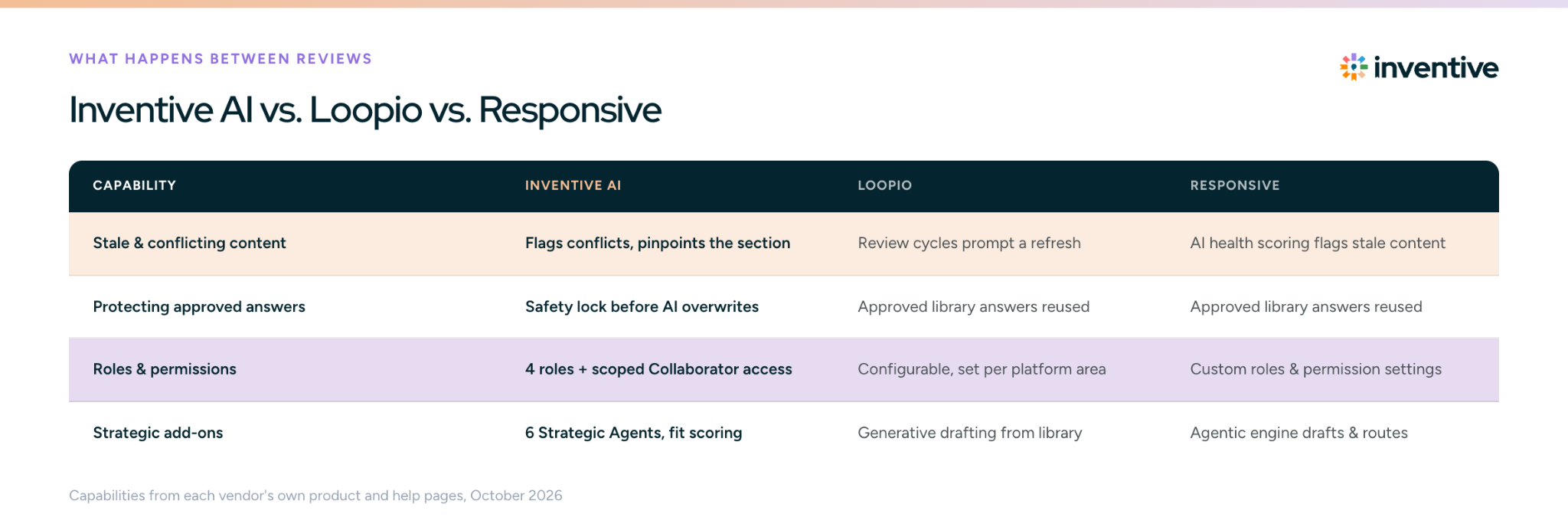
Loopio, Responsive and Inventive AI all offer role-based permissions, SME assignments and scheduled content reviews. Inventive AI differs in what happens between reviews: Memory (beta) learns from every edit, AI flags conflicting content at the section level, a safety lock protects approved answers, and Strategic Agents add fit scoring and competitive positioning.
Capabilities are taken from each vendor's own product and help pages as of October 2026.
How do you set up RFP workflow automation in Inventive AI?
Set up access first, then content, then the workflow. Most teams can run their first governed project after these ten steps:
- Connect SSO through Okta, Google or Microsoft, and turn on Okta SCIM so accounts follow your identity provider
- Assign organization roles (Admin, Manager, Base Plus or Base), and give occasional SMEs Collaborator access
- Set org-level AI instructions for tone and brand voice, and add project- or document-level instructions for language or terminology where needed
- Connect knowledge sources (SharePoint, Google Drive, Confluence, Notion, Zendesk) to the Knowledge Hub
- Assign content owners and set review cycles, priorities and deadlines for each content area
- Tag answers that must go out word for word so Verbatim Responses can reuse them
- Name an approver for each content area: legal, security, compliance and pricing
- Connect Salesforce and Slack so projects start from deals and updates reach people where they work
- Run a pilot RFP end to end and watch the project dashboard for stuck items
- Audit access quarterly, removing leavers and expired reviewer access on a set schedule
What happens to your organization's data in Inventive AI?
Inventive AI keeps your data isolated, encrypted and out of model training. Here's how it's protected:
- Kept out of model training: customer data isn't used to train, fine-tune or improve generalized AI models
- Zero data retention: enterprise agreements with AI model providers, including OpenAI and Anthropic, mean they don't retain your data
- Tenant isolation: each customer's data is logically isolated, with tightly controlled access to datastores
- Encryption: AES-256 at rest on AWS and TLS 1.2 in transit
- Independent audit: SOC 2 Type II, assessed against security, availability, processing integrity, confidentiality and privacy
- Private competitive data: your Competitor Board, fit scores and win themes are never shared with other customers
- Automatic offboarding: Okta SCIM removes leavers' accounts, and the activity log records who changed what
What triggers each automated step?
Most automation starts when a document lands in a project: the RFP is parsed, questions are extracted, drafts are generated from approved content, and assignments start their reminder clock. Each later status change triggers the next step.
Which tools does Inventive AI connect to?
The Knowledge Hub pulls content from SharePoint, Google Drive, Confluence, Notion and Zendesk. The workflow connects to Salesforce (start projects and push finished files back), Slack (an Inventive bot for answers and updates) and Okta (SSO and SCIM provisioning). A Chrome extension handles vendor portal questionnaires, and an MCP server, available on request, lets AI assistants like Claude or ChatGPT search approved Knowledge Hub content.
Related articles
- RFP Response Process Guide
- RFP Response Team Roles and Responsibilities
- RFP AI Agents Explained
- RFP Response Automation Checklist
- What Is a Proposal Manager?
- Understanding RFP Project Management
- Why AI-Native RFP Software Is Replacing Legacy Tools Like Responsive and Loopio